> ## Documentation Index
> Fetch the complete documentation index at: https://docs.goguardian.com/llms.txt
> Use this file to discover all available pages before exploring further.
# SMS Notifications
> Beacon SMS alerts include the predicted alert phase and a sign-in link — take action on the alert card to stop the escalation cycle.
When GoGuardian Beacon generates an alert, it notifies the first user on the **Escalation List**. If SMS notifications are enabled, both a text message and an email are sent. The text message includes the predicted phase and a sign-in link to the alert.
Learn more about SMS terms and opt-out options in [SMS Notification Terms](/products/beacon/sms-notification-terms).
## Sign In and Review the Alert
1. Click the link in the text message. You will be taken to the Beacon sign-in page.
2. Enter your GoGuardian credentials to access the Beacon Alerts page.
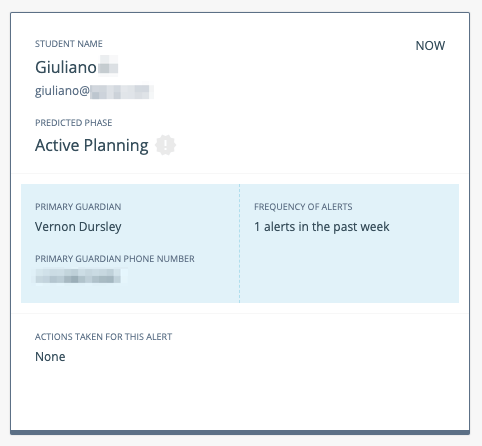
3. The unread alert appears at the top of the feed with a dark outline. Click the alert card to open the Alert Details view.
The alert card displays the student's primary guardian contact name and phone number for a quick response.
## Take Action to Stop the Escalation Cycle
To end the escalation list notification cycle, complete at least one of the following actions on the alert card:
* Select a **Risk Level** using the dropdown.
* Select at least one item under **Actions Taken for this Alert**.
If no action is taken within the configured **Interval Time**, the next user on the escalation list is notified.
{/* TECH-ACCURACY: verify current interval time options match UI */}
If you do not take action, notifications will continue cycling through the escalation list until the escalation cycle is complete or a user acts on the alert.
 ## Verify the Phase Prediction
After taking action, verify Beacon's phase prediction:
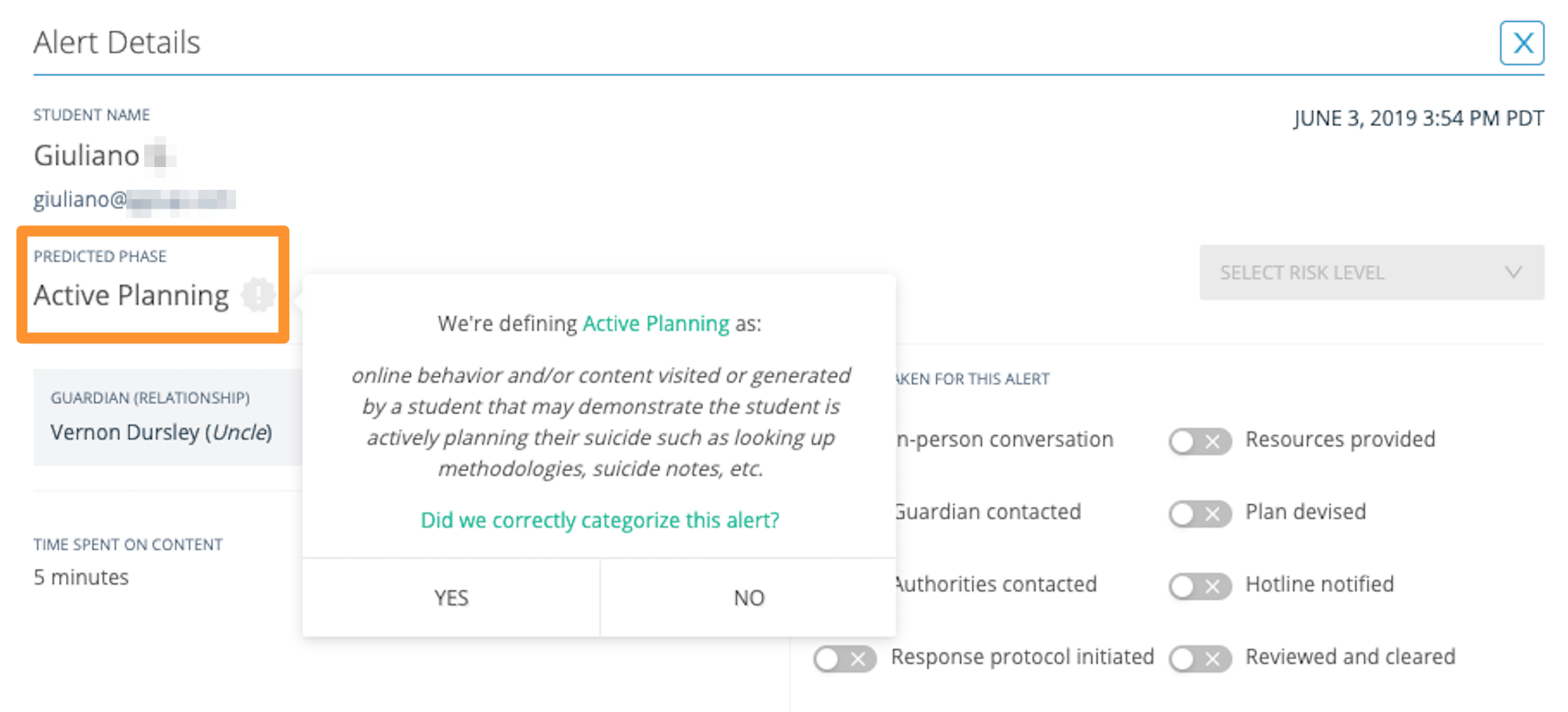
1. Click the listed **Predicted Phase** on the alert card.
2. Select **Yes** or **No** to confirm whether the prediction is accurate.
Your feedback helps improve Beacon's prediction model. You can update your response at any time.
**Phase names used by Beacon:**
* Active Planning
* Suicide Ideation
* Self Harm
* Help & Support
* Suicide Research
## Verify the Phase Prediction
After taking action, verify Beacon's phase prediction:
1. Click the listed **Predicted Phase** on the alert card.
2. Select **Yes** or **No** to confirm whether the prediction is accurate.
Your feedback helps improve Beacon's prediction model. You can update your response at any time.
**Phase names used by Beacon:**
* Active Planning
* Suicide Ideation
* Self Harm
* Help & Support
* Suicide Research
 ## Mark a Miscategorized Alert
Alerts cannot be deleted. If Beacon has miscategorized an alert, mark it as follows:
* Set **Risk Level** to **No Risk**.
* Click the **Predicted Phase** and select **No** if the prediction is inaccurate.
Setting the risk level to **No Risk** ends the escalation list cycle.
Review opt-in terms, opt-out instructions, and carrier information.
Enable SMS notifications in Your Beacon Profile.
Configure interval times and the number of reminders per alert.
Resolve issues with receiving Beacon text message alerts.
## Mark a Miscategorized Alert
Alerts cannot be deleted. If Beacon has miscategorized an alert, mark it as follows:
* Set **Risk Level** to **No Risk**.
* Click the **Predicted Phase** and select **No** if the prediction is inaccurate.
Setting the risk level to **No Risk** ends the escalation list cycle.
Review opt-in terms, opt-out instructions, and carrier information.
Enable SMS notifications in Your Beacon Profile.
Configure interval times and the number of reminders per alert.
Resolve issues with receiving Beacon text message alerts.