> ## Documentation Index
> Fetch the complete documentation index at: https://docs.goguardian.com/llms.txt
> Use this file to discover all available pages before exploring further.

# Manage Teacher Daily Summary Emails

> Turn on or off Teacher Daily Summary emails and understand the sections included in each daily report in GoGuardian Org Management.

In GoGuardian Org Management, Super Users can turn on Teacher Daily Summary emails to receive a daily summary report of overall GoGuardian Teacher usage. Teacher Daily Summaries are an individual setting. Turning them on or off does not affect other Super Users.

## Turn On or Off Teacher Daily Summary Emails

1. Sign in to manage.goguardian.com as a Super User.
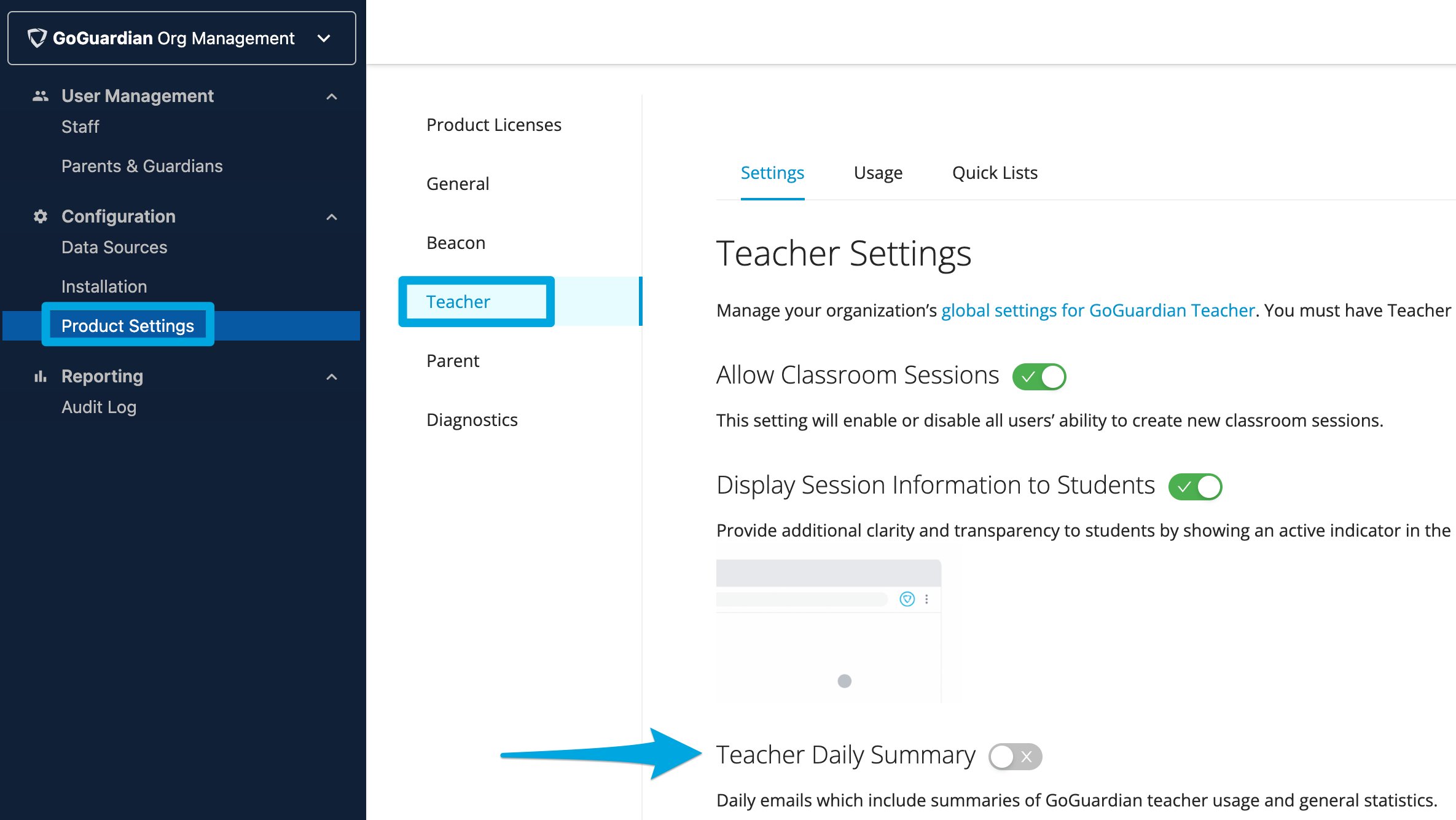
2. Click the **Product Settings** tab, then click **Teacher**.
3. Turn on or turn off **Teacher Daily Summary**. A green toggle means the feature is on. A gray toggle means it is off.
4. Verify the result: The toggle reflects your selection and the change takes effect immediately.

<Note>
  Turning Teacher Daily Summary emails on or off requires the user to have GoGuardian Teacher access set to **Enabled**.
</Note>

## Read a Teacher Daily Summary Email

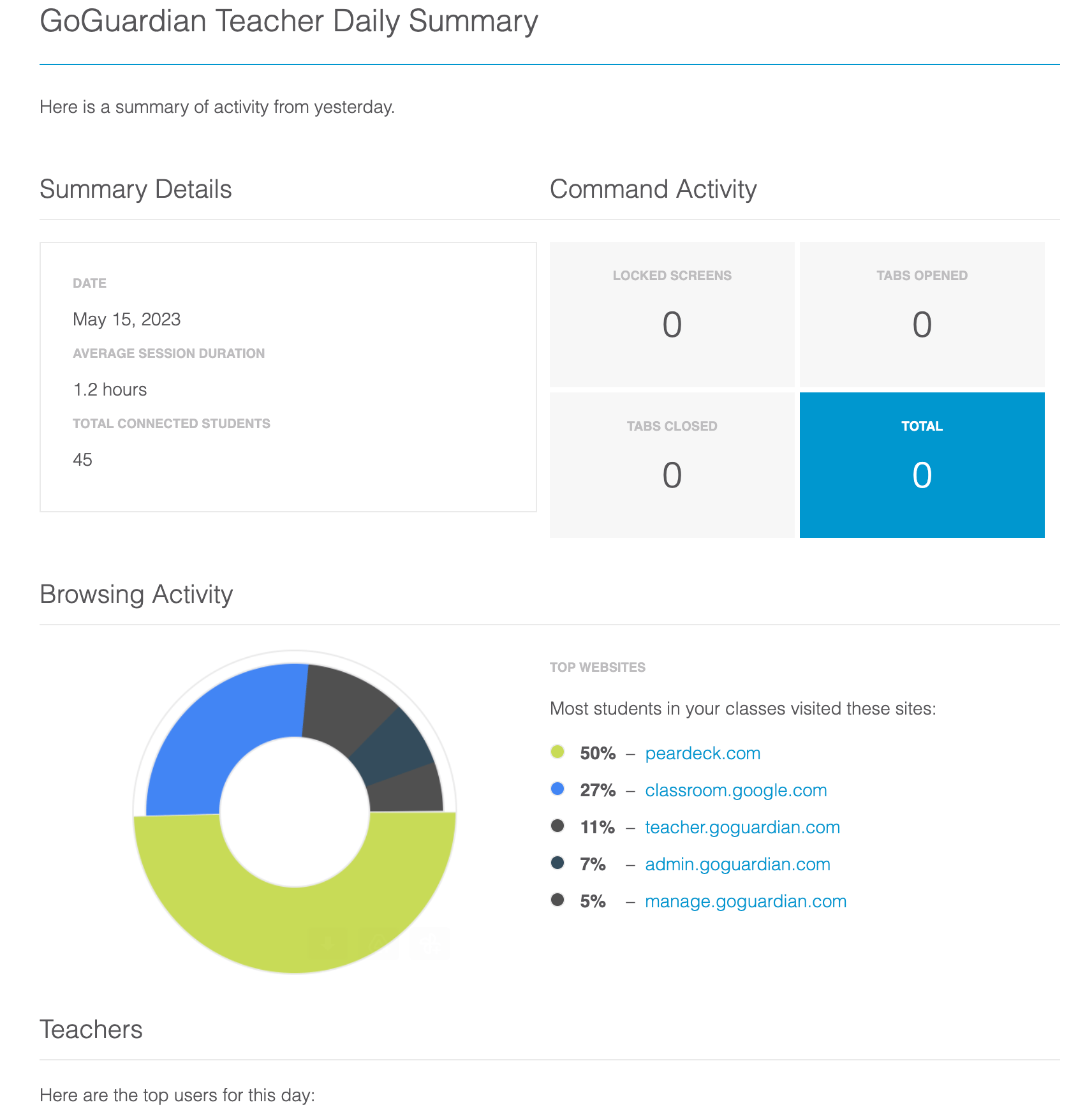
Each email contains four sections:

**Summary Details**

* Date
* Average session duration (in minutes)
* Total connected students across all sessions that day

**Command Activity**: statistics on commands issued by teachers across all sessions that day:

* Number of screens locked
* Number of tabs opened
* Number of tabs closed
* Total commands issued

**Browsing Activity**: a diagram of the top websites visited by students during sessions that day, shown as percentages of all websites visited.

**Teachers**: a list of teachers for that day and the number of hours each had classroom sessions running.
<img src="https://mintcdn.com/goguardian/EoYemi50Hgw6rVVD/images/screenshots/teacher-daily-summary-emails/step-01.png?fit=max&auto=format&n=EoYemi50Hgw6rVVD&q=85&s=5fcda5ad3a45f9c32efc61d3efb7e8d2" alt="GoGuardian Org Management > Product Settings (selected) > Teacher (selected) > Teacher Daily Summary (selected)…" data-og-width="2370" width="2370" data-og-height="1334" height="1334" data-path="images/screenshots/teacher-daily-summary-emails/step-01.png" data-optimize="true" data-opv="3" srcset="https://mintcdn.com/goguardian/EoYemi50Hgw6rVVD/images/screenshots/teacher-daily-summary-emails/step-01.png?w=280&fit=max&auto=format&n=EoYemi50Hgw6rVVD&q=85&s=e5a511cc5d84a370b8775ff5c89a98ce 280w, https://mintcdn.com/goguardian/EoYemi50Hgw6rVVD/images/screenshots/teacher-daily-summary-emails/step-01.png?w=560&fit=max&auto=format&n=EoYemi50Hgw6rVVD&q=85&s=369925bd1b7bb6938066b411766ffe65 560w, https://mintcdn.com/goguardian/EoYemi50Hgw6rVVD/images/screenshots/teacher-daily-summary-emails/step-01.png?w=840&fit=max&auto=format&n=EoYemi50Hgw6rVVD&q=85&s=a828b73dcab06c171d4275647ca29ff6 840w, https://mintcdn.com/goguardian/EoYemi50Hgw6rVVD/images/screenshots/teacher-daily-summary-emails/step-01.png?w=1100&fit=max&auto=format&n=EoYemi50Hgw6rVVD&q=85&s=ae63adc21ba8f713048150952f82115c 1100w, https://mintcdn.com/goguardian/EoYemi50Hgw6rVVD/images/screenshots/teacher-daily-summary-emails/step-01.png?w=1650&fit=max&auto=format&n=EoYemi50Hgw6rVVD&q=85&s=871ba3d35c99d517c7a97de3ddabbfcb 1650w, https://mintcdn.com/goguardian/EoYemi50Hgw6rVVD/images/screenshots/teacher-daily-summary-emails/step-01.png?w=2500&fit=max&auto=format&n=EoYemi50Hgw6rVVD&q=85&s=9f0d77cce25edad5b7e070f5c6e10d3f 2500w" />

<img src="https://mintcdn.com/goguardian/EoYemi50Hgw6rVVD/images/screenshots/teacher-daily-summary-emails/step-02.png?fit=max&auto=format&n=EoYemi50Hgw6rVVD&q=85&s=2a30be227fd423e613f9f959f03f5086" alt="GoGuardian Teacher Daily Summary: Here is a summary of the activity from yesterday: Date, Average Session Duration,…" width="1712" height="1746" data-path="images/screenshots/teacher-daily-summary-emails/step-02.png" />
