> ## Documentation Index
> Fetch the complete documentation index at: https://docs.goguardian.com/llms.txt
> Use this file to discover all available pages before exploring further.
# Create Rubric for Scoring Essays and Written Responses
> Build a grading rubric with custom criteria and performance ratings for essay and written response questions, then share it across your district.
The article guides users on how to create a rubric for scoring essays and written responses using Pear Assessment. It provides detailed steps to set up and use rubrics effectively for grading student work.
## Create Rubric for Scoring Essays and Written Responses
The article guides users on how to create a rubric for scoring essays and written responses using Pear Assessment. It provides detailed steps to set up and use rubrics effectively for grading student work.
Please note that a Teacher Premium subscription is required to create a rubric.
## Create Rubric in Essay Type Question
1. Click the Item Bank in the navigation menu.
2. Click New Item.
 3. Choose Writing from the resource of questions and choose any question type from this source.
 4. Under Scoring, select the checkbox next to Grading Rubric.
5. Users have two options:
* Create New Rubric
* Use Existing Rubric
6. Enter a name and description for the new rubric. Users can add criteria and ratings to the rubric by providing a name and description for each criterion. The criteria help users identify the parameters they want to grade the questions. Ratings represent the level of performance by the student in the concerned criteria. This Rating contains a name (like Satisfactory, Proficient, or Basic) with points associated with each rating and a basic description of the rating.
7. After users have created criteria and ratings for the rubric, click Save & Use to complete the rubric creation process. Users will then have the ability to clone, edit, delete, preview, or share the created rubric.
Tip: When using an existing rubric, users would need to type in the exact title of the rubric of a keyword of the title of a rubric.
8. Once an existing rubric is selected, the user can have the ability to go back and search for existing rubrics, clone rubrics, edit the existing rubric, delete the rubric, preview, remove, or share.
4. Under Scoring, select the checkbox next to Grading Rubric.
5. Users have two options:
* Create New Rubric
* Use Existing Rubric
6. Enter a name and description for the new rubric. Users can add criteria and ratings to the rubric by providing a name and description for each criterion. The criteria help users identify the parameters they want to grade the questions. Ratings represent the level of performance by the student in the concerned criteria. This Rating contains a name (like Satisfactory, Proficient, or Basic) with points associated with each rating and a basic description of the rating.
7. After users have created criteria and ratings for the rubric, click Save & Use to complete the rubric creation process. Users will then have the ability to clone, edit, delete, preview, or share the created rubric.
Tip: When using an existing rubric, users would need to type in the exact title of the rubric of a keyword of the title of a rubric.
8. Once an existing rubric is selected, the user can have the ability to go back and search for existing rubrics, clone rubrics, edit the existing rubric, delete the rubric, preview, remove, or share.
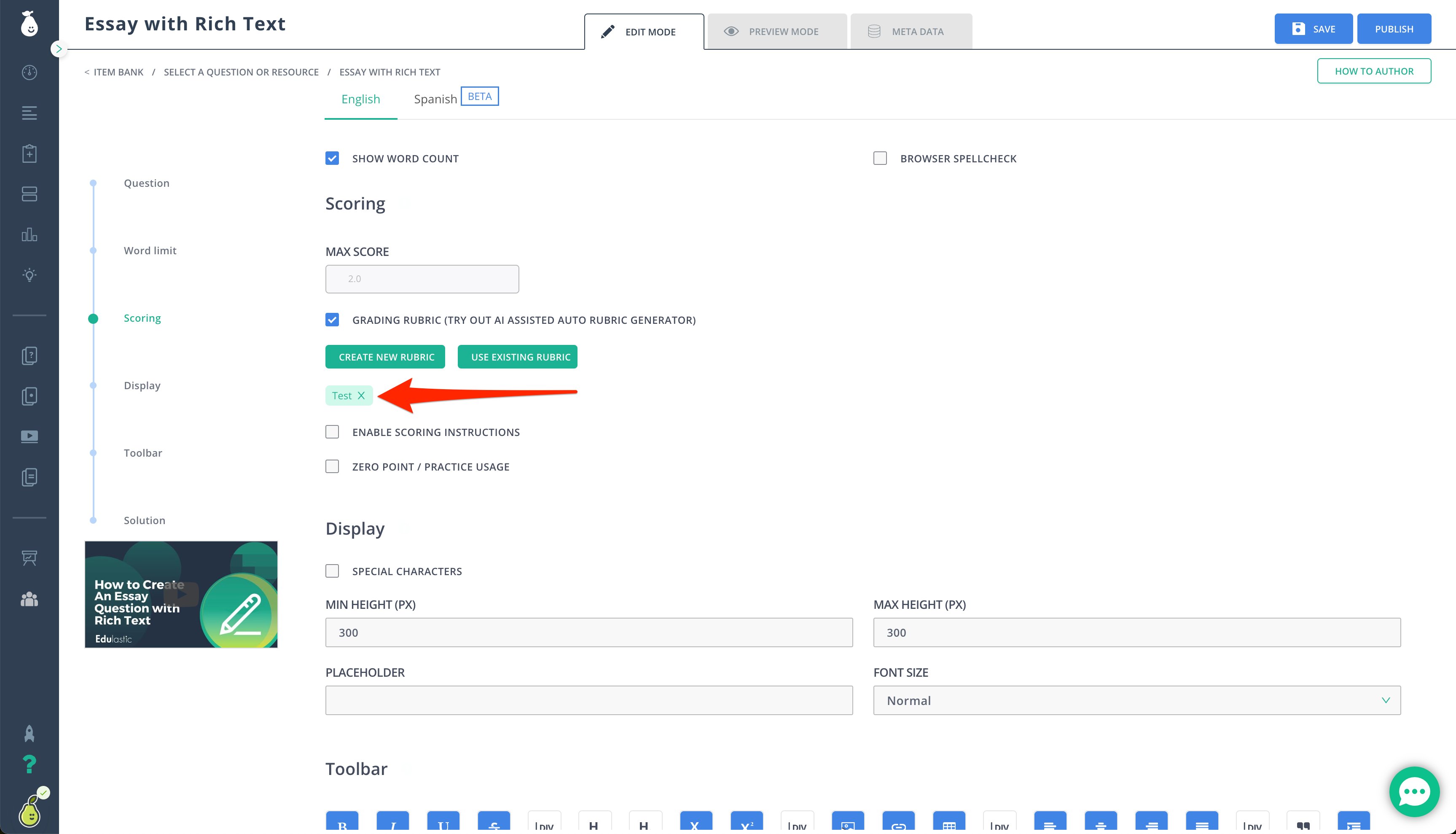
 9. When the user has finished with all of their options, click the "X" and you will see the name of the rubric under the options of Create New Rubric and Use Existing Rubric. The name of the created rubric will appear as a light green button with green text. This indicates the name of the rubric is applied to the question. Complete the question/item and save it.
### Fun Facts for Rubric Creation
* The created rubric needs to have at least one criterion.
* Each criterion must contain at least two ratings.
* Total points for the question, in which the user is using a rubric, is the summation of the maximum points for each criterion.
* Users can edit the rubric as long as the question has not been saved. When users click Save for a question, the rubric is stored and not available to edit.
### Share Rubrics with Teachers from District
1. While authoring an essay-type question, click Add/View Rubric.
2. Search for the created rubric with the rubric name.
3. Click the Share button > Yes. This shares the rubric with your district.
4. To unshare a rubric, users can follow the above steps and click the Unshare button.
Tip: If users want to delete a rubric “created by you”, search for the rubric in Use Rubric option and then select the Delete button.
9. When the user has finished with all of their options, click the "X" and you will see the name of the rubric under the options of Create New Rubric and Use Existing Rubric. The name of the created rubric will appear as a light green button with green text. This indicates the name of the rubric is applied to the question. Complete the question/item and save it.
### Fun Facts for Rubric Creation
* The created rubric needs to have at least one criterion.
* Each criterion must contain at least two ratings.
* Total points for the question, in which the user is using a rubric, is the summation of the maximum points for each criterion.
* Users can edit the rubric as long as the question has not been saved. When users click Save for a question, the rubric is stored and not available to edit.
### Share Rubrics with Teachers from District
1. While authoring an essay-type question, click Add/View Rubric.
2. Search for the created rubric with the rubric name.
3. Click the Share button > Yes. This shares the rubric with your district.
4. To unshare a rubric, users can follow the above steps and click the Unshare button.
Tip: If users want to delete a rubric “created by you”, search for the rubric in Use Rubric option and then select the Delete button.