> ## Documentation Index
> Fetch the complete documentation index at: https://docs.goguardian.com/llms.txt
> Use this file to discover all available pages before exploring further.
# Insights: Student Mastery Profile
> Review standards-level performance data for individual students, including mastery by domain, standard proficiency, and links to student tests.
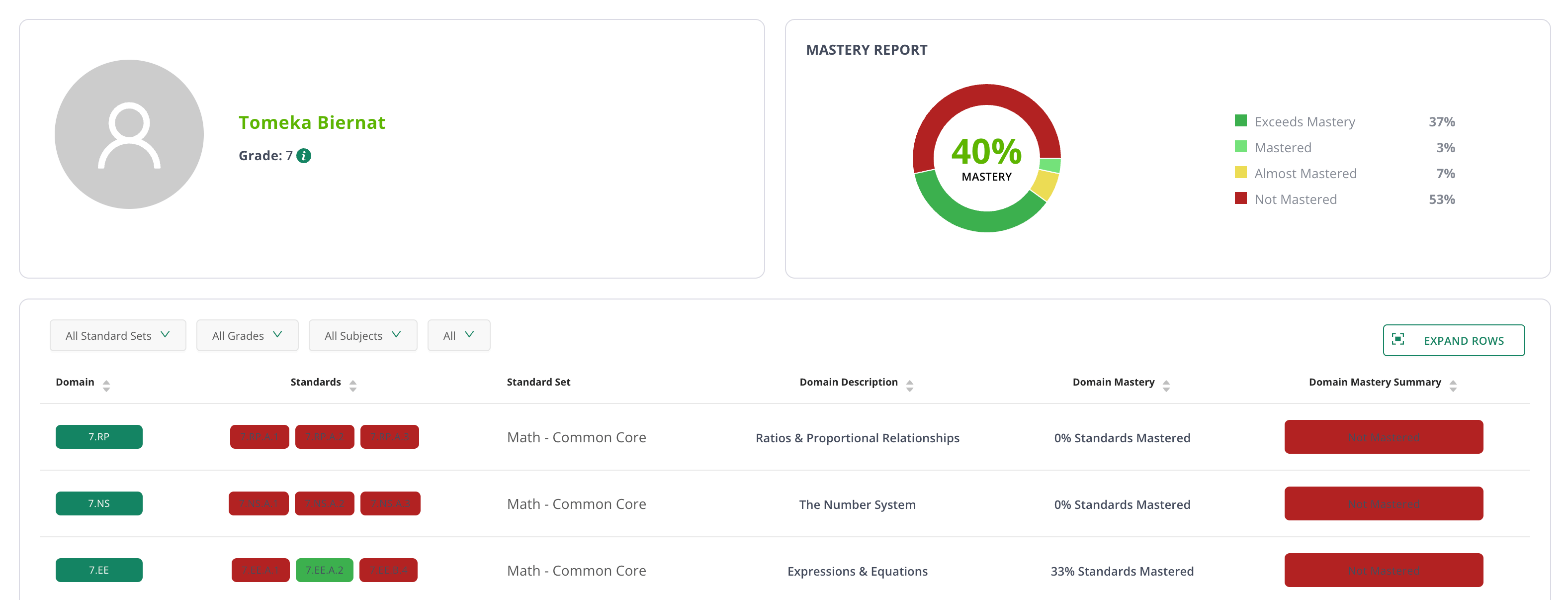
The Student Mastery Profile report provides a snapshot of student performance with standards-level performance data, links to student tests, and performance statistics per standard.
## Insights: Student Mastery Profile in Pear Assessment
The Student Mastery Profile report provides a snapshot of student performance with standards-level performance data, links to student tests, and performance statistics per standard.
## Review Student Mastery Profile
1. Click **Insights** in the navigation menu.
2. Click **Student Mastery Profile** under **Student Profile Report**.
 3. Select relevant filters to narrow your reporting scope.
 4. Enter a student's name to select them in the left-hand sub-filter.
5. Select a standard proficiency in the next sub-filter.
6. Review Mastery Report for student performance on mastery.
7. Review student mastery by domain and standard.
4. Enter a student's name to select them in the left-hand sub-filter.
5. Select a standard proficiency in the next sub-filter.
6. Review Mastery Report for student performance on mastery.
7. Review student mastery by domain and standard.