> ## Documentation Index
> Fetch the complete documentation index at: https://docs.goguardian.com/llms.txt
> Use this file to discover all available pages before exploring further.
# General Graphing Questions
> Understand how to create and grade graphing questions that ask students to place points on a function
Pear Assessment lets you create graphing questions where students place points on a function. You can specify the equation type, the number of points required, and whether partial scoring applies.
## Create a Graphing Question
To set up a graphing question:
1. Go to **Graphing Questions** in the question authoring tool.
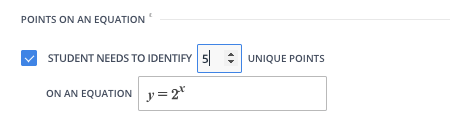
2. Scroll to **Points on an Equation** near the bottom of the form.
3. Enter the equation: for example, an exponent or power function.
4. Set the number of points the student must place on the graph.
 ## Preview and Grading
After configuring the question, open the **Preview** tab to review how Pear Assessment scores responses.
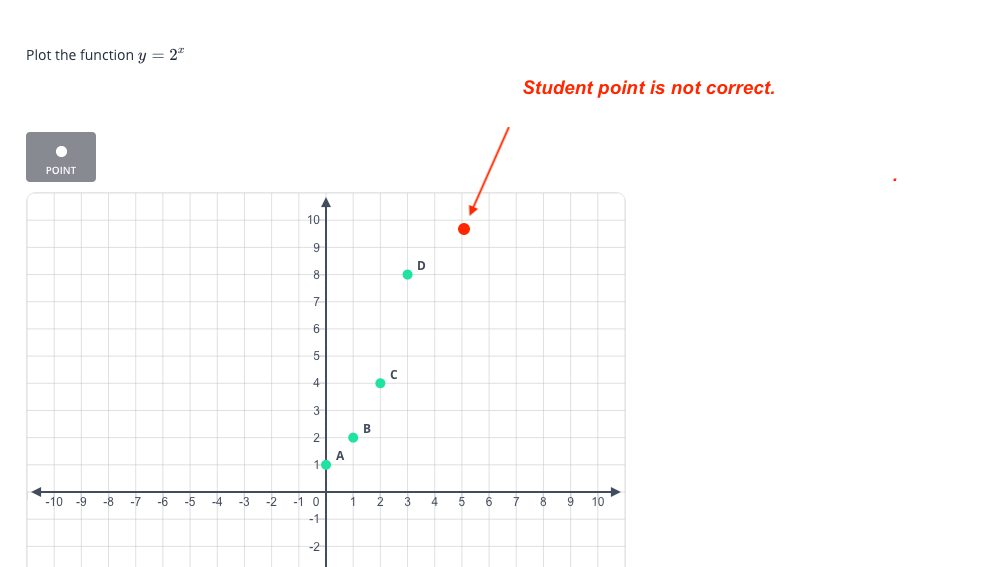
If a student places the first four points correctly but misses the fifth, the default score is 0. Enable partial scoring to award credit proportional to the number of correct points: in this example, a student with four of five correct would receive 0.80 points.
## Resources
Learn how to build and configure math question types in Pear Assessment.
## Preview and Grading
After configuring the question, open the **Preview** tab to review how Pear Assessment scores responses.
If a student places the first four points correctly but misses the fifth, the default score is 0. Enable partial scoring to award credit proportional to the number of correct points: in this example, a student with four of five correct would receive 0.80 points.
## Resources
Learn how to build and configure math question types in Pear Assessment.