> ## Documentation Index
> Fetch the complete documentation index at: https://docs.goguardian.com/llms.txt
> Use this file to discover all available pages before exploring further.

# Update Test Settings

> Update test dates, grade release, and other settings for one class or multiple classes in Pear Assessment

Teachers can update test settings in Pear Assessment at any time: changing test dates, releasing grades, and more. Settings can be updated for a single class or across multiple classes at once.

## Update Test Settings for One Class

1. Click **Assignments** in the navigation menu.
2. Click the assignment's name.
3. Click the **Settings** tab and make changes as needed.
4. Click **Close**.

<img src="https://mintcdn.com/goguardian/LyphObHfQA2gYBig/images/screenshots/update-test-settings/step-01.png?fit=max&auto=format&n=LyphObHfQA2gYBig&q=85&s=d7ef82eaa2752b5c69f7bc0f36703c88" alt="Settings tab for editing a test's settings." width="3158" height="886" data-path="images/screenshots/update-test-settings/step-01.png" />

## Update Test Settings for Multiple Classes

1. Click **Assignments** in the navigation menu.
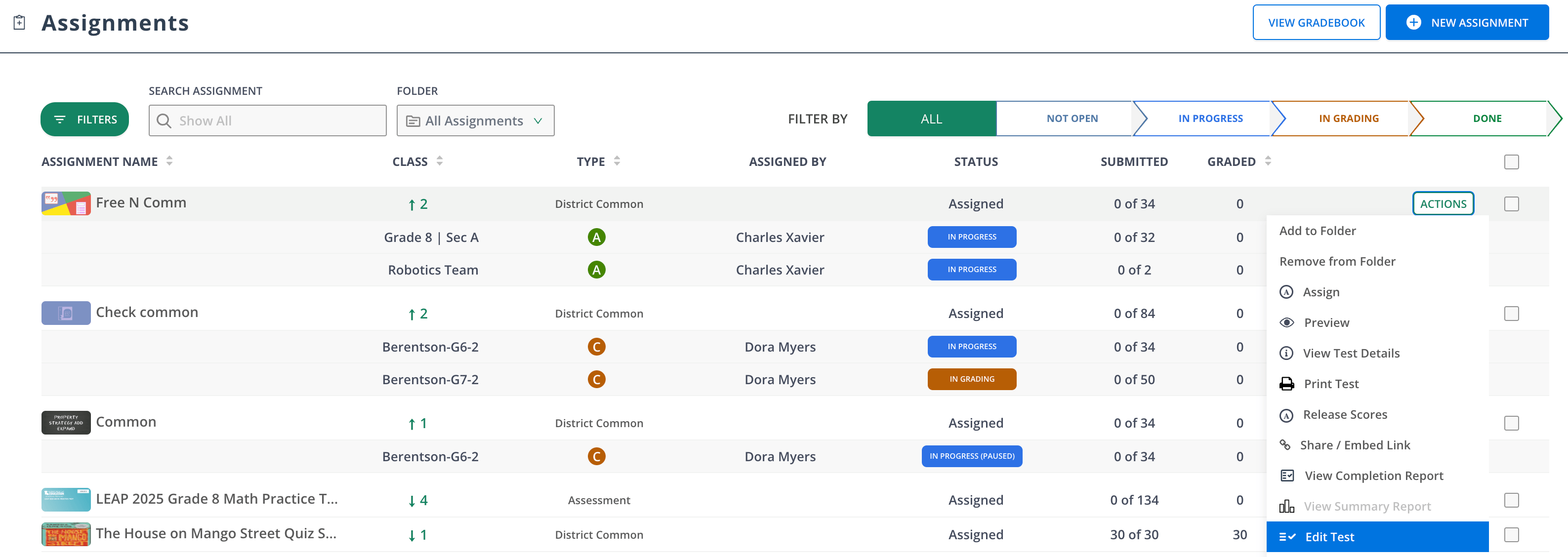
2. At the end of the assessment's row, click **Actions** > **Edit Test**.
3. Click the **Settings** tab and make changes as needed.
4. Click **Publish**.
<img src="https://mintcdn.com/goguardian/LyphObHfQA2gYBig/images/screenshots/update-test-settings/step-02.png?fit=max&auto=format&n=LyphObHfQA2gYBig&q=85&s=121e37eb2fd4cf8c2196d1e880249b22" alt="Edit the test as needed from the Actions menu > Edit Test." data-og-width="3174" width="3174" data-og-height="1128" height="1128" data-path="images/screenshots/update-test-settings/step-02.png" data-optimize="true" data-opv="3" srcset="https://mintcdn.com/goguardian/LyphObHfQA2gYBig/images/screenshots/update-test-settings/step-02.png?w=280&fit=max&auto=format&n=LyphObHfQA2gYBig&q=85&s=d7c789f99826a8b41868fd390783695d 280w, https://mintcdn.com/goguardian/LyphObHfQA2gYBig/images/screenshots/update-test-settings/step-02.png?w=560&fit=max&auto=format&n=LyphObHfQA2gYBig&q=85&s=1fda1320faee1a0ac7ba0b7dfefaab4c 560w, https://mintcdn.com/goguardian/LyphObHfQA2gYBig/images/screenshots/update-test-settings/step-02.png?w=840&fit=max&auto=format&n=LyphObHfQA2gYBig&q=85&s=bdc872b8c81852b1cc45241f66570037 840w, https://mintcdn.com/goguardian/LyphObHfQA2gYBig/images/screenshots/update-test-settings/step-02.png?w=1100&fit=max&auto=format&n=LyphObHfQA2gYBig&q=85&s=9548032563f3f29e26ecadd5122fcb88 1100w, https://mintcdn.com/goguardian/LyphObHfQA2gYBig/images/screenshots/update-test-settings/step-02.png?w=1650&fit=max&auto=format&n=LyphObHfQA2gYBig&q=85&s=f2e5df2f299e3dc82d95b826c0f74c89 1650w, https://mintcdn.com/goguardian/LyphObHfQA2gYBig/images/screenshots/update-test-settings/step-02.png?w=2500&fit=max&auto=format&n=LyphObHfQA2gYBig&q=85&s=1c8301ab0dc2628a94c840f059dee6af 2500w" />
