> ## Documentation Index
> Fetch the complete documentation index at: https://docs.goguardian.com/llms.txt
> Use this file to discover all available pages before exploring further.

# Install or Allow the Pear Deck Add-on for Your Google Domain

> Google administrators can force-install the Pear Deck for Google Slides Add-on for all users, or allow it so users can install it themselves.

This article is for administrators whose schools or districts use Google for Education. By default, apps like Pear Deck are not allowed in EDU domains. For teachers to get the Pear Deck for Google Slides Add-on, a Google administrator must set permissions in Google Admin Console. There are two ways to do this:

* Install Pear Deck in all users' accounts.
* Allow Pear Deck so individual users can install it themselves.

## Install Pear Deck for All Users

Follow these steps to automatically install the Pear Deck for Google Slides Add-on for every teacher in your Google domain:

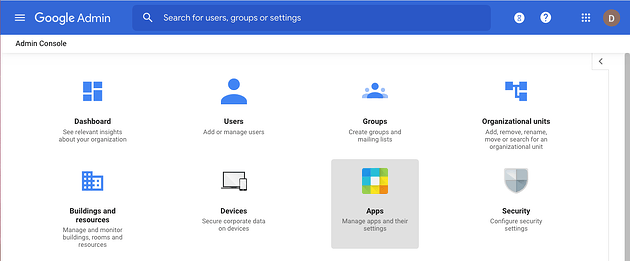
1. Open the [Google Admin Console](https://admin.google.com/ac/home).
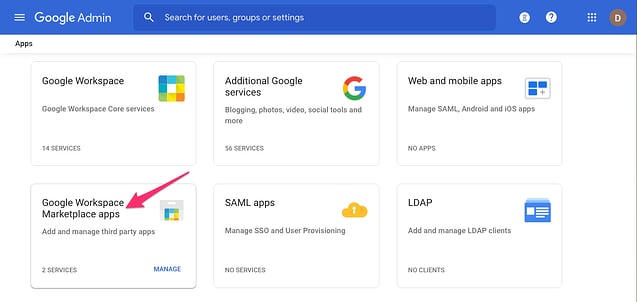
2. Select **Apps**.
3. Select **Google Workspace Marketplace apps**.
4. Select **Add app to Domain Install List**.
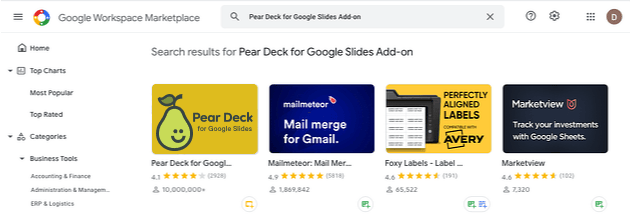
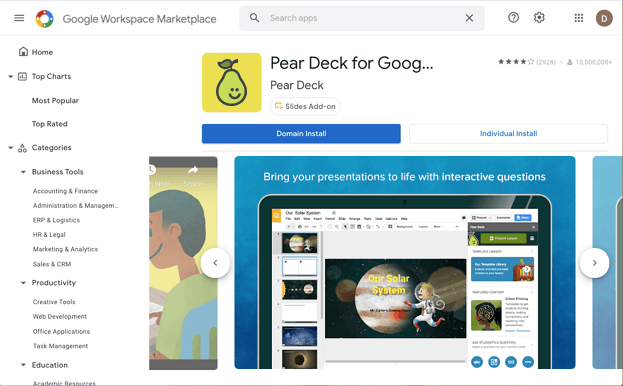
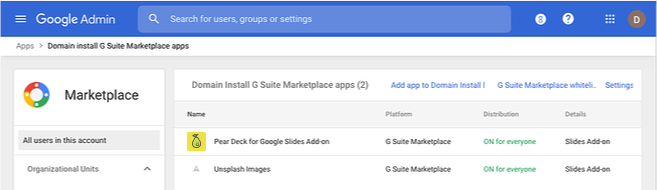
5. In the Google Workspace Marketplace, search for and select **Pear Deck for Google Slides Add-on**, then complete the domain install.
<img src="https://mintcdn.com/goguardian/iWFURxXtrSobFR-o/images/screenshots/install-pear-deck-add-on/step-01.png?fit=max&auto=format&n=iWFURxXtrSobFR-o&q=85&s=4f2f90126838e646998997c9397dbfb9" alt="1. Google admin, main menu, zoomed" width="630" height="261" data-path="images/screenshots/install-pear-deck-add-on/step-01.png" />

<img src="https://mintcdn.com/goguardian/iWFURxXtrSobFR-o/images/screenshots/install-pear-deck-add-on/step-02.png?fit=max&auto=format&n=iWFURxXtrSobFR-o&q=85&s=06014973d16f2c3424aea5169a800e89" alt="2. Google admin, apps page, zoomed with arrow" width="637" height="302" data-path="images/screenshots/install-pear-deck-add-on/step-02.png" />

<img src="https://mintcdn.com/goguardian/iWFURxXtrSobFR-o/images/screenshots/install-pear-deck-add-on/step-03.png?fit=max&auto=format&n=iWFURxXtrSobFR-o&q=85&s=e4a5572fcfa2eb769b6e78709662ee7d" alt="Google Admin, add app to domain install list, 1 zoomed" width="637" height="174" data-path="images/screenshots/install-pear-deck-add-on/step-03.png" />

<img src="https://mintcdn.com/goguardian/iWFURxXtrSobFR-o/images/screenshots/install-pear-deck-add-on/step-04.png?fit=max&auto=format&n=iWFURxXtrSobFR-o&q=85&s=5214384af07006e6e8ed3d04c5598628" alt="Pear Deck in search bar" width="631" height="214" data-path="images/screenshots/install-pear-deck-add-on/step-04.png" />

<img src="https://mintcdn.com/goguardian/iWFURxXtrSobFR-o/images/screenshots/install-pear-deck-add-on/step-05.png?fit=max&auto=format&n=iWFURxXtrSobFR-o&q=85&s=e98943c341d326e75407779ccb0522b5" alt="Pear Deck domain install button" width="623" height="386" data-path="images/screenshots/install-pear-deck-add-on/step-05.png" />

<img src="https://mintcdn.com/goguardian/iWFURxXtrSobFR-o/images/screenshots/install-pear-deck-add-on/step-06.png?fit=max&auto=format&n=iWFURxXtrSobFR-o&q=85&s=249cc83a7a62d1c2659ac0d937c43a99" alt="Pear Deck in Google Admin Console" width="657" height="190" data-path="images/screenshots/install-pear-deck-add-on/step-06.png" />

## Allow Pear Deck for Users to Install

Alternatively, allow Pear Deck in Google Workspace so individual users can install the Add-on in Google Slides themselves.