Find the right contact to renew GoGuardian licensing, request a quote, or view your organization’s current product licenses.
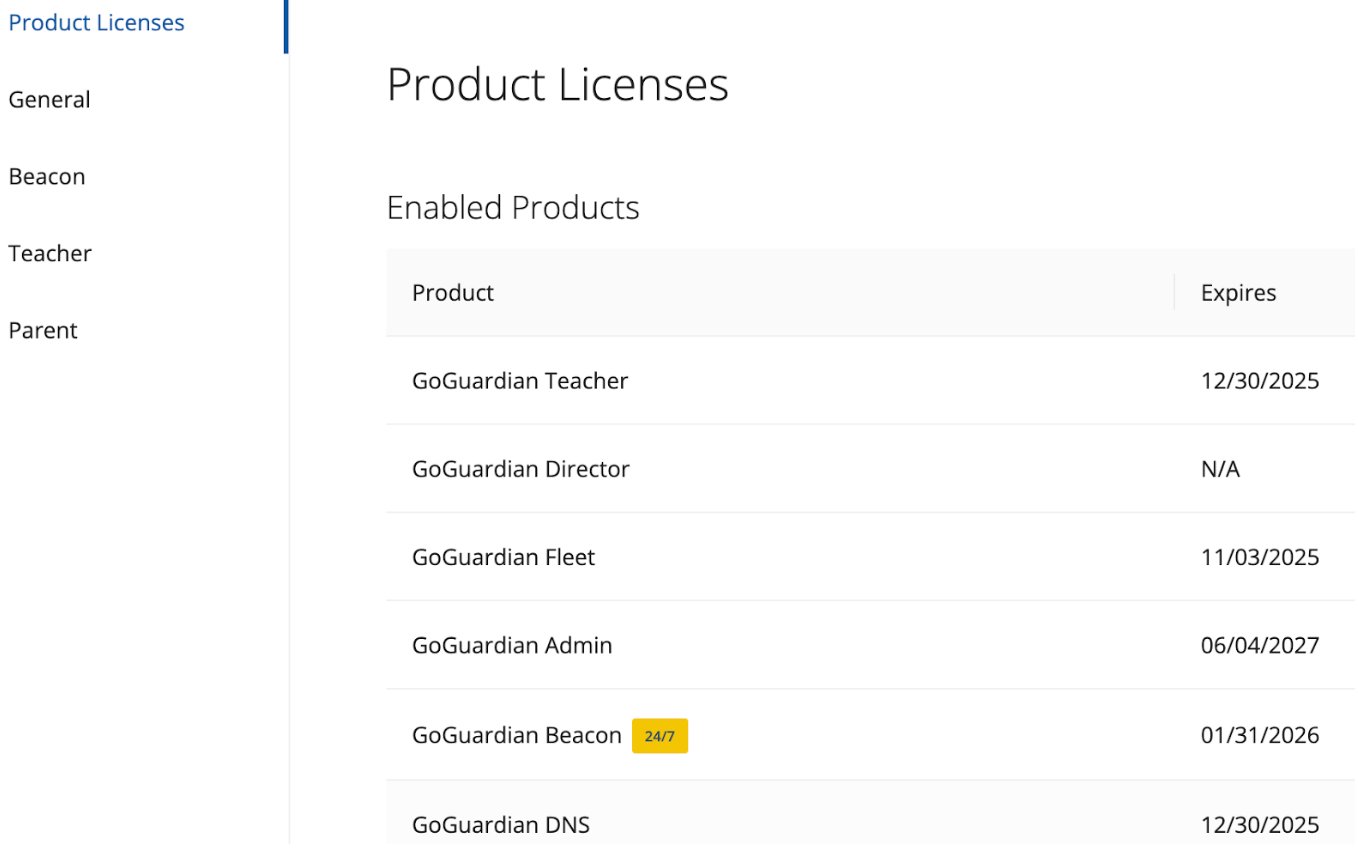
Licensing renewals, quotes, and sales inquiries are handled by GoGuardian account representatives. Super Users can also view current product licenses directly in GoGuardian Org Management.
Contact Your Account Representative (Current Customers)
To renew or extend licensing, request a quote for a new product or service, or for general sales inquiries, contact your GoGuardian account representative by email.If you’re not sure who to contact, submit a request at goguardian.com/contact-support. The GoGuardian Support team cannot modify licensing or process renewals, but can connect you with the appropriate account representative.
On the Discover trial page, click Start Free Trial.
Verify the result: Discover shows Your free trial has started and the date your trial ends.
After the trial starts, Discover loads app usage data from the last 2 months. Data appears within 24 hours. Around day 15, your account manager checks in. The trial ends 30 days after it starts, and access to Discover stops unless your organization purchases it.If Free trial is temporarily unavailable appears, GoGuardian isn’t starting new trials right now and emails you when trials are available again.
Last modified on November 12, 2026
Was this page helpful?
⌘I
{"docsConfig":{"theme":"linden","$schema":"https://mintlify.com/docs.json","name":"GoGuardian","description":"Help center and product documentation for GoGuardian's K-12 safety and classroom management suite, including Admin (web filtering), Teacher (classroom management), Beacon (student safety alerts), Hall Pass, Discover, and Org Management.","colors":{"primary":"#0A59A3","light":"#439CEF","dark":"#002F6C"},"logo":{"light":"https://mintcdn.com/goguardian/08olqC3O-Uu3gBIf/images/logo/gg-pdl-lockup.svg?fit=max\u0026auto=format\u0026n=08olqC3O-Uu3gBIf\u0026q=85\u0026s=4e52b3255e2eae1b6b38419db0a1bf62","dark":"https://mintcdn.com/goguardian/08olqC3O-Uu3gBIf/images/logo/gg-pdl-lockup-white.svg?fit=max\u0026auto=format\u0026n=08olqC3O-Uu3gBIf\u0026q=85\u0026s=98894adb9647f2b523e0d11de1fc7961"},"favicon":"https://media.brand.dev/fb6d60c3-9a7a-4a85-a889-7a95764fa5ed.png","background":{"color":{"light":"#FFFFFF","dark":"#0F1F36"}},"search":{"prompt":"Search GoGuardian help articles…"},"seo":{"metatags":{"og:site_name":"GoGuardian Help Center","og:type":"website","twitter:card":"summary_large_image"},"indexing":"navigable"},"fonts":{"family":"TTCommonsPro"},"styling":{"eyebrows":"breadcrumbs","latex":false},"metadata":{"timestamp":true},"navigation":{"pages":[]}},"deployment":{"deploymentMetadataValue":{"subdomain":"goguardian","hasAudioNarration":false,"actualSubdomain":"goguardian","customDomains":["docs.goguardian.com"],"gitSource":{"type":"github","owner":"goguardian","repo":"docs","deployBranch":"main","isPrivate":true,"contentDirectory":"","mountPath":"","label":""},"feedback":{"thumbs":true},"entitlements":{"AI_CHAT":{"status":"ENABLED"},"WEB_MCP":{"status":"ENABLED"},"NARRATION":{"status":"ENABLED"}},"buildId":"6af5f46caa1faedf27c3ae18","clientVersion":"0.0.4117","searchFilterCounts":[{"language":"default","tag":"Products","count":766},{"language":"default","tag":"Pear Deck Learning","count":392},{"language":"default","tag":"GoGuardian","count":384},{"language":"default","tag":"Pear Assessment","count":192},{"language":"default","tag":"Getting Started","count":118},{"language":"default","tag":"Teacher","count":96},{"language":"default","tag":"Admin","count":95},{"language":"default","tag":"Pear Deck","count":84},{"language":"default","tag":"Pear Practice","count":82},{"language":"default","tag":"Troubleshooting","count":77}],"searchSettings":{"maxResults":20,"isFiltersEnabled":true}},"assistantConfig":{"enableAskAiButton":false,"enableStarterQuestions":false,"enableContextualStarterQuestions":false,"enableAskAiSearchBar":true},"basePath":"","hasChatPermissions":false,"hasWebMcpPermissions":true,"toggles":[{"name":"kill-isr","enabled":true,"variant":{"name":"disabled","enabled":false,"feature_enabled":true},"impressionData":false},{"name":"custom-rbac-roles","enabled":true,"variant":{"name":"disabled","enabled":false,"feature_enabled":true},"impressionData":false},{"name":"agent-mintlify-slack","enabled":true,"variant":{"name":"disabled","enabled":false,"feature_enabled":true},"impressionData":false},{"name":"agent-integrations-settings","enabled":true,"variant":{"name":"disabled","enabled":false,"feature_enabled":true},"impressionData":false},{"name":"rbac-expansion","enabled":true,"variant":{"name":"disabled","enabled":false,"feature_enabled":true},"impressionData":false},{"name":"automations-pr-grouping","enabled":true,"variant":{"name":"disabled","enabled":false,"feature_enabled":true},"impressionData":false},{"name":"custom-prefix","enabled":true,"variant":{"name":"disabled","enabled":false,"feature_enabled":true},"impressionData":false},{"name":"analytics-v7","enabled":true,"variant":{"name":"disabled","enabled":false,"feature_enabled":true},"impressionData":false},{"name":"user-flows-analytics","enabled":true,"variant":{"name":"disabled","enabled":false,"feature_enabled":true},"impressionData":false},{"name":"no-publish-flow","enabled":true,"variant":{"name":"disabled","enabled":false,"feature_enabled":true},"impressionData":false},{"name":"workos-onboarding","enabled":true,"variant":{"name":"disabled","enabled":false,"feature_enabled":true},"impressionData":false},{"name":"llms-txt-v2","enabled":true,"variant":{"name":"disabled","enabled":false,"feature_enabled":true},"impressionData":false},{"name":"snapshot-serving-live","enabled":true,"variant":{"name":"disabled","enabled":false,"feature_enabled":true},"impressionData":false},{"name":"stripTemperatureMiddleware","enabled":true,"variant":{"name":"disabled","enabled":false,"feature_enabled":true},"impressionData":false},{"name":"support-platform-pylon-zendesk","enabled":true,"variant":{"name":"disabled","enabled":false,"feature_enabled":true},"impressionData":false},{"name":"snapshot-serving","enabled":true,"variant":{"name":"disabled","enabled":false,"feature_enabled":true},"impressionData":false},{"name":"instant-rollback","enabled":true,"variant":{"name":"disabled","enabled":false,"feature_enabled":true},"impressionData":false},{"name":"granular-notifications-server","enabled":true,"variant":{"name":"disabled","enabled":false,"feature_enabled":true},"impressionData":false},{"name":"granular-notifications","enabled":true,"variant":{"name":"disabled","enabled":false,"feature_enabled":true},"impressionData":false},{"name":"automations-fable","enabled":true,"variant":{"name":"disabled","enabled":false,"feature_enabled":true},"impressionData":false},{"name":"fixed-ai-action-pricing","enabled":true,"variant":{"name":"disabled","enabled":false,"feature_enabled":true},"impressionData":false},{"name":"automation-resolve-merge-conflict","enabled":true,"variant":{"name":"disabled","enabled":false,"feature_enabled":true},"impressionData":false},{"name":"scoped-publishing","enabled":true,"variant":{"name":"disabled","enabled":false,"feature_enabled":true},"impressionData":false},{"name":"mintql","enabled":true,"variant":{"name":"disabled","enabled":false,"feature_enabled":true},"impressionData":false},{"name":"page-level-analytics","enabled":true,"variant":{"name":"disabled","enabled":false,"feature_enabled":true},"impressionData":false},{"name":"editor-version-history-v2","enabled":true,"variant":{"name":"disabled","enabled":false,"feature_enabled":true},"impressionData":false},{"name":"billing-page-v2","enabled":true,"variant":{"name":"disabled","enabled":false,"feature_enabled":true},"impressionData":false},{"name":"full-page-search","enabled":true,"variant":{"name":"disabled","enabled":false,"feature_enabled":true},"impressionData":false},{"name":"workspace-projects","enabled":true,"variant":{"name":"disabled","enabled":false,"feature_enabled":true},"impressionData":false},{"name":"assistant-v5","enabled":true,"variant":{"name":"disabled","enabled":false,"feature_enabled":true},"impressionData":false},{"name":"fork-pr-previews","enabled":true,"variant":{"name":"disabled","enabled":false,"feature_enabled":true},"impressionData":false},{"name":"revalidation-jwt","enabled":true,"variant":{"name":"disabled","enabled":false,"feature_enabled":true},"impressionData":false},{"name":"workos-sso-scim","enabled":true,"variant":{"name":"disabled","enabled":false,"feature_enabled":true},"impressionData":false},{"name":"hobby-abuse-scan","enabled":true,"variant":{"name":"disabled","enabled":false,"feature_enabled":true},"impressionData":false},{"name":"dashboard-inbox","enabled":true,"variant":{"name":"disabled","enabled":false,"feature_enabled":true},"impressionData":false},{"name":"workos-signup","enabled":true,"variant":{"name":"disabled","enabled":false,"feature_enabled":true},"impressionData":false},{"name":"turbopuffer-dual-write","enabled":true,"variant":{"name":"disabled","enabled":false,"feature_enabled":true},"impressionData":false},{"name":"workos-enabled","enabled":true,"variant":{"name":"disabled","enabled":false,"feature_enabled":true},"impressionData":false},{"name":"approve-review-flow","enabled":true,"variant":{"name":"disabled","enabled":false,"feature_enabled":true},"impressionData":false},{"name":"editor-metadata","enabled":true,"variant":{"name":"disabled","enabled":false,"feature_enabled":true},"impressionData":false},{"name":"sso-setup-deadline-banner","enabled":true,"variant":{"name":"disabled","enabled":false,"feature_enabled":true},"impressionData":false},{"name":"turbopuffer-serve","enabled":true,"variant":{"name":"disabled","enabled":false,"feature_enabled":true},"impressionData":false},{"name":"live-agents","enabled":true,"variant":{"name":"disabled","enabled":false,"feature_enabled":true},"impressionData":false}],"googleFontsInlined":false},"customCss":[{"filePath":"custom.css","content":"@font-face{font-family:'TTCommonsPro';src:url('/fonts/TTCommonsPro-Thin.otf') format('opentype');font-weight:100;font-style:normal;font-display:swap}@font-face{font-family:'TTCommonsPro';src:url('/fonts/TTCommonsPro-ThinItalic.otf') format('opentype');font-weight:100;font-style:italic;font-display:swap}@font-face{font-family:'TTCommonsPro';src:url('/fonts/TTCommonsPro-ExtraLight.otf') format('opentype');font-weight:200;font-style:normal;font-display:swap}@font-face{font-family:'TTCommonsPro';src:url('/fonts/TTCommonsPro-ExtraLightItalic.otf') format('opentype');font-weight:200;font-style:italic;font-display:swap}@font-face{font-family:'TTCommonsPro';src:url('/fonts/TTCommonsPro-Light.otf') format('opentype');font-weight:300;font-style:normal;font-display:swap}@font-face{font-family:'TTCommonsPro';src:url('/fonts/TTCommonsPro-LightItalic.otf') format('opentype');font-weight:300;font-style:italic;font-display:swap}@font-face{font-family:'TTCommonsPro';src:url('/fonts/TTCommonsPro-Regular.otf') format('opentype');font-weight:400;font-style:normal;font-display:swap}@font-face{font-family:'TTCommonsPro';src:url('/fonts/TTCommonsPro-Italic.otf') format('opentype');font-weight:400;font-style:italic;font-display:swap}@font-face{font-family:'TTCommonsPro';src:url('/fonts/TTCommonsPro-Medium.otf') format('opentype');font-weight:500;font-style:normal;font-display:swap}@font-face{font-family:'TTCommonsPro';src:url('/fonts/TTCommonsPro-MediumItalic.otf') format('opentype');font-weight:500;font-style:italic;font-display:swap}@font-face{font-family:'TTCommonsPro';src:url('/fonts/TTCommonsPro-DemiBold.otf') format('opentype');font-weight:600;font-style:normal;font-display:swap}@font-face{font-family:'TTCommonsPro';src:url('/fonts/TTCommonsPro-DemiBoldItalic.otf') format('opentype');font-weight:600;font-style:italic;font-display:swap}@font-face{font-family:'TTCommonsPro';src:url('/fonts/TTCommonsPro-Bold.otf') format('opentype');font-weight:700;font-style:normal;font-display:swap}@font-face{font-family:'TTCommonsPro';src:url('/fonts/TTCommonsPro-BoldItalic.otf') format('opentype');font-weight:700;font-style:italic;font-display:swap}@font-face{font-family:'TTCommonsPro';src:url('/fonts/TTCommonsPro-ExtraBold.otf') format('opentype');font-weight:800;font-style:normal;font-display:swap}@font-face{font-family:'TTCommonsPro';src:url('/fonts/TTCommonsPro-ExtraBoldItalic.otf') format('opentype');font-weight:800;font-style:italic;font-display:swap}@font-face{font-family:'TTCommonsPro';src:url('/fonts/TTCommonsPro-Black.otf') format('opentype');font-weight:900;font-style:normal;font-display:swap}@font-face{font-family:'TTCommonsPro';src:url('/fonts/TTCommonsPro-BlackItalic.otf') format('opentype');font-weight:900;font-style:italic;font-display:swap}@font-face{font-family:'TTCommonsPro';src:url('/fonts/TTCommonsPro-ExtraBlack.otf') format('opentype');font-weight:950;font-style:normal;font-display:swap}@font-face{font-family:'TTCommonsPro';src:url('/fonts/TTCommonsPro-ExtraBlackItalic.otf') format('opentype');font-weight:950;font-style:italic;font-display:swap}body,html{font-family:'TTCommonsPro', ui-sans-serif, system-ui, -apple-system,\n BlinkMacSystemFont, 'Segoe UI', Roboto, 'Helvetica Neue', Arial, sans-serif}header nav,header>div,nav[class*=\"navbar\"],div[class*=\"navbar\"]{max-width:none!important;width:100%!important}img.nav-logo{height:2.5rem}@media (min-width: 1024px){img.nav-logo{margin-left:2rem}}.nav-tabs-item{white-space:nowrap}#pagination .uppercase{text-transform:none}kbd{background:#F0F0F0;border:1px solid #D0D0D0;color:#262626;border-radius:4px;padding:0.1rem 0.4rem;font-size:0.85em}html.dark kbd{background:#2D2D2D;border:1px solid #4A4A4A;color:#F0F0F0}.mdx-content .zoom-image-trigger img{margin-block:2rem}"}],"page":{"pagePath":"products/org-management/licensing-and-renewals","slug":"/products/org-management/licensing-and-renewals","pageMetadata":{"title":"Review Licensing, Renewals, and Sales Contacts","description":"Find the right contact to renew GoGuardian licensing, request a quote, or view your organization's current product licenses.","last_reviewed":"June 2026","article_type":"Reference","products":"GoGuardian Org Management","audience":"IT administrators, Tech directors","keywords":["renew license","contact sales rep","request a quote","check subscription expiration","product license dates"],"href":"/products/org-management/licensing-and-renewals"},"description":{"compiledSource":"\"use strict\";\nconst {jsx: _jsx} = arguments[0];\nconst {useMDXComponents: _provideComponents} = arguments[0];\nfunction _createMdxContent(props) {\n const _components = {\n p: \"p\",\n ..._provideComponents(),\n ...props.components\n };\n return _jsx(_components.p, {\n children: \"Find the right contact to renew GoGuardian licensing, request a quote, or view your organization’s current product licenses.\"\n });\n}\nfunction MDXContent(props = {}) {\n const {wrapper: MDXLayout} = {\n ..._provideComponents(),\n ...props.components\n };\n return MDXLayout ? _jsx(MDXLayout, {\n ...props,\n children: _jsx(_createMdxContent, {\n ...props\n })\n }) : _createMdxContent(props);\n}\nreturn {\n default: MDXContent\n};\n","frontmatter":{},"scope":{}},"pageType":"default","mdx":{"mdxSource":{"compiledSource":"\"use strict\";const{Fragment:_Fragment,jsx:_jsx,jsxs:_jsxs}=arguments[0];const{useMDXComponents:_provideComponents}=arguments[0];function _createMdxContent(props){const _components={a:`a`,li:`li`,ol:`ol`,p:`p`,strong:`strong`,..._provideComponents(),...props.components},{Heading,OptimizedImage}=_components;if(!Heading)_missingMdxReference(`Heading`,true);if(!OptimizedImage)_missingMdxReference(`OptimizedImage`,true);return _jsxs(_Fragment,{children:[_jsx(_components.p,{children:`Licensing renewals, quotes, and sales inquiries are handled by GoGuardian account representatives. Super Users can also view current product licenses directly in GoGuardian Org Management.`}),`\n`,_jsx(Heading,{level:`2`,id:`contact-your-account-representative-current-customers`,children:`Contact Your Account Representative (Current Customers)`}),`\n`,_jsx(_components.p,{children:`To renew or extend licensing, request a quote for a new product or service, or for general sales inquiries, contact your GoGuardian account representative by email.`}),`\n`,_jsxs(_components.p,{children:[`If you’re not sure who to contact, submit a request at `,_jsx(_components.a,{href:`https://goguardian.com/contact-support`,children:`goguardian.com/contact-support`}),`. The GoGuardian Support team cannot modify licensing or process renewals, but can connect you with the appropriate account representative.`]}),`\n`,_jsx(Heading,{level:`2`,id:`request-a-trial-new-customers`,children:`Request a Trial (New Customers)`}),`\n`,_jsxs(_components.p,{children:[`To get started with GoGuardian, visit `,_jsx(_components.a,{href:`https://www.goguardian.com`,children:`GoGuardian.com`}),` and request a trial.`]}),`\n`,_jsx(Heading,{level:`2`,id:`view-current-licensing`,children:`View Current Licensing`}),`\n`,_jsxs(_components.p,{children:[`Super Users can view your organization’s enabled products and licensing dates at the `,_jsx(_components.strong,{children:`Product Licenses`}),` tab: `,_jsx(_components.a,{href:`https://manage.goguardian.com/products/licenses`,children:`manage.goguardian.com/products/licenses`}),`.`]}),`\n`,_jsx(OptimizedImage,{src:`https://mintcdn.com/goguardian/FVKUrnWRnACRmEDK/images/screenshots/licensing-and-renewals/step-01.png?fit=max\u0026auto=format\u0026n=FVKUrnWRnACRmEDK\u0026q=85\u0026s=095825308b1bfb8d35fbdf958e1a68b2`,alt:`View Current Licensing`,\"data-og-width\":`1358`,width:`1358`,\"data-og-height\":`856`,height:`856`,\"data-path\":`images/screenshots/licensing-and-renewals/step-01.png`,\"data-optimize\":`true`,\"data-opv\":`3`,srcset:`https://mintcdn.com/goguardian/FVKUrnWRnACRmEDK/images/screenshots/licensing-and-renewals/step-01.png?w=280\u0026fit=max\u0026auto=format\u0026n=FVKUrnWRnACRmEDK\u0026q=85\u0026s=ddb00008824e57aff40a8b4e076d4f42 280w, https://mintcdn.com/goguardian/FVKUrnWRnACRmEDK/images/screenshots/licensing-and-renewals/step-01.png?w=560\u0026fit=max\u0026auto=format\u0026n=FVKUrnWRnACRmEDK\u0026q=85\u0026s=28d80cd980bcc9853b4d15465ae16c59 560w, https://mintcdn.com/goguardian/FVKUrnWRnACRmEDK/images/screenshots/licensing-and-renewals/step-01.png?w=840\u0026fit=max\u0026auto=format\u0026n=FVKUrnWRnACRmEDK\u0026q=85\u0026s=65caebd970a3132b9522c491c8e14779 840w, https://mintcdn.com/goguardian/FVKUrnWRnACRmEDK/images/screenshots/licensing-and-renewals/step-01.png?w=1100\u0026fit=max\u0026auto=format\u0026n=FVKUrnWRnACRmEDK\u0026q=85\u0026s=e89920893d9a50e0446ff174b8530e4e 1100w, https://mintcdn.com/goguardian/FVKUrnWRnACRmEDK/images/screenshots/licensing-and-renewals/step-01.png?w=1650\u0026fit=max\u0026auto=format\u0026n=FVKUrnWRnACRmEDK\u0026q=85\u0026s=7bcf76c1e158dd1a887553395da92c7a 1650w, https://mintcdn.com/goguardian/FVKUrnWRnACRmEDK/images/screenshots/licensing-and-renewals/step-01.png?w=2500\u0026fit=max\u0026auto=format\u0026n=FVKUrnWRnACRmEDK\u0026q=85\u0026s=9b4736d174a04bde74220c72a01a54ac 2500w`}),`\n`,_jsx(Heading,{level:`2`,id:`start-a-discover-trial`,children:`Start a Discover Trial`}),`\n`,_jsx(_components.p,{children:`Super Users can start a 30-day GoGuardian Discover trial.`}),`\n`,_jsxs(_components.ol,{children:[`\n`,_jsxs(_components.li,{children:[`Go to `,_jsx(_components.a,{href:`https://manage.goguardian.com/products/licenses`,children:`manage.goguardian.com/products/licenses`}),`.`]}),`\n`,_jsxs(_components.li,{children:[`Find `,_jsx(_components.strong,{children:`GoGuardian Discover`}),` and click `,_jsx(_components.strong,{children:`Start Trial`}),`.`]}),`\n`,_jsxs(_components.li,{children:[`On the Discover trial page, click `,_jsx(_components.strong,{children:`Start Free Trial`}),`.`]}),`\n`,_jsxs(_components.li,{children:[`Verify the result: Discover shows `,_jsx(_components.strong,{children:`Your free trial has started`}),` and the date your trial ends.`]}),`\n`]}),`\n`,_jsx(_components.p,{children:`After the trial starts, Discover loads app usage data from the last 2 months. Data appears within 24 hours. Around day 15, your account manager checks in. The trial ends 30 days after it starts, and access to Discover stops unless your organization purchases it.`}),`\n`,_jsxs(_components.p,{children:[`If `,_jsx(_components.strong,{children:`Free trial is temporarily unavailable`}),` appears, GoGuardian isn’t starting new trials right now and emails you when trials are available again.`]})]})}function MDXContent(props={}){const{wrapper:MDXLayout}={..._provideComponents(),...props.components};return MDXLayout?_jsx(MDXLayout,{...props,children:_jsx(_createMdxContent,{...props})}):_createMdxContent(props)}return{default:MDXContent};function _missingMdxReference(id,component){throw new Error(`Expected `+(component?`component`:`object`)+\" `\"+id+\"` to be defined: you likely forgot to import, pass, or provide it.\")}","frontmatter":{},"scope":{"config":{},"pageMetadata":{"title":"Review Licensing, Renewals, and Sales Contacts","description":"Find the right contact to renew GoGuardian licensing, request a quote, or view your organization's current product licenses.","last_reviewed":"June 2026","article_type":"Reference","products":"GoGuardian Org Management","audience":"IT administrators, Tech directors","keywords":["renew license","contact sales rep","request a quote","check subscription expiration","product license dates"],"href":"/products/org-management/licensing-and-renewals"}}},"mdxSourceWithNoJs":null},"mdxExtracts":{"tableOfContents":[{"title":"Contact Your Account Representative (Current Customers)","slug":"contact-your-account-representative-current-customers","depth":2,"children":[]},{"title":"Request a Trial (New Customers)","slug":"request-a-trial-new-customers","depth":2,"children":[]},{"title":"View Current Licensing","slug":"view-current-licensing","depth":2,"children":[]},{"title":"Start a Discover Trial","slug":"start-a-discover-trial","depth":2,"children":[]}],"codeExamples":{}},"jsLinks":["/_mintlify/custom/goguardian/6782fcf1d7fb5a3b/scripts/scrape-and-convert.js","/_mintlify/custom/goguardian/8381199bed4c67a2/scripts/scrape-articles.js","/_mintlify/custom/goguardian/2c3caca81eed856c/scripts/build-dashboard-data.js","/_mintlify/custom/goguardian/e8b250ad39ec8372/bot.js","/_mintlify/custom/goguardian/d06a21d0e2ea70ca/scripts/legacy-screenshot/build-mapping.js","/_mintlify/custom/goguardian/7f2923f811257823/scripts/legacy-screenshot/lib.js","/_mintlify/custom/goguardian/073ab821f8b5f779/scripts/legacy-screenshot/migrate-article.js","/_mintlify/custom/goguardian/d7c722b087def904/scripts/legacy-screenshot/migrate-batch.js","/_mintlify/custom/goguardian/3e4031e7a1248e44/scripts/legacy-screenshot/migrate-core.js","/_mintlify/custom/goguardian/a8f363b6346cb963/scripts/legacy-screenshot/preview.js","/_mintlify/custom/goguardian/4031161c6df3f968/scripts/pull-mintlify-analytics-full.js","/_mintlify/custom/goguardian/de6381608244a6eb/scripts/check-nav-orphans.js"],"subdomain":"goguardian","siteName":"GoGuardian","title":"Review Licensing, Renewals, and Sales Contacts - GoGuardian","navMaps":{"firstHrefInVersion":{},"firstHrefInLanguage":{}},"lastModified":"2026-11-12T04:48:37.435Z","gitLastModified":"2026-11-12T04:48:12.000Z","originalFileLocation":"products/org-management/licensing-and-renewals.mdx"},"headHtml":"\u003cscript data-mint-head>(function(){var d=document.documentElement,p=null;if(!p){try{p=localStorage.getItem(\"isDarkMode\")}catch(e){}if(p==='true')p='dark';else if(p==='false')p='light';if(p!=='light'\u0026\u0026p!=='dark'\u0026\u0026p!=='system')p=\"system\"}var r=p==='system'?(matchMedia(\"(prefers-color-scheme: dark)\").matches?'dark':'light'):p;d.classList.remove(r==='dark'?'light':'dark');d.classList.add(r);d.setAttribute(\"data-theme-preference\",p)})();\u003c/script>\u003cmeta data-mint-head name=\"description\" content=\"Find the right contact to renew GoGuardian licensing, request a quote, or view your organization\u0026#x27;s current product licenses.\">\u003cmeta data-mint-head name=\"application-name\" content=\"GoGuardian\">\u003cmeta data-mint-head name=\"generator\" content=\"Mintlify\">\u003clink data-mint-head rel=\"apple-touch-icon\" type=\"image/png\" sizes=\"180x180\" href=\"https://media.brand.dev/fb6d60c3-9a7a-4a85-a889-7a95764fa5ed.png\">\u003clink data-mint-head rel=\"icon\" type=\"image/png\" sizes=\"32x32\" href=\"https://media.brand.dev/fb6d60c3-9a7a-4a85-a889-7a95764fa5ed.png\">\u003clink data-mint-head rel=\"icon\" type=\"image/png\" sizes=\"16x16\" href=\"https://media.brand.dev/fb6d60c3-9a7a-4a85-a889-7a95764fa5ed.png\">\u003clink data-mint-head rel=\"shortcut icon\" type=\"image/png\" href=\"https://media.brand.dev/fb6d60c3-9a7a-4a85-a889-7a95764fa5ed.png\">\u003cmeta data-mint-head property=\"og:title\" content=\"Review Licensing, Renewals, and Sales Contacts - GoGuardian\">\u003cmeta data-mint-head property=\"og:description\" content=\"Find the right contact to renew GoGuardian licensing, request a quote, or view your organization\u0026#x27;s current product licenses.\">\u003cmeta data-mint-head property=\"og:site_name\" content=\"GoGuardian Help Center\">\u003cmeta data-mint-head property=\"og:url\" content=\"https://docs.goguardian.com/products/org-management/licensing-and-renewals\">\u003cmeta data-mint-head property=\"og:type\" content=\"website\">\u003cmeta data-mint-head property=\"og:image\" content=\"https://goguardian.mintlify.site/_mintlify/api/og/v2?division=Troubleshooting\u0026amp;title=Review+Licensing%2C+Renewals%2C+and+Sales+Contacts\u0026amp;description=Find+the+right+contact+to+renew+GoGuardian+licensing%2C+request+a+quote%2C+or+view+your+organization%27s+current+product+licenses.\u0026amp;theme=ed3e54e1523a35ffe58192e9\u0026amp;signature=7e7a27d9f92b45745e883b1cae0f6549ab161b220dbb25b34a6e3d6af68f5a7c\">\u003cmeta data-mint-head property=\"og:image:width\" content=\"1200\">\u003cmeta data-mint-head property=\"og:image:height\" content=\"630\">\u003cmeta data-mint-head name=\"twitter:card\" content=\"summary_large_image\">\u003cmeta data-mint-head name=\"twitter:title\" content=\"Review Licensing, Renewals, and Sales Contacts - GoGuardian\">\u003cmeta data-mint-head name=\"twitter:description\" content=\"Find the right contact to renew GoGuardian licensing, request a quote, or view your organization\u0026#x27;s current product licenses.\">\u003cmeta data-mint-head name=\"twitter:image\" content=\"https://goguardian.mintlify.site/_mintlify/api/og/v2?division=Troubleshooting\u0026amp;title=Review+Licensing%2C+Renewals%2C+and+Sales+Contacts\u0026amp;description=Find+the+right+contact+to+renew+GoGuardian+licensing%2C+request+a+quote%2C+or+view+your+organization%27s+current+product+licenses.\u0026amp;theme=ed3e54e1523a35ffe58192e9\u0026amp;signature=7e7a27d9f92b45745e883b1cae0f6549ab161b220dbb25b34a6e3d6af68f5a7c\">\u003cmeta data-mint-head name=\"twitter:image:width\" content=\"1200\">\u003cmeta data-mint-head name=\"twitter:image:height\" content=\"630\">\u003cmeta data-mint-head name=\"msapplication-config\" content=\"https://mintlify.s3.us-west-1.amazonaws.com/goguardian/_generated/favicon/browserconfig.xml?v=3\">\u003cmeta data-mint-head name=\"apple-mobile-web-app-title\" content=\"GoGuardian\">\u003cmeta data-mint-head name=\"msapplication-TileColor\" content=\"#0A59A3\">\u003clink data-mint-head rel=\"canonical\" href=\"https://docs.goguardian.com/products/org-management/licensing-and-renewals\">\u003clink data-mint-head rel=\"alternate\" type=\"application/xml\" href=\"/sitemap.xml\">\u003clink data-mint-head rel=\"alternate\" type=\"text/markdown\" href=\"/products/org-management/licensing-and-renewals.md\">\u003cscript data-mint-head type=\"application/ld+json\">{\"@context\":\"https://schema.org\",\"@graph\":[{\"@type\":\"Organization\",\"@id\":\"https://docs.goguardian.com/#organization\",\"name\":\"GoGuardian\",\"url\":\"https://docs.goguardian.com\",\"logo\":{\"@type\":\"ImageObject\",\"url\":\"https://mintcdn.com/goguardian/08olqC3O-Uu3gBIf/images/logo/gg-pdl-lockup.svg?fit=max\u0026auto=format\u0026n=08olqC3O-Uu3gBIf\u0026q=85\u0026s=4e52b3255e2eae1b6b38419db0a1bf62\"}},{\"@type\":\"WebSite\",\"@id\":\"https://docs.goguardian.com#website\",\"name\":\"GoGuardian\",\"url\":\"https://docs.goguardian.com\",\"publisher\":{\"@id\":\"https://docs.goguardian.com/#organization\"}},{\"@type\":\"WebPage\",\"@id\":\"https://docs.goguardian.com/products/org-management/licensing-and-renewals#webpage\",\"url\":\"https://docs.goguardian.com/products/org-management/licensing-and-renewals\",\"name\":\"Review Licensing, Renewals, and Sales Contacts\",\"description\":\"Find the right contact to renew GoGuardian licensing, request a quote, or view your organization's current product licenses.\",\"dateModified\":\"2026-11-12T04:48:12.000Z\",\"isPartOf\":{\"@id\":\"https://docs.goguardian.com#website\"},\"breadcrumb\":{\"@id\":\"https://docs.goguardian.com/products/org-management/licensing-and-renewals#breadcrumb\"}},{\"@type\":\"BreadcrumbList\",\"@id\":\"https://docs.goguardian.com/products/org-management/licensing-and-renewals#breadcrumb\",\"itemListElement\":[{\"@type\":\"ListItem\",\"position\":1,\"name\":\"Products\",\"item\":\"https://docs.goguardian.com/products/admin\"},{\"@type\":\"ListItem\",\"position\":2,\"name\":\"Org Management\",\"item\":\"https://docs.goguardian.com/products/org-management\"},{\"@type\":\"ListItem\",\"position\":3,\"name\":\"Troubleshooting\",\"item\":\"https://docs.goguardian.com/products/org-management/add-exceptions\"},{\"@type\":\"ListItem\",\"position\":4,\"name\":\"Review Licensing, Renewals, and Sales Contacts\",\"item\":\"https://docs.goguardian.com/products/org-management/licensing-and-renewals\"}]},{\"@type\":[\"Article\",\"TechArticle\"],\"@id\":\"https://docs.goguardian.com/products/org-management/licensing-and-renewals#article\",\"headline\":\"Review Licensing, Renewals, and Sales Contacts\",\"name\":\"Review Licensing, Renewals, and Sales Contacts\",\"description\":\"Find the right contact to renew GoGuardian licensing, request a quote, or view your organization's current product licenses.\",\"url\":\"https://docs.goguardian.com/products/org-management/licensing-and-renewals\",\"mainEntityOfPage\":{\"@id\":\"https://docs.goguardian.com/products/org-management/licensing-and-renewals#webpage\"},\"dateModified\":\"2026-11-12T04:48:12.000Z\",\"keywords\":\"renew license, contact sales rep, request a quote, check subscription expiration, product license dates\",\"publisher\":{\"@id\":\"https://docs.goguardian.com/#organization\"},\"isPartOf\":{\"@id\":\"https://docs.goguardian.com#website\"}}]}\u003c/script>\u003cscript data-mint-head type=\"application/ld+json\">{\"@context\":\"https://schema.org\",\"@type\":\"WebSite\",\"name\":\"GoGuardian\",\"publisher\":{\"@type\":\"Organization\",\"name\":\"GoGuardian\"},\"provider\":{\"@type\":\"Organization\",\"name\":\"Mintlify\",\"url\":\"https://mintlify.com\"}}\u003c/script>","agentPointerHref":"/products/org-management/licensing-and-renewals.md","siteName":"GoGuardian","nav":{"global":null,"tabs":[{"tab":"GoGuardian","groups":[{"group":"Getting Started","expanded":false,"pages":[{"title":"GoGuardian Help Center","sidebarTitle":"Welcome","href":"/welcome"},{"title":"Prepare for Onboarding","href":"/getting-started"},{"group":"GoGuardian Extensions","pages":[{"title":"Install GoGuardian Extensions and Configure Google Admin Console","href":"/products/admin/install-extensions"},{"title":"Verify the GoGuardian Extension Deployment","href":"/products/org-management/verify-extension-deployment"}]},{"group":"The GoGuardian App","pages":[{"title":"Overview","href":"/products/gg-app/overview"},{"title":"The GoGuardian App on Windows","href":"/products/gg-app/windows"},{"title":"The GoGuardian App on iPad","href":"/products/gg-app/ipad"},{"title":"The GoGuardian App on macOS","href":"/products/gg-app/macos"}]}]},{"group":"Products","pages":[{"group":"Admin","expanded":false,"pages":[{"title":"Overview","sidebarTitle":"Overview","href":"/products/admin"},{"group":"Filtering","pages":[{"title":"Overview","href":"/products/admin/filtering-overview"},{"title":"Apply Recommendations in GoGuardian Admin","href":"/products/admin/recommendation-engine"},{"group":"Policies","pages":[{"title":"Understand Filtering Policies","href":"/products/admin/filtering-policies"},{"title":"How Filtering Rules Interact","href":"/products/admin/how-filtering-rules-interact"},{"title":"Create a Filtering Policy","href":"/products/admin/create-a-filtering-policy"},{"title":"Block Multiple Google Account Sign-Ins","href":"/products/admin/block-multiple-google-account-sign-ins"},{"title":"Allow and Block Websites","href":"/products/admin/block-and-allow-websites"},{"title":"Update Multiple Policies with Quick Editor","href":"/products/admin/use-quick-editor"},{"title":"Use Wildcard Rules in Policies","href":"/products/admin/filtering-with-wildcards"},{"title":"Use Auto-Format Domains for Website URL Rules","href":"/products/admin/auto-format-domains"},{"title":"Review Website Categories","href":"/products/admin/website-categories"},{"title":"Block Uncategorized Websites","href":"/products/admin/block-uncategorized-websites"},{"title":"Simulate Policies","href":"/products/admin/filtering-simulator"},{"title":"Understand Block Pages","href":"/products/admin/block-pages"},{"title":"Manage Custom Groups","href":"/products/admin/custom-groups"},{"title":"Sync Entra Groups to Admin Custom Groups","href":"/products/admin/entra-custom-groups-sync"},{"title":"Advanced Filtering Tips for GoGuardian Admin Policies","href":"/products/admin/advanced-filtering-tips"},{"title":"Filter Chrome Apps and Extensions in GoGuardian Admin","href":"/products/admin/filter-apps-and-extensions"},{"group":"YouTube Filtering","pages":[{"title":"Explore YouTube Filtering Layers","href":"/products/admin/youtube-filtering-layers"},{"title":"Configure YouTube Filtering","href":"/products/admin/youtube-filtering"},{"title":"Block Live Chat in YouTube","href":"/products/admin/block-live-chat-in-youtube"}]},{"group":"Custom Configuration","pages":[{"title":"Configure Bypass Passwords","href":"/products/admin/configure-bypass-passwords"},{"title":"Configure Global Filter Settings","href":"/products/admin/global-config"},{"title":"Configure Smart Rules","href":"/products/admin/smart-rules"},{"title":"GoGuardian Admin and Chromebook Desks","href":"/products/admin/chromebook-desks"},{"title":"Configure At-Home Filtering","href":"/products/admin/configure-at-home-filtering"},{"title":"Block Access to Personal Google Accounts","href":"/products/admin/block-personal-google-accounts"},{"title":"Customize the GoGuardian Admin Block Page","href":"/products/admin/customize-the-block-page"}]}]},{"group":"Smart Alerts","pages":[{"title":"Manage the Smart Alerts Allowlist","href":"/products/admin/smart-alerts-allowlist"},{"title":"Configure Smart Alerts Access","href":"/products/admin/smart-alerts-access"},{"title":"Configure Smart Alert Triggers","href":"/products/admin/configure-smart-alert-triggers"},{"title":"Compare Smart Alerts and Flagged Activity","href":"/products/admin/smart-alerts-vs-flagged-activity"},{"title":"Smart Alerts Image Filtering","href":"/products/admin/smart-alerts-image-filtering"},{"title":"Block Proxy Sites with Smart Alerts","href":"/products/admin/smart-alerts-for-proxies"},{"title":"Block Gaming Sites with Smart Alerts","href":"/products/admin/smart-alerts-for-games"},{"title":"Smart Alert Notifications and Email Alerts","href":"/products/admin/smart-alert-notifications-and-email-alerts"}]}]},{"group":"Reporting","pages":[{"title":"Overview","href":"/products/admin/reporting-overview"},{"group":"Dashboard","pages":[{"title":"Review the Admin Dashboard","href":"/products/admin/admin-dashboard"},{"title":"Review Browsing Activity","href":"/products/admin/browsing-activity"},{"title":"Review Student Activity","href":"/products/admin/student-activity"},{"title":"Review Screen Time Activity","href":"/products/admin/screen-time-activity"},{"title":"Use Global Search","href":"/products/admin/global-search"},{"title":"A Student Name Shows as Pending","href":"/products/admin/troubleshoot-pending-students"},{"title":"Review AI Activity with Prompt Visibility","href":"/products/admin/ai-activity-prompt-visibility"},{"title":"Understand AI Activity Classifications","href":"/products/admin/understand-ai-activity-classifications"}]},{"group":"Reports and Logs","pages":[{"title":"Export Student Reports","href":"/products/admin/export-student-reports"},{"title":"Review Exported Reports","href":"/products/admin/exported-reports"},{"title":"Look Up a Student by Device","href":"/products/admin/device-lookup"},{"title":"Review the Admin Audit Log","href":"/products/admin/audit-log"}]},{"group":"Flagged Activity","pages":[{"title":"Manage Flagged Activity","href":"/products/admin/manage-flagged-activity"},{"title":"Manage Flagged Terms ","href":"/products/admin/manage-flagged-terms"}]}]},{"group":"Troubleshooting","boost":6,"pages":[{"title":"Review Filtering Contexts","href":"/products/admin/filtering-contexts"},{"title":"Site Blocked Unexpectedly","href":"/products/admin/site-blocked-unexpectedly"},{"title":"Site Not Blocked Unexpectedly","href":"/products/admin/site-not-blocked-unexpectedly"},{"title":"Embedded Content Filtering","href":"/products/admin/troubleshoot-iframe-filtering"},{"title":"YouTube Video Blocked Unexpectedly","href":"/products/admin/youtube-video-blocked-unexpectedly"},{"title":"Google Searches Are Blocked Unexpectedly","href":"/products/admin/google-searches-blocked-unexpectedly"},{"title":"Block CROSH","href":"/products/admin/troubleshoot-crosh"},{"title":"Block Google Doodle Games","href":"/products/admin/block-google-doodle"},{"title":"A Device Is Not Filtering on the School Network","href":"/products/admin/device-not-filtering-on-school-network"},{"title":"A Windows Device Is Not Filtering","href":"/products/admin/windows-device-not-filtering"},{"title":"Troubleshoot Why a Website Is Blocked in GoGuardian Admin","href":"/products/admin/troubleshoot-blocked-websites"},{"title":"Troubleshoot Theft Recovery Devices and Statuses","href":"/products/admin/troubleshoot-theft-recovery"}]},{"group":"Theft Recovery","pages":[{"title":"Understand Theft Recovery","href":"/products/admin/theft-recovery"},{"title":"Set Up Theft Recovery","href":"/products/admin/set-up-theft-recovery"},{"title":"Migrate Chromebooks to New Theft Recovery Extension","href":"/products/admin/migrate-chromebooks-theft-recovery"},{"title":"Track a Missing Device","href":"/products/admin/track-a-missing-device"},{"title":"Recover a Missing Device","href":"/products/admin/recover-a-missing-device"},{"title":"Understand Data Collected by Theft Recovery","href":"/products/admin/theft-recovery-data-collected"}]},{"group":"Fleet","pages":[{"title":"Overview","href":"/products/fleet"},{"title":"How GoGuardian Fleet Works","href":"/products/fleet/understand-goguardian-fleet"},{"title":"FAQs","href":"/products/fleet/fleet-faqs"},{"group":"Users and Access","pages":[{"title":"Manage Fleet Users","href":"/products/fleet/manage-fleet-users"},{"title":"Grant a User Access to GoGuardian Fleet","href":"/products/fleet/grant-user-access-to-fleet"},{"title":"Revoke a User's Access to GoGuardian Fleet","href":"/products/fleet/revoke-fleet-access"}]},{"group":"Device Management","pages":[{"title":"Import Devices","href":"/products/fleet/import-devices"},{"title":"Sync with Google Admin Console","href":"/products/fleet/sync-with-google-admin-console"},{"title":"Search and Filter Devices","href":"/products/fleet/search-and-filter-devices"},{"title":"Update Device Status","href":"/products/fleet/update-device-status"},{"title":"Check Device Software Versions in GoGuardian Fleet","href":"/products/fleet/check-device-software-versions"},{"title":"Change Displayed Device Data in GoGuardian Fleet","href":"/products/fleet/change-displayed-device-data"}]},{"group":"Repairs","pages":[{"title":"Track Device Repairs","href":"/products/fleet/track-device-repairs"},{"title":"Export Repair Data","href":"/products/fleet/export-repair-data"},{"title":"Start a Device Repair in GoGuardian Fleet","href":"/products/fleet/start-a-device-repair"}]},{"group":"Troubleshooting","boost":6,"pages":[{"title":"Troubleshoot a Fleet Authorization Error","href":"/products/fleet/troubleshoot-fleet-authorization-error"}]}]},{"group":"DNS","pages":[{"title":"Overview","href":"/products/dns"},{"title":"Review DNS Traffic Data","href":"/products/dns/dns-reporting"},{"title":"FAQs","href":"/products/dns/dns-faqs"},{"group":"Network Configuration","pages":[{"title":"Set Up GoGuardian DNS","href":"/products/dns/set-up-goguardian-dns"},{"title":"Enable AdDeflect","href":"/products/dns/addeflect"},{"title":"Delete DNS Network","href":"/products/dns/delete-a-network"},{"title":"How GoGuardian DNS Works","href":"/products/dns/understand-goguardian-dns"},{"title":"Fix DNS Resolver Connectivity","href":"/products/dns/troubleshoot-dns-resolvers"}]}]},{"title":"DNS Precision Filtering","href":"/products/admin/dns-precision-filtering"}]},{"group":"Beacon","expanded":false,"pages":[{"title":"Overview","href":"/products/beacon"},{"group":"Getting Started","pages":[{"title":"About GoGuardian Beacon","href":"/products/beacon/about-beacon"},{"title":"How Beacon Works","href":"/products/beacon/how-beacon-works"},{"title":"Beacon Glossary","href":"/products/beacon/beacon-glossary"},{"title":"Initial Setup Checklist","href":"/products/beacon/initial-setup-checklist"},{"title":"Best Practices: Beacon Rollout","href":"/products/beacon/best-practices-rollout"},{"title":"Tips and Resources","href":"/products/beacon/tips-and-resources"}]},{"group":"Beacon Settings","pages":[{"title":"Create a Deployment","href":"/products/beacon/create-a-deployment"},{"title":"Understand How Students Appear in GoGuardian Beacon","href":"/products/beacon/student-roster-sync"},{"title":"Configure Beacon Settings","href":"/products/beacon/configure-beacon-settings"},{"title":"Enable Threats and Violence Alert Categories","href":"/products/beacon/enable-categories"},{"title":"Alert Categories","href":"/products/beacon/alert-categories"},{"title":"Configure School Hours","href":"/products/beacon/configure-school-hours"},{"title":"Alert Preferences","href":"/products/beacon/alert-preferences"},{"title":"Schedule a Pause","href":"/products/beacon/schedule-a-pause"},{"title":"Set Up Your Profile","href":"/products/beacon/set-up-your-profile"},{"title":"Beacon API Coverage","href":"/products/beacon/beacon-api-coverage"},{"title":"Enable Enhanced Microsoft Outlook Monitoring","href":"/products/beacon/outlook-email-monitoring"},{"title":"Enable Google Docs Coverage in GoGuardian Beacon","href":"/products/beacon/enable-google-docs-coverage"},{"title":"Domain Wide Delegation for GoGuardian Beacon and Admin","href":"/products/beacon/domain-wide-delegation-beacon-admin"},{"title":"Enhanced Gmail Alert Cards","href":"/products/beacon/enhanced-gmail-alert-cards"}]},{"group":"Beacon 24/7","pages":[{"title":"Review a Beacon 24/7 Alert","href":"/products/beacon/review-a-247-alert"},{"title":"Grouped Alerts","href":"/products/beacon/grouped-alerts"},{"title":"Risk Levels","href":"/products/beacon/risk-levels"},{"title":"Alert Phases","href":"/products/beacon/alert-phases"},{"title":"Enable Enhanced Gmail Monitoring","href":"/products/beacon/enhanced-gmail-monitoring"},{"title":"Best Practices: Beacon 24/7","href":"/products/beacon/best-practices-247"},{"title":"Beacon 24/7 FAQ","href":"/products/beacon/247-faq"}]},{"group":"Users and Escalation","pages":[{"title":"Beacon User Roles and Permissions","href":"/products/beacon/user-roles-and-permissions"},{"title":"Add and Manage Beacon Users","href":"/products/beacon/manage-beacon-users"},{"title":"Configure Escalation Lists","href":"/products/beacon/escalation-lists"},{"title":"Configure a Beacon 24/7 Escalation List","href":"/products/beacon/247-escalation-list"},{"title":"Include Student Names in Email Notifications","href":"/products/beacon/include-student-names-in-notifications"}]},{"group":"Alerts and Dashboard","pages":[{"title":"Beacon Dashboard Overview","href":"/products/beacon/dashboard-overview"},{"title":"Alert Card Anatomy","href":"/products/beacon/alert-card-anatomy"},{"title":"Beacon 24/7 Alert Card Anatomy","href":"/products/beacon/alert-card-anatomy-247"},{"title":"Understand Alert Generation","href":"/products/beacon/understand-alert-generation"},{"title":"Investigate a Beacon Alert","href":"/products/beacon/investigate-an-alert"},{"title":"Respond to Email Notification Alerts","href":"/products/beacon/respond-to-email-alerts"},{"title":"Save an Alert as PDF","href":"/products/beacon/save-alert-as-pdf"},{"title":"Snooze an Alert","href":"/products/beacon/snooze-an-alert"},{"title":"Activity Log","href":"/products/beacon/activity-log"}]},{"group":"Notifications","pages":[{"title":"Configure Alert Notifications","href":"/products/beacon/configure-alert-notifications"},{"title":"Set Up Staff Notifications for Threats and Violence Alerts","href":"/products/beacon/set-up-staff-notifications"},{"title":"SMS Notifications","href":"/products/beacon/sms-notifications"},{"title":"Notification Settings","href":"/products/beacon/notification-settings"},{"title":"SMS Notification Terms","href":"/products/beacon/sms-notification-terms"},{"title":"Parent and Guardian Notifications","href":"/products/beacon/parent-guardian-notifications"},{"title":"Review Alerts on Mobile","href":"/products/beacon/review-alerts-on-mobile"},{"title":"Stop Email Notifications","href":"/products/beacon/stop-email-notifications"}]},{"group":"Threats and Violence","pages":[{"title":"Student Messaging","href":"/products/beacon/student-messaging"},{"title":"Threats and Violence Student Messaging","href":"/products/beacon/threats-and-violence-student-messaging"},{"title":"Threats and Violence Parent and Guardian Notifications","href":"/products/beacon/threats-and-violence-parent-notifications"},{"title":"Threats and Violence FAQ","href":"/products/beacon/threats-and-violence-faq"}]},{"group":"Communication Resources","pages":[{"title":"Letter Template for Parents and Guardians","href":"/products/beacon/letter-template"},{"title":"Core Letter Template for Counselors — Suicide and Self-Harm Alerts","href":"/products/beacon/core-letter-template"},{"title":"24/7 Letter Template for Escalation List Counselors","href":"/products/beacon/247-letter-template"},{"title":"Threats and Violence Letter Template for Counselors","href":"/products/beacon/threats-violence-letter-template"},{"title":"Parent and Guardian Communication Resources","href":"/products/beacon/parent-guardian-communication-resources"},{"title":"Communicating with Guardians — Additional Resources","href":"/products/beacon/communicating-with-guardians"},{"title":"Communicating with Parents and Guardians About GoGuardian Beacon","href":"/products/beacon/communicating-with-parents-and-guardians"},{"title":"Preguntas Frecuentes — GoGuardian Beacon (Spanish)","href":"/products/beacon/faq-spanish"}]},{"group":"Troubleshooting","boost":6,"pages":[{"title":"Troubleshoot SMS Short Code Issues","href":"/products/beacon/troubleshoot-sms-short-code"}]}]},{"group":"Discover","expanded":false,"pages":[{"title":"Overview","href":"/products/discover"},{"title":"Manage Email Notifications","href":"/products/discover/manage-email-notifications"},{"group":"Dashboard and Data","pages":[{"title":"Filter Dashboard Data","href":"/products/discover/filter-dashboard-data"},{"title":"Ask Questions About Discover Data","href":"/products/discover/ask-questions-about-data"},{"title":"Find Usage Trends","href":"/products/discover/find-usage-trends"},{"title":"Identify Underused Apps","href":"/products/discover/identify-underused-apps"},{"title":"Review Dashboard Metrics","href":"/products/discover/review-dashboard-metrics"}]},{"group":"Screen Time Insights","pages":[{"title":"Understand Screen Time Insights","href":"/products/discover/understand-screen-time-insights"}]},{"group":"App Catalog","pages":[{"title":"Browse App Catalog","href":"/products/discover/browse-app-catalog"},{"title":"Compare App Usage Across Groups","href":"/products/discover/compare-app-usage-across-schools"},{"title":"Suggest App for Catalog","href":"/products/discover/suggest-app-for-catalog"},{"title":"Review App Catalog Fields","href":"/products/discover/review-app-catalog-fields"},{"title":"Manage App Approval Details","href":"/products/discover/manage-app-approval-details"},{"title":"Use App Approval Workflow","href":"/products/discover/use-app-approval-workflow"},{"title":"Review App Policy and Terms","href":"/products/discover/review-app-policy-and-terms"},{"title":"Block App in GoGuardian Admin","href":"/products/discover/block-app-in-admin"}]},{"group":"Shared Views","pages":[{"title":"Understand Shared Views","href":"/products/discover/understand-shared-views"},{"title":"Create and Manage Shared Views","href":"/products/discover/create-manage-shared-views"}]},{"group":"Licenses and Contracts","pages":[{"title":"Manage Licenses","href":"/products/discover/manage-licenses"},{"title":"Upload Contract","href":"/products/discover/upload-contract"},{"title":"Review License Status Fields","href":"/products/discover/review-license-status-fields"}]},{"group":"Troubleshooting","boost":6,"pages":[{"title":"Fix Missing Data","href":"/products/discover/fix-missing-data"},{"title":"Troubleshoot Contract Upload","href":"/products/discover/troubleshoot-contract-upload"}]}]},{"group":"Hall Pass","expanded":false,"pages":[{"title":"Overview","sidebarTitle":"Overview","href":"/products/hall-pass"},{"title":"What's New in GoGuardian Hall Pass","sidebarTitle":"What's New","href":"/products/hall-pass/whats-new"},{"group":"Getting Started","pages":[{"title":"Set Up Hall Pass in Org Management","href":"/products/hall-pass/set-up-hall-pass"},{"title":"Add Users to GoGuardian Hall Pass","href":"/products/hall-pass/add-users-to-hall-pass"},{"title":"Understand Rooms and Locations","href":"/products/hall-pass/rooms-and-locations"},{"title":"Review Site Settings","href":"/products/hall-pass/site-settings"},{"title":"Integrate GoGuardian Teacher with Hall Pass","href":"/products/hall-pass/integrate-teacher"}]},{"group":"Role Guides","pages":[{"title":"Hall Pass User Roles and Permissions","href":"/products/hall-pass/user-roles-and-permissions"},{"title":"Request and Manage Your Hall Pass","href":"/products/hall-pass/student-passes"},{"title":"Create and Manage Passes as Staff","href":"/products/hall-pass/teacher-staff-passes"},{"title":"Use Hallway","href":"/products/hall-pass/hall-monitor"}]},{"group":"Passes","pages":[{"title":"Understand Approvals, Limits, and Rules","href":"/products/hall-pass/approvals-limits-and-rules"},{"title":"Request a Pass","href":"/products/hall-pass/request-a-pass"},{"title":"Approve, Reject, Cancel, or End a Pass","href":"/products/hall-pass/approve-reject-cancel-end-a-pass"},{"title":"Understand Pass Statuses and Timing","href":"/products/hall-pass/pass-statuses"},{"title":"Set Up Recurring Passes","href":"/products/hall-pass/recurring-passes"}]},{"group":"Rules and Enforcement","pages":[{"title":"Enable Auto-Approve for a Room","href":"/products/hall-pass/auto-approve-passes"},{"title":"Create Group Rules","href":"/products/hall-pass/group-rules"},{"title":"Create Out-together Rules","href":"/products/hall-pass/out-together-rules"},{"title":"Create Time Restrictions","href":"/products/hall-pass/time-restrictions"},{"title":"Use Emergency Mode","href":"/products/hall-pass/emergency-mode"},{"title":"Hall Pass Notifications","href":"/products/hall-pass/notifications"}]},{"group":"Kiosk and Badges","pages":[{"title":"Set Up Kiosk Mode","href":"/products/hall-pass/kiosk-mode"},{"title":"Set Up Hall Pass as a PWA in Kiosk Mode","href":"/products/hall-pass/pwa-kiosk-mode"},{"title":"Set Up QR Codes and Badges","href":"/products/hall-pass/qr-codes-and-badges"}]},{"group":"Reporting","pages":[{"title":"Review Reports","href":"/products/hall-pass/reports"},{"title":"Set Up Smart Reports","href":"/products/hall-pass/smart-reports"},{"title":"Review Site Scans","href":"/products/hall-pass/site-scans"}]}]},{"group":"Org Management","expanded":false,"pages":[{"title":"Overview","sidebarTitle":"Overview","href":"/products/org-management"},{"group":"Integrations","pages":[{"title":"Enable GoGuardian in Google Admin Console","href":"/products/org-management/enable-in-google-admin-console"},{"title":"Sync OUs from Google Admin Console","href":"/products/org-management/sync-ous-from-google"},{"title":"Google Directory Teacher Provisioning","href":"/products/org-management/google-directory-provisioning"},{"title":"Provision Admin Accounts from Google","href":"/products/org-management/provision-admins"},{"title":"User Provisioning with CSV via SFTP Sync","href":"/products/org-management/user-provisioning-csv-sftp"},{"title":"Sync Rosters with Clever, ClassLink, or OneRoster","href":"/products/org-management/clever-classlink-sync"},{"title":"Sync Groups with Microsoft Entra","href":"/products/org-management/microsoft-entra-sync"},{"title":"Understand Active Directory OU Sync","href":"/products/org-management/active-directory"},{"title":"Set Up Active Directory Sync","href":"/products/org-management/setup-active-directory"},{"title":"Sync Organizational Units via Clever","href":"/products/org-management/sync-ous-via-clever"},{"title":"Modify an Existing Clever or ClassLink Integration","href":"/products/org-management/modify-an-existing-integration"}]},{"group":"User Management","pages":[{"title":"Create and Manage User Accounts","href":"/products/org-management/create-manage-user-accounts"},{"title":"User Roles and Permissions","href":"/products/org-management/user-roles-and-permissions"},{"title":"Understand OU Mapping and Assigned Org Units","href":"/products/org-management/ou-permissions"},{"title":"Set Up Granular Access Control with RBAC","href":"/products/org-management/granular-access-control"},{"title":"Bulk Update User Permissions by CSV","href":"/products/org-management/bulk-update-permissions-csv"},{"title":"Set Up Teacher Accounts","href":"/products/org-management/set-up-teacher-accounts"},{"title":"Make Another User a Super User","href":"/products/org-management/make-another-user-an-administrator"},{"title":"Welcome Email, Password Setup, and Login Options","href":"/products/org-management/welcome-email-and-login-options"}]},{"group":"Security and Authentication","pages":[{"title":"Set Up Multi-Factor Authentication","href":"/products/org-management/multi-factor-authentication"},{"title":"Configure Staff SAML SSO","href":"/products/org-management/saml-sso"},{"title":"Turn On Automatic Logout","href":"/products/org-management/automatic-logout"},{"title":"Use ClassLink SSO with GoGuardian Teacher","href":"/products/org-management/classlink-sso-for-teacher"},{"title":"Verify User Logins with GoGuardian","href":"/products/org-management/verified-login"}]},{"group":"Settings and Scheduling","pages":[{"title":"Configure At Home Mode","href":"/products/org-management/at-home-mode"},{"title":"Temporarily Disable Filtering and Activity Review","href":"/products/org-management/disable-filtering-and-monitoring"}]},{"group":"Reports and Audits","pages":[{"title":"Understand When GoGuardian Is Active","href":"/products/org-management/when-is-goguardian-active"},{"title":"Review the Audit Log","href":"/products/org-management/audit-log"},{"title":"Review Teacher Usage and Reporting","href":"/products/org-management/teacher-usage-reporting"},{"title":"Access Historical Chat Logs","href":"/products/org-management/access-historical-chat-logs"},{"title":"Review and Manage Teacher Classroom Activity","href":"/products/org-management/review-teacher-classroom-activity"},{"title":"Manage Teacher Daily Summary Emails","href":"/products/org-management/teacher-daily-summary-emails"}]},{"group":"Troubleshooting","boost":6,"pages":[{"title":"Add Exceptions in Organization Management","href":"/products/org-management/add-exceptions"},{"title":"Fix GoGuardian Sign-In and Account Access Errors","description":"Identify which GoGuardian product you're signing in to and resolve sign-in errors from account permissions, disabled access, SSO, MFA, or incorrect credentials.","href":"/products/org-management/troubleshoot-login"},{"title":"Review Licensing, Renewals, and Sales Contacts","href":"/products/org-management/licensing-and-renewals"},{"title":"Troubleshoot Rostering and Sync Issues Across GoGuardian","description":"Identify which roster source is failing — Google Directory, Clever, ClassLink, or CSV/SFTP — and resolve missing users, wrong classes, and sync failures.","href":"/products/org-management/troubleshoot-clever-classlink-sync"},{"title":"Troubleshoot Active Directory Sync","href":"/products/org-management/troubleshoot-active-directory-sync"},{"title":"Troubleshoot with Diagnostics in Organization Management","href":"/products/org-management/diagnostics"},{"title":"End GoGuardian Subscription","href":"/products/org-management/end-goguardian-subscription"}]}]},{"group":"Parent","expanded":false,"pages":[{"title":"Overview","href":"/products/parent-app"},{"title":"Overview","sidebarTitle":"Understand GoGuardian Parent","href":"/products/parent-app/overview"},{"title":"Get Started with GoGuardian Parent","href":"/products/parent-app/get-started-with-goguardian-parent"},{"title":"Set Up GoGuardian Parent","href":"/products/parent-app/set-up-goguardian-parent"},{"title":"Add Guardian Contact Information","href":"/products/parent-app/add-guardian-contact-information"},{"title":"Review Student Activity in GoGuardian Parent","href":"/products/parent-app/review-student-activity"}]},{"group":"Teacher","expanded":false,"pages":[{"title":"Overview","href":"/products/teacher"},{"group":"Getting Started","pages":[{"group":"Accounts and Access","pages":[{"title":"Import Teachers from Google Directory","href":"/products/teacher/import-teachers-from-google-directory"},{"title":"Manage Users and Organization Settings","href":"/products/teacher/manage-users-and-settings"},{"title":"Log In as a Teacher","href":"/products/teacher/log-in-as-a-teacher"},{"title":"Create a Test Student Account for GoGuardian Teacher","sidebarTitle":"Create a Test Student Account","href":"/products/teacher/create-a-test-student-account"},{"title":"Accept Terms of Service","href":"/products/teacher/accept-terms-of-service"},{"title":"Export Chrome Policy JSON","href":"/products/teacher/export-chrome-policy"},{"title":"Enable Screenshots for Students via Google Admin Console","href":"/products/teacher/enable-screenshots-for-students"}]},{"group":"Classrooms","pages":[{"title":"Create a Classroom","href":"/products/teacher/create-a-classroom"},{"title":"Add Students to a Class","href":"/products/teacher/add-students-to-a-class"},{"title":"Edit Classroom Information","href":"/products/teacher/edit-classroom-info"},{"title":"Remove Students From a Classroom","href":"/products/teacher/remove-students-from-a-classroom"},{"title":"Sort and Reorganize Classrooms","href":"/products/teacher/sort-classrooms"},{"title":"Merge Classrooms","href":"/products/teacher/merge-classrooms"},{"title":"Communicate with Parents and Guardians About GoGuardian Teacher","href":"/products/teacher/communicate-with-parents-and-guardians"},{"title":"Template Letter for Parents and Guardians About GoGuardian Admin and Teacher","href":"/products/teacher/template-letter-for-guardians"},{"title":"Enroll Students in GoGuardian Teacher Classes","href":"/products/teacher/enroll-students-in-teacher-classes"},{"title":"Add Additional Teachers and Helpers to a Class","href":"/products/teacher/add-co-teachers-and-helpers"}]},{"group":"Integrations","pages":[{"title":"Manage Classes Integrated from Clever and ClassLink","href":"/products/teacher/classroom-integrations"},{"title":"Use Google Classroom Coursework Integration","href":"/products/teacher/google-classroom-coursework"},{"title":"Integrate GoGuardian Teacher with Hall Pass","href":"/products/teacher/integrate-hall-pass"},{"title":"Use Pear Deck Instant Share","href":"/products/teacher/integrate-pear-deck"}]},{"group":"Best Practices","pages":[{"title":"End-of-Year and End-of-Semester Best Practices","href":"/products/teacher/end-of-year-best-practices"},{"title":"Chromebook Desks and Chrome Split View in GoGuardian Teacher","href":"/products/teacher/chromebook-multi-desk"},{"title":"GoGuardian Teacher Training and Professional Development Resources","href":"/products/teacher/professional-development"}]}]},{"group":"Scenes","pages":[{"title":"Scenes Overview","href":"/products/teacher/scenes-overview"},{"title":"Create and Apply a Scene","href":"/products/teacher/create-and-apply-a-scene"},{"title":"Components of a Scene","href":"/products/teacher/components-of-a-scene"},{"title":"Allow Access to Blocked Sites","href":"/products/teacher/allow-access-to-blocked-sites"},{"title":"Use Wildcards in Scenes","href":"/products/teacher/use-wildcards-in-scenes"},{"title":"Use Advanced Filtering in Scenes","href":"/products/teacher/advanced-filtering"},{"title":"Apply Scenes to Student Groups","href":"/products/teacher/scenes-for-student-groups"},{"title":"Share Scenes With Another Teacher","href":"/products/teacher/share-scenes"},{"title":"Delete a Scene","href":"/products/teacher/delete-a-scene"},{"title":"Check if a Website Is Blocked","href":"/products/teacher/website-checker"},{"title":"Shared Quick Lists in GoGuardian Teacher","href":"/products/teacher/shared-quick-lists"}]},{"group":"Classroom Sessions","pages":[{"group":"Start Sessions","pages":[{"title":"Start a Classroom Session","href":"/products/teacher/start-a-classroom-session"},{"title":"Schedule Classroom Sessions","href":"/products/teacher/schedule-classroom-sessions"},{"title":"Use Teacher Chat","href":"/products/teacher/use-teacher-chat"},{"title":"Send Announcements to Students","href":"/products/teacher/use-announcements"},{"title":"Use Student Check-Ins","href":"/products/teacher/teacher-check-ins"},{"title":"Session Report Emails","href":"/products/teacher/session-report-emails"}]},{"group":"Video Calls","pages":[{"title":"Enable Video Conferencing","href":"/products/teacher/enable-video-conferencing"},{"title":"Video Call Mode","href":"/products/teacher/video-call-mode"},{"title":"Voice-Only Call Mode","href":"/products/teacher/voice-only-call-mode"},{"title":"Use Lecture and Presentation Mode","href":"/products/teacher/lecture-presentation-mode"},{"title":"Enable Screen Sharing for a Media Device","href":"/products/teacher/enable-screen-sharing"},{"title":"Super Users: Enable Video Conferencing and Present to Class","href":"/products/teacher/enable-present-to-class"}]},{"group":"Student Activity","pages":[{"title":"Active Screens View","href":"/products/teacher/active-screens-view"},{"title":"Active Classroom: Timelines View","href":"/products/teacher/timelines-view"},{"title":"Student Browsing Reports","href":"/products/teacher/student-browsing-reports"},{"title":"Email a Student Report as a PDF","href":"/products/teacher/email-student-reports"},{"title":"Access Data from Past Sessions","href":"/products/teacher/access-past-session-data"},{"title":"View Data from Past Sessions","href":"/products/teacher/view-past-sessions"},{"title":"Access Chat Logs","href":"/products/teacher/access-chat-logs"},{"title":"Take a Screenshot","href":"/products/teacher/take-a-screenshot"},{"title":"Off-Task Alerts","href":"/products/teacher/off-task-alerts"},{"title":"Allow Desktop Notifications","href":"/products/teacher/allow-desktop-notifications"}]},{"group":"Controls","pages":[{"title":"Commands Overview","href":"/products/teacher/commands-overview"},{"title":"Lock Screen","href":"/products/teacher/lock-screen"},{"title":"Unlock a Student's Screen","href":"/products/teacher/unlock-screen"},{"title":"Close a Tab","href":"/products/teacher/close-tab"},{"title":"Open Tab","href":"/products/teacher/open-tab"},{"title":"Exclude and Include Students","href":"/products/teacher/exclude-and-include-students"},{"title":"Focus Tabs","href":"/products/teacher/focus-tabs"},{"title":"Reorganize Classes and Students Using Drag and Drop","href":"/products/teacher/drag-and-drop"},{"title":"Enable Teacher Override","href":"/products/teacher/teacher-override"},{"title":"Set Up and Use Student Groups","href":"/products/teacher/student-groups"},{"title":"Archive, Restore, or Delete a Classroom","href":"/products/teacher/archive-restore-delete-a-classroom"}]}]},{"group":"Troubleshooting","boost":6,"pages":[{"group":"Student Status","pages":[{"title":"Device Unavailable","href":"/products/teacher/device-unavailable"},{"title":"Run Diagnostic on Unavailable Device","href":"/products/teacher/troubleshoot-student-device-diagnostics"},{"title":"Student Screen Shows No Active Tab","href":"/products/teacher/no-active-tab"},{"title":"Fix \"No Data\" on Students Screen","href":"/products/teacher/no-data"},{"title":"Waiting for Activity","href":"/products/teacher/waiting-for-activity"},{"title":"Student May Be Idle","href":"/products/teacher/student-may-be-idle"},{"title":"Monitoring Restricted","href":"/products/teacher/reviewing-activity-restricted"},{"title":"Monitoring Not Allowed By Admin","href":"/products/teacher/reviewing-activity-not-allowed"},{"title":"Student Not Found","href":"/products/teacher/student-not-found"},{"title":"Seeing Multiple Student Screens","href":"/products/teacher/multiple-student-screens"},{"title":"Students Missing from Classroom Session","href":"/products/teacher/students-missing-from-session"}]},{"group":"Filtering and Integrations","pages":[{"title":"Scene Conflicts","href":"/products/teacher/scene-conflicts"},{"title":"Troubleshoot Common Scene Problems","href":"/products/teacher/common-scene-problems"},{"title":"Troubleshoot Teacher Commands","href":"/products/teacher/troubleshoot-commands"},{"title":"Troubleshoot Google Classroom Issues","href":"/products/teacher/troubleshoot-google-classroom"},{"title":"Troubleshoot ClassLink Classes Not Syncing in Teacher","href":"/products/teacher/troubleshoot-classlink-sync"},{"title":"Disable Ad Blockers in GoGuardian Teacher","href":"/products/teacher/disable-ad-blockers"},{"title":"Troubleshoot Google OU Sync Issues","href":"/products/teacher/troubleshoot-ou-import"}]},{"group":"App and Extensions","pages":[{"title":"Fix GoGuardian Teacher Loading and Performance Issues","href":"/products/teacher/troubleshoot-loading-performance"},{"title":"Fix the GoGuardian Extension on Teacher Devices","href":"/products/teacher/troubleshoot-teacher-extension"}]},{"group":"FAQs","pages":[{"title":"Unlock a Student's Device","href":"/products/teacher/faq-unlock-student"},{"title":"Why Is a Student Getting Blocked?","href":"/products/teacher/faq-student-getting-blocked"},{"title":"FAQ: Refresh a Student's Scene","href":"/products/teacher/faq-scene-override"},{"title":"FAQ: Multiple Sessions for Students and Teachers","href":"/products/teacher/faq-multiple-sessions"},{"title":"FAQ: Archived Classroom Reports Show Wrong Students","href":"/products/teacher/faq-archived-classroom-reports"},{"title":"Turn Off Teacher Sessions During School Breaks","href":"/products/teacher/faq-turn-off-sessions"},{"title":"GoGuardian Teacher FAQs","href":"/products/teacher/faqs"}]}]}]},{"group":"Visitor","expanded":false,"pages":[{"title":"Overview","sidebarTitle":"Overview","href":"/products/visitor"},{"title":"What's New in GoGuardian Visitor","sidebarTitle":"What's New","href":"/products/visitor/whats-new"},{"group":"Getting Started","pages":[{"title":"Add Sites and Users in Org Management","href":"/products/visitor/add-sites-and-users-in-org-management"},{"title":"Set Up GoGuardian Visitor","href":"/products/visitor/set-up-visitor"},{"title":"Users and Permissions","href":"/products/visitor/users-and-permissions"},{"title":"Compatibility and Requirements","href":"/products/visitor/compatibility-and-requirements"}]},{"group":"Front Desk","pages":[{"title":"Use the Front Desk","href":"/products/visitor/front-desk"},{"title":"Review Screening Alerts","href":"/products/visitor/review-screening-alerts"},{"title":"The Kiosk Check-In Experience","href":"/products/visitor/kiosk-check-in-experience"}]},{"title":"Activity Log","href":"/products/visitor/activity-log"},{"title":"Hallway View","href":"/products/visitor/hallway-view"},{"title":"Visitor Notifications","href":"/products/visitor/notifications"},{"group":"Forms","pages":[{"title":"Create and Manage Forms","href":"/products/visitor/create-and-manage-forms"},{"title":"Form Steps Reference","href":"/products/visitor/form-steps-reference"}]},{"group":"Check-In Points and Devices","pages":[{"title":"Check-In Points","href":"/products/visitor/check-in-points"},{"title":"Kiosks","href":"/products/visitor/kiosks"},{"title":"Set Up Windows Kiosks","href":"/products/visitor/set-up-windows-kiosks"},{"title":"Badge Printers","href":"/products/visitor/badge-printers"}]},{"group":"Screening and Safety","pages":[{"title":"Understand Visitor Screening","href":"/products/visitor/visitor-screening"},{"title":"Watchlists","href":"/products/visitor/watchlists"},{"title":"Notification Lists","href":"/products/visitor/notification-lists"},{"title":"Respond to a Visitor Alert","href":"/products/visitor/respond-to-a-visitor-alert"}]},{"title":"Use GoGuardian Visitor with Hall Pass","href":"/products/visitor/visitor-and-hall-pass"},{"group":"Troubleshooting","pages":[{"title":"Troubleshoot Kiosks","href":"/products/visitor/troubleshoot-kiosks"},{"title":"Troubleshoot Badge Printing","href":"/products/visitor/troubleshoot-badge-printing"}]}]}]},{"group":"Looking for Pear Deck Learning?","pages":[{"title":"Pear Deck Learning Help Center","sidebarTitle":"Pear Deck Learning Help Center","url":"/pear-deck/welcome","href":"/shortcuts/pear-deck-learning-help-center"}]}]},{"tab":"Pear Deck Learning","pages":[{"title":"Pear Deck Learning","href":"/pear-deck/welcome"}]},{"tab":"Support","pages":[{"title":"Support","href":"/support/contact-support"}]}]},"basePath":"","title":"Review Licensing, Renewals, and Sales Contacts - GoGuardian","buildId":"dpl_41S5Z2jG9QnfDRwN1KZrLdBwj7DM","deploymentId":"dpl_41S5Z2jG9QnfDRwN1KZrLdBwj7DM","dynamics":["a74be98ba7"],"chunks":["zoom-image-lightbox-CMHgNu49.js","lightbox-handle-r17bVUz3.js"]}