Sync SIS data, auto-provision teacher and student accounts, and enable Clever instant sign-on by connecting your district’s Clever account to Pear Assessment.
Integration with CleverThe article discusses the integration between Pear Assessment and Clever. It explains the benefits of integration, how to set it up, and the steps to link Pear Assessment with Clever for streamlined user management and data synchronization.
Clever can sync SIS data (Clever Sync Overview) with Pear Assessment using either Pull (AutoSync) or Push (SFTP Syncs) mode. It can synchronize data from the most common Student Information Systems (SIS) such as PowerSchool, Infinite Campus, Skyward, etc. with Pear Assessment in a secure and FERPA-compliant mode.The Pear Assessment-Clever integration ensures that:
Teachers and students do not need to sign up. The user, grade, and class information will come from SIS via Clever. Class sections, teacher, and student accounts will be automatically provisioned when the sync occurs
If class structure changes (e.g. students leave the class or join a new class or leave a school), the information will be synced in Pear Assessment (e.g. the students will be moved around or removed)
Clever instant sign-on is available for ease-of-access
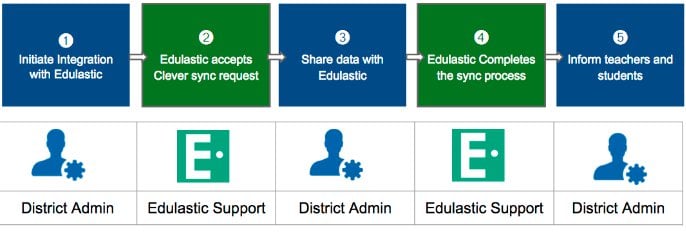
The following chart shows the integration process:To integrate with Pear Assessment, please reach out to the support team to request information on the processes to get your district/ school to be synced with Clever.Please note that Clever sync typically 1-2 business days to complete. However depending upon the time of the year, number of records, and existing account merge needs, the actual sync time may take 3-5 business days. To sync Pear Assessment with your district or school’s Clever account, you must have an Enterprise subscription.