

This feature is not available on Beacon Starter. Beacon Starter generates Active Planning alerts only.
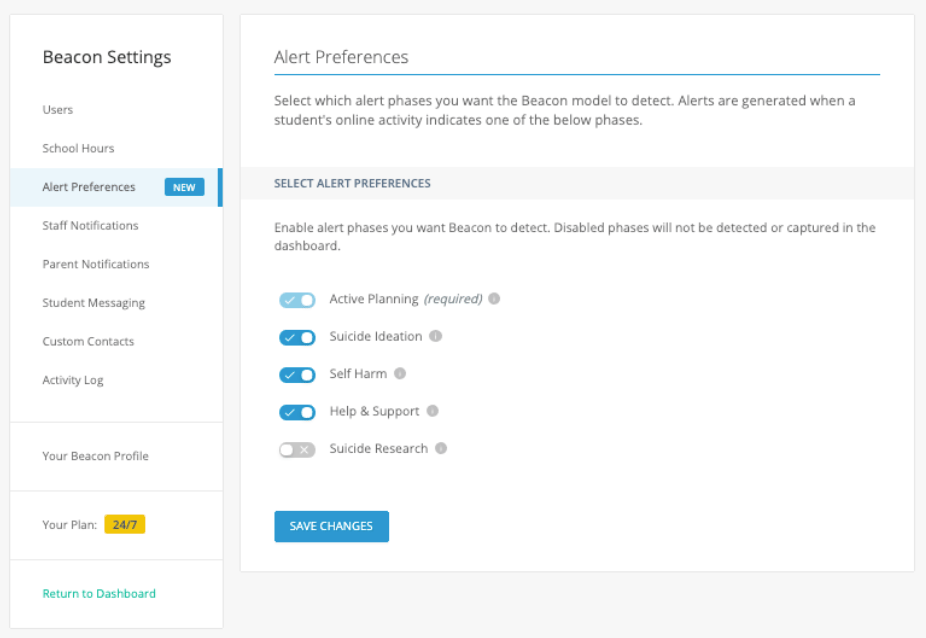
Modify Alert Preferences
-
Go to
beacon.goguardian.comand sign in. - Click Settings in the navigation menu.
- Select Alert Preferences.
- Turn on or turn off each phase according to your school’s needs.
- Click Save Changes at the bottom of the page.
Modify Staff Notifications
Staff notifications determine whether the escalation list receives email and text messages for each enabled phase. Turning off a phase in Alert Preferences automatically disables it in Staff Notifications.-
Go to
beacon.goguardian.comand sign in. - Click Settings in the navigation menu.
- Select Staff Notifications.
- Turn on or turn off the phases your staff should be notified about via email and text message.
- Scroll to the bottom of the page and click Save Changes.
Resources
Configure School Hours
Set the school hours that control when notifications are sent.
Enable Threats and Violence Alert Categories
Turn on alert categories for Threats and Violence behavior.
Configure Beacon Settings
Complete the full Beacon setup checklist.
Alert Categories
Review definitions for Threats and Violence alert categories.