

Set the Interval Time
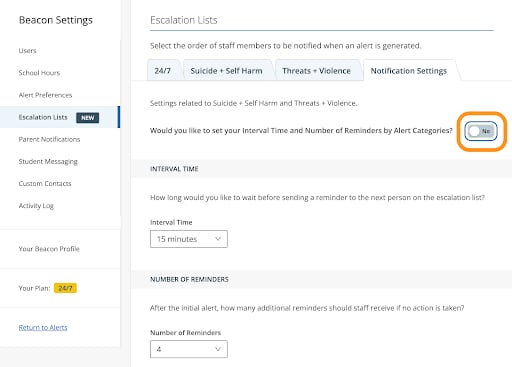
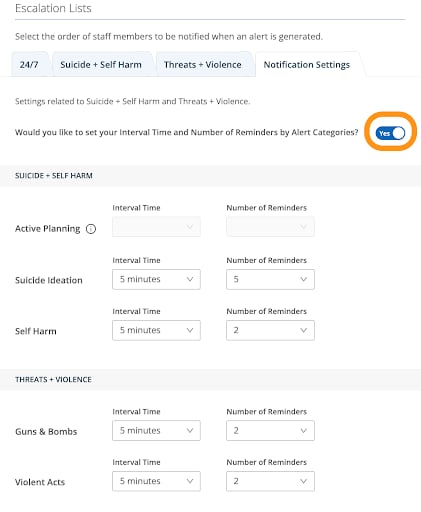
The interval time is the amount of time between each notification in the escalation cycle. If no action is taken on an alert card, Beacon waits the configured interval before notifying the next user. Once a user takes action on the alert, notifications stop. Available interval times:- 5 minutes (default)
- 15 minutes
- 30 minutes
- 1 hour
- 2 hours
Set the Number of Reminders
The number of reminders setting determines how many times a reminder email — and optional SMS — is sent to escalation list members for a given alert. Once a user takes action on the alert card, reminders stop. The number of reminders can be set from 0 to 5.Configure Interval Times and Number of Reminders
- Go to beacon.goguardian.com.
- Click Settings in the navigation menu, go to Escalation Lists, then click the Notification Settings tab.
-
- To apply the same interval time and reminder count to all alert categories, turn off Yes for “Would you like to set your interval time and number of reminders by alert categories?” and adjust the global settings.
- To set different values per category or phase, turn on Yes for that option, then adjust the interval time and reminder count for each category you have enabled in Alert Preferences.
- Click Save Changes.
Settings apply only to alert categories and phases that have notifications turned on in Alert Preferences.
Configure Alert Notifications
Set up individual notification preferences including SMS.
Set Up Staff Notifications
Build and manage escalation lists for Threats and Violence alerts.
Stop Email Notifications
Take action on an alert to end the email notification cycle.
Alert Categories
Review the alert categories and phases Beacon identifies.