

Stop Notifications from an Email
- Click the log in link in the email notification. You will be taken directly to the alert card. Sign in with your GoGuardian credentials if prompted.
-
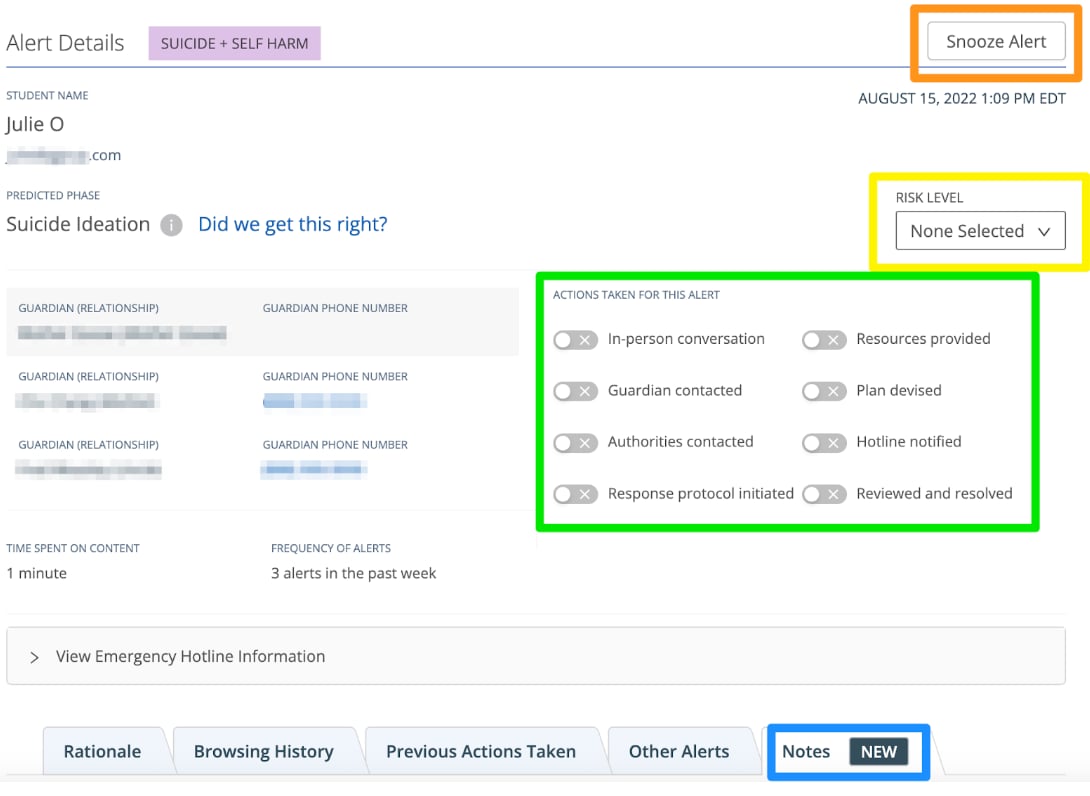
Complete at least one of the following:
- Select a Risk Level
- Turn on an action under Actions Taken
- Create a Note
- Select Snooze (available for non-Active Planning alerts)
Stop Notifications from the Beacon Alert Page
- Go to beacon.goguardian.com and sign in.
- Click the relevant alert card.
-
Complete at least one of the following:
- Turn on an action under Actions Taken
- Create a Note
- Select Snooze (available for non-Active Planning alerts)
Selecting a Risk Level is also available from the alert page and will stop email notifications.
Notification Settings
Configure the interval time and number of reminders for alert notifications.
Configure Alert Notifications
Set up your personal notification preferences for email and SMS.
SMS Notifications
Learn how to respond to and act on a Beacon text message alert.
Dashboard Overview
Navigate the Beacon dashboard and alert feed.