

For Teachers
Archive and Update Classroom Settings
- Archive completed classes. In addition to cleaning up your Classroom dashboard, archiving stops any pre-scheduled classes from running and reduces scene overlap with other teachers. See Archive, Restore, or Delete a Classroom.
- Go to the Calendar and confirm that your scheduled class times are current. See Schedule Classroom Sessions for details on adding and editing schedules.
- Import or create your new classrooms for the upcoming term. See Add Students to a Class for information on adding and importing classes.

For Super Users
Update Org Management with Staff and Setting Changes
-
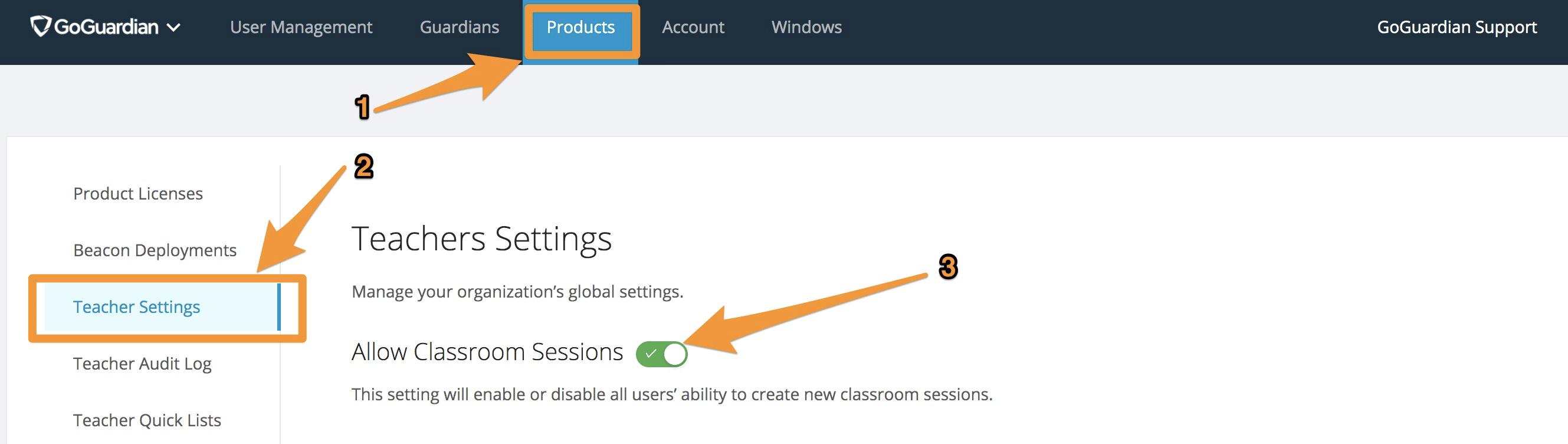
Disable sessions over break (optional). During a break, some districts choose not to allow any classroom sessions. Turning this setting on prevents any session from starting. To configure it, go to Products > Teacher > Teacher Settings in Org Management.
You must turn this setting back on before the next term begins. Set a reminder so sessions are available when teachers return.
- Disable accounts for departing staff. When staff leave your district, archive their account to prevent their classes from running. Changing their name to start with “Z” moves them to the bottom of your list. You can also filter by Enabled users at any time. See Manage Users and Settings and FAQs for best practices when disabling accounts.
- Add new staff accounts. Adding new staff before the semester starts puts you ahead for the new term. Confirm that each user is enabled and has at least 1 product enabled. See Manage Users and Settings or Set Up Teacher Accounts for bulk import options.
- Review and update user permissions. For staff members who have changed roles, update their permissions to confirm they have the appropriate access to products and student information. See Manage Users and Settings.
- Apply GoGuardian extensions to new organizational units. Verify that the GoGuardian extensions are applied to any new OUs so incoming students receive the extensions on their first login. See Set Up Teacher Accounts for deployment guidance.

Resources
Archive, Restore, or Delete a Classroom
Steps for archiving completed classes at the end of a term.
Schedule Classroom Sessions
Add or update scheduled class times on the Teacher calendar.
Manage Users and Settings
Disable departing staff, add new users, and update permissions in Org Management.
Set Up Teacher Accounts
Deploy GoGuardian Teacher to new staff and organizational units.