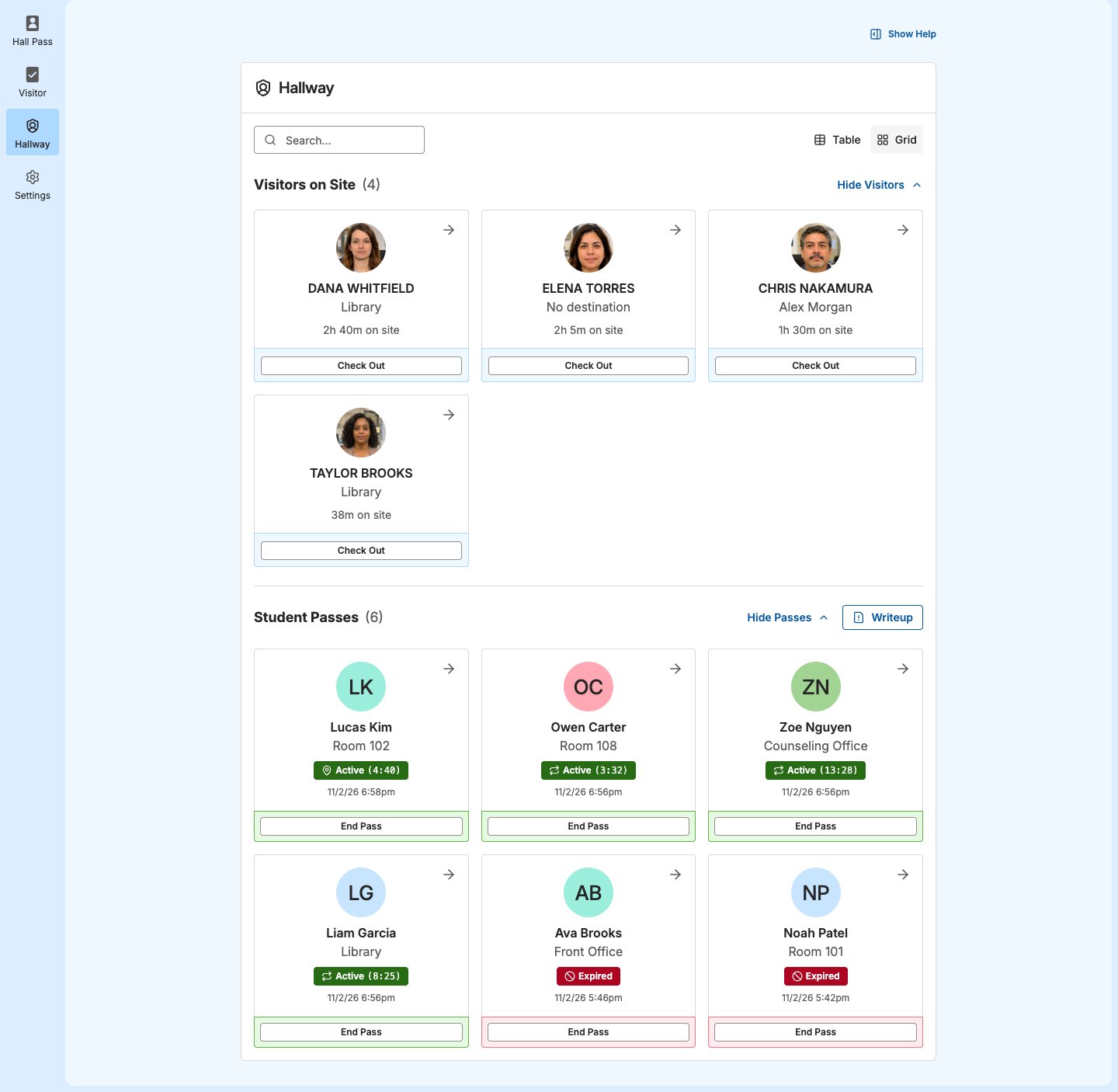
See every visitor checked in at your site in Hallway, open a visitor’s details, and check visitors out without going to the Front Desk.
Hallway shows who’s at your school right now. At a site that uses GoGuardian Visitor, Visitors on Site lists every visitor who has checked in and hasn’t checked out yet, with their photo, where they’re headed, and how long they’ve been on site. Administrators and staff around the building can see who’s on site from a computer or a phone’s browser, without calling the front office.Hallway access is separate from Visitor access. Staff with Hallway access see Visitors on Site without being assigned to a check-in point. Site Admins can give hall monitors and staff on hallway duty the list of who’s on site without giving them the Front Desk, the Activity Log, or screening results.
Site Admins always have Hallway access. To give it to all staff, a Site Admin turns on Allow Staff Access to Hallway in Settings → Hallway, or adds specific staff to Hallway Users. See Users and Permissions.
Sign in to GoGuardian Hall Pass or GoGuardian Visitor.
Select Hallway in the left-hand product navigation.
Verify the result: Visitors on Site appears at the top of the page, with the number of visitors next to it.
Visitors on Site lists visitors checked in with a visitor form at every check-in point at the site, not only the check-in points you’re assigned to. The oldest check-in is first. Students checking in and guardians picking up a student don’t appear, the same as Currently Checked In on the Front Desk.A visitor appears once they finish checking in. A visitor who’s still checking in, including one waiting for staff to review a screening alert, isn’t listed yet, and a denied check-in never appears. If you got an alert about a visitor, see Respond to a Visitor Alert.Each visitor shows:
Their photo from the Confirm Visitor Identity step, if one was taken
Their name
Where they’re headed: the destination they chose, or their host if they didn’t choose one
How long they’ve been on site
To change the layout, click Grid or Table. The table adds the Form and the Checked in time, and shows both the destination and the host. Your layout choice also applies to student passes.To find a visitor, enter a name, form, destination, or host in Search…. The search also filters the student pass list.To collapse the list, click Hide Visitors. Hallway remembers your layout and what you hide in this browser, so they stay the same the next time you open Hallway on this computer.Hallway updates on its own about every 10 seconds. A visitor who checks in at a kiosk or the Front Desk appears without refreshing the page, and a visitor who checks out drops off the list. At midnight in your site’s time zone, GoGuardian Visitor checks out any visitor still checked in, so the list starts each day empty.
Click a visitor’s card, or click View in table view. Visitor Details opens.
Review the details:
Checked In: the date and time the visitor checked in
Time On Site: how long they’ve been on site
Check-In Point: where they checked in
Destination: the destination they chose, or “No destination given”
Host: the host they chose, or “No host given”
Form: the form they checked in with
If the visitor has a photo, click it to see it larger.
If you have Visitor access at the visitor’s check-in point, click View in Activity Log to see the full check-in, including screening results and form answers. See Activity Log.
Hallway shows only these details. Screening results, form answers, and ID images stay in Visitor. Only Site Admins and staff assigned to that check-in point can see them. Hallway shows a visitor’s photo only while they’re on site, not after they check out.
You can check a visitor out from Hallway if you’re a Site Admin or a staff member assigned to the check-in point where the visitor checked in. Otherwise, the card shows View Details in place of Check Out, and Visitor Details shows only Close.
In grid view, click Check Out on the visitor’s card. In table view, click View, then click Check Out in Visitor Details.
In “Check out [name]?”, click Check Out. A check-out can’t be undone, but you can change the check-out time later in the Activity Log.
Verify the result: The visitor no longer appears in Visitors on Site, and the count goes down by 1.
If your school also uses GoGuardian Hall Pass, Student Passes appears below Visitors on Site. It lists active, overtime, and expired passes. Passes waiting for approval are collapsed above the list. Click Show requests to see them.To collapse the student passes, click Hide Passes. For working with passes, see Use Hallway.
Ask a Site Admin to turn on Allow Staff Access to Hallway or add you to Hallway Users in Settings → Hallway.
Visitors on Site doesn’t appear in Hallway
Your site doesn’t use GoGuardian Visitor, or you’re viewing another site
Check the site you’re viewing. If the site should use GoGuardian Visitor, contact your IT team and tell them which site. See Add Sites and Users in Org Management.
A visitor, student, or guardian isn’t in the list
Visitors on Site lists only visitors checked in with a visitor form, not student check-ins or pickups. A visitor still checking in or waiting on an alert review doesn’t appear yet, and a denied check-in never does.
Find the check-in in the Activity Log. If you don’t have Visitor access, ask the front office.
A visitor shows no photo
No photo was taken in the Confirm Visitor Identity step
No action needed. Use the name, destination, and host to find the visitor.
You see View Details instead of Check Out
You don’t have Visitor access at the visitor’s check-in point
Ask the front office to check the visitor out, or ask a Site Admin to assign you to the check-in point. See Users and Permissions.
A visitor who left still appears
No staff member has checked them out yet
If you see Check Out, check them out from Hallway. Otherwise, ask the front office. GoGuardian Visitor checks them out automatically at midnight.
{"docsConfig":{"theme":"linden","$schema":"https://mintlify.com/docs.json","name":"GoGuardian","description":"Help center and product documentation for GoGuardian's K-12 safety and classroom management suite, including Admin (web filtering), Teacher (classroom management), Beacon (student safety alerts), Hall Pass, Discover, and Org Management.","colors":{"primary":"#0A59A3","light":"#439CEF","dark":"#002F6C"},"logo":{"light":"https://mintcdn.com/goguardian/08olqC3O-Uu3gBIf/images/logo/gg-pdl-lockup.svg?fit=max\u0026auto=format\u0026n=08olqC3O-Uu3gBIf\u0026q=85\u0026s=4e52b3255e2eae1b6b38419db0a1bf62","dark":"https://mintcdn.com/goguardian/08olqC3O-Uu3gBIf/images/logo/gg-pdl-lockup-white.svg?fit=max\u0026auto=format\u0026n=08olqC3O-Uu3gBIf\u0026q=85\u0026s=98894adb9647f2b523e0d11de1fc7961"},"favicon":"https://media.brand.dev/fb6d60c3-9a7a-4a85-a889-7a95764fa5ed.png","background":{"color":{"light":"#FFFFFF","dark":"#0F1F36"}},"search":{"prompt":"Search GoGuardian help articles…"},"seo":{"metatags":{"og:site_name":"GoGuardian Help Center","og:type":"website","twitter:card":"summary_large_image"},"indexing":"navigable"},"fonts":{"family":"TTCommonsPro"},"styling":{"eyebrows":"breadcrumbs","latex":false},"metadata":{"timestamp":true},"navigation":{"pages":[]}},"deployment":{"deploymentMetadataValue":{"subdomain":"goguardian","hasAudioNarration":false,"actualSubdomain":"goguardian","customDomains":["docs.goguardian.com"],"gitSource":{"type":"github","owner":"goguardian","repo":"docs","deployBranch":"main","isPrivate":true,"contentDirectory":"","mountPath":"","label":""},"chroma":{"liveDeploymentHistoryId":"6ae8cd1f6b2402847b6c28b5","collectionId":"a59cba30-806d-47be-bea7-bfd586530c65","schemaVersion":"v3","latestBuiltDeploymentHistoryId":"6ae8cd1f6b2402847b6c28b5"},"feedback":{"thumbs":true},"entitlements":{"AI_CHAT":{"status":"ENABLED"},"WEB_MCP":{"status":"ENABLED"},"NARRATION":{"status":"ENABLED"}},"buildId":"6ae93e6cc54790090eebd7f9","clientVersion":"0.0.4045","searchFilterCounts":[{"language":"default","tag":"Products","count":743},{"language":"default","tag":"Pear Deck Learning","count":396},{"language":"default","tag":"GoGuardian","count":357},{"language":"default","tag":"Pear Assessment","count":195},{"language":"default","tag":"Getting Started","count":114},{"language":"default","tag":"Teacher","count":96},{"language":"default","tag":"Admin","count":95},{"language":"default","tag":"Pear Deck","count":84},{"language":"default","tag":"Pear Practice","count":83},{"language":"default","tag":"Troubleshooting","count":77}],"searchSettings":{"maxResults":20,"isFiltersEnabled":true}},"assistantConfig":{"enableAskAiButton":false,"enableStarterQuestions":false,"enableContextualStarterQuestions":false,"enableAskAiSearchBar":true},"basePath":"","hasChatPermissions":false,"hasWebMcpPermissions":true,"toggles":[{"name":"kill-isr","enabled":true,"variant":{"name":"disabled","enabled":false,"feature_enabled":true},"impressionData":false},{"name":"agent-mintlify-slack","enabled":true,"variant":{"name":"disabled","enabled":false,"feature_enabled":true},"impressionData":false},{"name":"agent-integrations-settings","enabled":true,"variant":{"name":"disabled","enabled":false,"feature_enabled":true},"impressionData":false},{"name":"automations-pr-grouping","enabled":true,"variant":{"name":"disabled","enabled":false,"feature_enabled":true},"impressionData":false},{"name":"custom-prefix","enabled":true,"variant":{"name":"disabled","enabled":false,"feature_enabled":true},"impressionData":false},{"name":"analytics-v7","enabled":true,"variant":{"name":"disabled","enabled":false,"feature_enabled":true},"impressionData":false},{"name":"user-flows-analytics","enabled":true,"variant":{"name":"disabled","enabled":false,"feature_enabled":true},"impressionData":false},{"name":"no-publish-flow","enabled":true,"variant":{"name":"disabled","enabled":false,"feature_enabled":true},"impressionData":false},{"name":"workos-onboarding","enabled":true,"variant":{"name":"disabled","enabled":false,"feature_enabled":true},"impressionData":false},{"name":"llms-txt-v2","enabled":true,"variant":{"name":"disabled","enabled":false,"feature_enabled":true},"impressionData":false},{"name":"snapshot-serving-live","enabled":true,"variant":{"name":"disabled","enabled":false,"feature_enabled":true},"impressionData":false},{"name":"stripTemperatureMiddleware","enabled":true,"variant":{"name":"disabled","enabled":false,"feature_enabled":true},"impressionData":false},{"name":"support-platform-pylon-zendesk","enabled":true,"variant":{"name":"disabled","enabled":false,"feature_enabled":true},"impressionData":false},{"name":"snapshot-serving","enabled":true,"variant":{"name":"disabled","enabled":false,"feature_enabled":true},"impressionData":false},{"name":"instant-rollback","enabled":true,"variant":{"name":"disabled","enabled":false,"feature_enabled":true},"impressionData":false},{"name":"granular-notifications-server","enabled":true,"variant":{"name":"disabled","enabled":false,"feature_enabled":true},"impressionData":false},{"name":"granular-notifications","enabled":true,"variant":{"name":"disabled","enabled":false,"feature_enabled":true},"impressionData":false},{"name":"automations-fable","enabled":true,"variant":{"name":"disabled","enabled":false,"feature_enabled":true},"impressionData":false},{"name":"fixed-ai-action-pricing","enabled":true,"variant":{"name":"disabled","enabled":false,"feature_enabled":true},"impressionData":false},{"name":"automation-resolve-merge-conflict","enabled":true,"variant":{"name":"disabled","enabled":false,"feature_enabled":true},"impressionData":false},{"name":"scoped-publishing","enabled":true,"variant":{"name":"disabled","enabled":false,"feature_enabled":true},"impressionData":false},{"name":"mintql","enabled":true,"variant":{"name":"disabled","enabled":false,"feature_enabled":true},"impressionData":false},{"name":"page-level-analytics","enabled":true,"variant":{"name":"disabled","enabled":false,"feature_enabled":true},"impressionData":false},{"name":"editor-version-history-v2","enabled":true,"variant":{"name":"disabled","enabled":false,"feature_enabled":true},"impressionData":false},{"name":"billing-page-v2","enabled":true,"variant":{"name":"disabled","enabled":false,"feature_enabled":true},"impressionData":false},{"name":"full-page-search","enabled":true,"variant":{"name":"disabled","enabled":false,"feature_enabled":true},"impressionData":false},{"name":"workspace-projects","enabled":true,"variant":{"name":"disabled","enabled":false,"feature_enabled":true},"impressionData":false},{"name":"assistant-v5","enabled":true,"variant":{"name":"disabled","enabled":false,"feature_enabled":true},"impressionData":false},{"name":"byok-sep-25","enabled":true,"variant":{"name":"disabled","enabled":false,"feature_enabled":true},"impressionData":false},{"name":"fork-pr-previews","enabled":true,"variant":{"name":"disabled","enabled":false,"feature_enabled":true},"impressionData":false},{"name":"revalidation-jwt","enabled":true,"variant":{"name":"disabled","enabled":false,"feature_enabled":true},"impressionData":false},{"name":"vite-origin","enabled":true,"variant":{"name":"disabled","enabled":false,"feature_enabled":true},"impressionData":false},{"name":"billing-updated-9-15","enabled":true,"variant":{"name":"disabled","enabled":false,"feature_enabled":true},"impressionData":false},{"name":"workos-sso-scim","enabled":true,"variant":{"name":"disabled","enabled":false,"feature_enabled":true},"impressionData":false},{"name":"hobby-abuse-scan","enabled":true,"variant":{"name":"disabled","enabled":false,"feature_enabled":true},"impressionData":false},{"name":"dashboard-inbox","enabled":true,"variant":{"name":"disabled","enabled":false,"feature_enabled":true},"impressionData":false},{"name":"workos-signup","enabled":true,"variant":{"name":"disabled","enabled":false,"feature_enabled":true},"impressionData":false},{"name":"turbopuffer-dual-write","enabled":true,"variant":{"name":"disabled","enabled":false,"feature_enabled":true},"impressionData":false},{"name":"workos-enabled","enabled":true,"variant":{"name":"disabled","enabled":false,"feature_enabled":true},"impressionData":false},{"name":"approve-review-flow","enabled":true,"variant":{"name":"disabled","enabled":false,"feature_enabled":true},"impressionData":false},{"name":"sso-setup-deadline-banner","enabled":true,"variant":{"name":"disabled","enabled":false,"feature_enabled":true},"impressionData":false}],"googleFontsInlined":false},"customCss":[{"filePath":"custom.css","content":"@font-face{font-family:'TTCommonsPro';src:url(/fonts/TTCommonsPro-Thin.otf) format('opentype');font-weight:100;font-style:normal;font-display:swap}@font-face{font-family:'TTCommonsPro';src:url(/fonts/TTCommonsPro-ThinItalic.otf) format('opentype');font-weight:100;font-style:italic;font-display:swap}@font-face{font-family:'TTCommonsPro';src:url(/fonts/TTCommonsPro-ExtraLight.otf) format('opentype');font-weight:200;font-style:normal;font-display:swap}@font-face{font-family:'TTCommonsPro';src:url(/fonts/TTCommonsPro-ExtraLightItalic.otf) format('opentype');font-weight:200;font-style:italic;font-display:swap}@font-face{font-family:'TTCommonsPro';src:url(/fonts/TTCommonsPro-Light.otf) format('opentype');font-weight:300;font-style:normal;font-display:swap}@font-face{font-family:'TTCommonsPro';src:url(/fonts/TTCommonsPro-LightItalic.otf) format('opentype');font-weight:300;font-style:italic;font-display:swap}@font-face{font-family:'TTCommonsPro';src:url(/fonts/TTCommonsPro-Regular.otf) format('opentype');font-weight:400;font-style:normal;font-display:swap}@font-face{font-family:'TTCommonsPro';src:url(/fonts/TTCommonsPro-Italic.otf) format('opentype');font-weight:400;font-style:italic;font-display:swap}@font-face{font-family:'TTCommonsPro';src:url(/fonts/TTCommonsPro-Medium.otf) format('opentype');font-weight:500;font-style:normal;font-display:swap}@font-face{font-family:'TTCommonsPro';src:url(/fonts/TTCommonsPro-MediumItalic.otf) format('opentype');font-weight:500;font-style:italic;font-display:swap}@font-face{font-family:'TTCommonsPro';src:url(/fonts/TTCommonsPro-DemiBold.otf) format('opentype');font-weight:600;font-style:normal;font-display:swap}@font-face{font-family:'TTCommonsPro';src:url(/fonts/TTCommonsPro-DemiBoldItalic.otf) format('opentype');font-weight:600;font-style:italic;font-display:swap}@font-face{font-family:'TTCommonsPro';src:url(/fonts/TTCommonsPro-Bold.otf) format('opentype');font-weight:700;font-style:normal;font-display:swap}@font-face{font-family:'TTCommonsPro';src:url(/fonts/TTCommonsPro-BoldItalic.otf) format('opentype');font-weight:700;font-style:italic;font-display:swap}@font-face{font-family:'TTCommonsPro';src:url(/fonts/TTCommonsPro-ExtraBold.otf) format('opentype');font-weight:800;font-style:normal;font-display:swap}@font-face{font-family:'TTCommonsPro';src:url(/fonts/TTCommonsPro-ExtraBoldItalic.otf) format('opentype');font-weight:800;font-style:italic;font-display:swap}@font-face{font-family:'TTCommonsPro';src:url(/fonts/TTCommonsPro-Black.otf) format('opentype');font-weight:900;font-style:normal;font-display:swap}@font-face{font-family:'TTCommonsPro';src:url(/fonts/TTCommonsPro-BlackItalic.otf) format('opentype');font-weight:900;font-style:italic;font-display:swap}@font-face{font-family:'TTCommonsPro';src:url(/fonts/TTCommonsPro-ExtraBlack.otf) format('opentype');font-weight:950;font-style:normal;font-display:swap}@font-face{font-family:'TTCommonsPro';src:url(/fonts/TTCommonsPro-ExtraBlackItalic.otf) format('opentype');font-weight:950;font-style:italic;font-display:swap}body,html{font-family:'TTCommonsPro',ui-sans-serif,system-ui,-apple-system,BlinkMacSystemFont,'Segoe UI',Roboto,'Helvetica Neue',Arial,sans-serif}div[class*=navbar],header nav,header>div,nav[class*=navbar]{max-width:none!important;width:100%!important}img.nav-logo{height:2.5rem}@media (min-width:1024px){img.nav-logo{margin-left:2rem}}.nav-tabs-item{white-space:nowrap}#pagination .uppercase{text-transform:none}kbd{background:#f0f0f0;border:1px solid #d0d0d0;color:#262626;border-radius:4px;padding:.1rem .4rem;font-size:.85em}html.dark kbd{background:#2d2d2d;border:1px solid #4a4a4a;color:#f0f0f0}"}],"page":{"pagePath":"products/visitor/hallway-view","slug":"/products/visitor/hallway-view","pageMetadata":{"title":"Hallway View","description":"See every visitor checked in at your site in Hallway, open a visitor's details, and check visitors out without going to the Front Desk.","last_reviewed":"November 2026","article_type":"How-To","products":"GoGuardian Visitor","audience":"Administrators, Staff","keywords":["who is on site right now","hallway duty visitor list","visitor photo and destination","sign out visitor from hallway","hallway visitors not showing","visitor still showing after leaving","hallway access without visitor access"],"href":"/products/visitor/hallway-view"},"description":{"compiledSource":"\"use strict\";\nconst {jsx: _jsx} = arguments[0];\nconst {useMDXComponents: _provideComponents} = arguments[0];\nfunction _createMdxContent(props) {\n const _components = {\n p: \"p\",\n ..._provideComponents(),\n ...props.components\n };\n return _jsx(_components.p, {\n children: \"See every visitor checked in at your site in Hallway, open a visitor’s details, and check visitors out without going to the Front Desk.\"\n });\n}\nfunction MDXContent(props = {}) {\n const {wrapper: MDXLayout} = {\n ..._provideComponents(),\n ...props.components\n };\n return MDXLayout ? _jsx(MDXLayout, {\n ...props,\n children: _jsx(_createMdxContent, {\n ...props\n })\n }) : _createMdxContent(props);\n}\nreturn {\n default: MDXContent\n};\n","frontmatter":{},"scope":{}},"pageType":"default","mdx":{"mdxSource":{"compiledSource":"\"use strict\";const{Fragment:_Fragment,jsx:_jsx,jsxs:_jsxs}=arguments[0];const{useMDXComponents:_provideComponents}=arguments[0];function _createMdxContent(props){const _components={a:`a`,li:`li`,ol:`ol`,p:`p`,strong:`strong`,tbody:`tbody`,td:`td`,th:`th`,thead:`thead`,tr:`tr`,ul:`ul`,..._provideComponents(),...props.components},{Heading,OptimizedImage,Table}=_components;if(!Heading)_missingMdxReference(`Heading`,true);if(!OptimizedImage)_missingMdxReference(`OptimizedImage`,true);if(!Table)_missingMdxReference(`Table`,true);return _jsxs(_Fragment,{children:[_jsxs(_components.p,{children:[`Hallway shows who’s at your school right now. At a site that uses GoGuardian Visitor, `,_jsx(_components.strong,{children:`Visitors on Site`}),` lists every visitor who has checked in and hasn’t checked out yet, with their photo, where they’re headed, and how long they’ve been on site. Administrators and staff around the building can see who’s on site from a computer or a phone’s browser, without calling the front office.`]}),`\n`,_jsxs(_components.p,{children:[`Hallway access is separate from Visitor access. Staff with Hallway access see `,_jsx(_components.strong,{children:`Visitors on Site`}),` without being assigned to a check-in point. Site Admins can give hall monitors and staff on hallway duty the list of who’s on site without giving them the `,_jsx(_components.strong,{children:`Front Desk`}),`, the `,_jsx(_components.strong,{children:`Activity Log`}),`, or screening results.`]}),`\n`,_jsx(Heading,{level:`2`,id:`open-hallway`,children:`Open Hallway`}),`\n`,_jsxs(_components.p,{children:[`Site Admins always have Hallway access. To give it to all staff, a Site Admin turns on `,_jsx(_components.strong,{children:`Allow Staff Access to Hallway`}),` in `,_jsx(_components.strong,{children:`Settings`}),` → `,_jsx(_components.strong,{children:`Hallway`}),`, or adds specific staff to `,_jsx(_components.strong,{children:`Hallway Users`}),`. See `,_jsx(_components.a,{href:`/products/visitor/users-and-permissions#show-visitors-on-site-in-hallway`,children:`Users and Permissions`}),`.`]}),`\n`,_jsxs(_components.ol,{children:[`\n`,_jsx(_components.li,{children:`Sign in to GoGuardian Hall Pass or GoGuardian Visitor.`}),`\n`,_jsxs(_components.li,{children:[`Select `,_jsx(_components.strong,{children:`Hallway`}),` in the left-hand product navigation.`]}),`\n`,_jsxs(_components.li,{children:[`Verify the result: `,_jsx(_components.strong,{children:`Visitors on Site`}),` appears at the top of the page, with the number of visitors next to it.`]}),`\n`]}),`\n`,_jsx(Heading,{level:`2`,id:`find-visitors-on-site`,children:`Find Visitors on Site`}),`\n`,_jsxs(_components.p,{children:[_jsx(_components.strong,{children:`Visitors on Site`}),` lists visitors checked in with a visitor form at every check-in point at the site, not only the check-in points you’re assigned to. The oldest check-in is first. Students checking in and guardians picking up a student don’t appear, the same as `,_jsx(_components.strong,{children:`Currently Checked In`}),` on the `,_jsx(_components.strong,{children:`Front Desk`}),`.`]}),`\n`,_jsxs(_components.p,{children:[`A visitor appears once they finish checking in. A visitor who’s still checking in, including one waiting for staff to review a screening alert, isn’t listed yet, and a denied check-in never appears. If you got an alert about a visitor, see `,_jsx(_components.a,{href:`/products/visitor/respond-to-a-visitor-alert`,children:`Respond to a Visitor Alert`}),`.`]}),`\n`,_jsx(_components.p,{children:`Each visitor shows:`}),`\n`,_jsxs(_components.ul,{children:[`\n`,_jsxs(_components.li,{children:[`Their photo from the `,_jsx(_components.strong,{children:`Confirm Visitor Identity`}),` step, if one was taken`]}),`\n`,_jsx(_components.li,{children:`Their name`}),`\n`,_jsx(_components.li,{children:`Where they’re headed: the destination they chose, or their host if they didn’t choose one`}),`\n`,_jsx(_components.li,{children:`How long they’ve been on site`}),`\n`]}),`\n`,_jsxs(_components.p,{children:[`To change the layout, click `,_jsx(_components.strong,{children:`Grid`}),` or `,_jsx(_components.strong,{children:`Table`}),`. The table adds the `,_jsx(_components.strong,{children:`Form`}),` and the `,_jsx(_components.strong,{children:`Checked in`}),` time, and shows both the destination and the host. Your layout choice also applies to student passes.`]}),`\n`,_jsxs(_components.p,{children:[`To find a visitor, enter a name, form, destination, or host in `,_jsx(_components.strong,{children:`Search…`}),`. The search also filters the student pass list.`]}),`\n`,_jsxs(_components.p,{children:[`To collapse the list, click `,_jsx(_components.strong,{children:`Hide Visitors`}),`. Hallway remembers your layout and what you hide in this browser, so they stay the same the next time you open Hallway on this computer.`]}),`\n`,_jsxs(_components.p,{children:[`Hallway updates on its own about every 10 seconds. A visitor who checks in at a kiosk or the `,_jsx(_components.strong,{children:`Front Desk`}),` appears without refreshing the page, and a visitor who checks out drops off the list. At midnight in your site’s time zone, GoGuardian Visitor checks out any visitor still checked in, so the list starts each day empty.`]}),`\n`,_jsx(OptimizedImage,{src:`https://mintcdn.com/goguardian/vbbcOHBdrxzrcZoi/images/screenshots/hallway-view/01-visitors-on-site.png?fit=max\u0026auto=format\u0026n=vbbcOHBdrxzrcZoi\u0026q=85\u0026s=624cb77af0b55e116fa1ef6aa4117732`,alt:`Hallway in grid view with Visitors on Site listing 4 fictional visitors with their photos, destination or host, and time on site, above Student Passes with active and expired passes for fictional students`,\"data-og-width\":`1440`,width:`1440`,\"data-og-height\":`1406`,height:`1406`,\"data-path\":`images/screenshots/hallway-view/01-visitors-on-site.png`,\"data-optimize\":`true`,\"data-opv\":`3`,srcset:`https://mintcdn.com/goguardian/vbbcOHBdrxzrcZoi/images/screenshots/hallway-view/01-visitors-on-site.png?w=280\u0026fit=max\u0026auto=format\u0026n=vbbcOHBdrxzrcZoi\u0026q=85\u0026s=ab93292d78b524d3a784d7667b535569 280w, https://mintcdn.com/goguardian/vbbcOHBdrxzrcZoi/images/screenshots/hallway-view/01-visitors-on-site.png?w=560\u0026fit=max\u0026auto=format\u0026n=vbbcOHBdrxzrcZoi\u0026q=85\u0026s=7358498629c71576eb1436716add189c 560w, https://mintcdn.com/goguardian/vbbcOHBdrxzrcZoi/images/screenshots/hallway-view/01-visitors-on-site.png?w=840\u0026fit=max\u0026auto=format\u0026n=vbbcOHBdrxzrcZoi\u0026q=85\u0026s=dfb209ee0f85abf969ed59ec24da44c8 840w, https://mintcdn.com/goguardian/vbbcOHBdrxzrcZoi/images/screenshots/hallway-view/01-visitors-on-site.png?w=1100\u0026fit=max\u0026auto=format\u0026n=vbbcOHBdrxzrcZoi\u0026q=85\u0026s=7df20bbcbbe8bfe68488e8e765d24d35 1100w, https://mintcdn.com/goguardian/vbbcOHBdrxzrcZoi/images/screenshots/hallway-view/01-visitors-on-site.png?w=1650\u0026fit=max\u0026auto=format\u0026n=vbbcOHBdrxzrcZoi\u0026q=85\u0026s=6a9020bd7e7a60f066e00a0330decd6f 1650w, https://mintcdn.com/goguardian/vbbcOHBdrxzrcZoi/images/screenshots/hallway-view/01-visitors-on-site.png?w=2500\u0026fit=max\u0026auto=format\u0026n=vbbcOHBdrxzrcZoi\u0026q=85\u0026s=60a297578312f49cba6f03e91378cf0b 2500w`}),`\n`,_jsx(Heading,{level:`2`,id:`view-a-visitor’s-details`,children:`View a Visitor’s Details`}),`\n`,_jsxs(_components.ol,{children:[`\n`,_jsxs(_components.li,{children:[`Click a visitor’s card, or click `,_jsx(_components.strong,{children:`View`}),` in table view. `,_jsx(_components.strong,{children:`Visitor Details`}),` opens.`]}),`\n`,_jsxs(_components.li,{children:[`Review the details:`,`\n`,_jsxs(_components.ul,{children:[`\n`,_jsxs(_components.li,{children:[_jsx(_components.strong,{children:`Checked In:`}),` the date and time the visitor checked in`]}),`\n`,_jsxs(_components.li,{children:[_jsx(_components.strong,{children:`Time On Site:`}),` how long they’ve been on site`]}),`\n`,_jsxs(_components.li,{children:[_jsx(_components.strong,{children:`Check-In Point:`}),` where they checked in`]}),`\n`,_jsxs(_components.li,{children:[_jsx(_components.strong,{children:`Destination:`}),` the destination they chose, or “No destination given”`]}),`\n`,_jsxs(_components.li,{children:[_jsx(_components.strong,{children:`Host:`}),` the host they chose, or “No host given”`]}),`\n`,_jsxs(_components.li,{children:[_jsx(_components.strong,{children:`Form:`}),` the form they checked in with`]}),`\n`]}),`\n`]}),`\n`,_jsx(_components.li,{children:`If the visitor has a photo, click it to see it larger.`}),`\n`,_jsxs(_components.li,{children:[`If you have Visitor access at the visitor’s check-in point, click `,_jsx(_components.strong,{children:`View in Activity Log`}),` to see the full check-in, including screening results and form answers. See `,_jsx(_components.a,{href:`/products/visitor/activity-log`,children:`Activity Log`}),`.`]}),`\n`]}),`\n`,_jsx(_components.p,{children:`Hallway shows only these details. Screening results, form answers, and ID images stay in Visitor. Only Site Admins and staff assigned to that check-in point can see them. Hallway shows a visitor’s photo only while they’re on site, not after they check out.`}),`\n`,_jsx(OptimizedImage,{src:`https://mintcdn.com/goguardian/vbbcOHBdrxzrcZoi/images/screenshots/hallway-view/02-visitor-details.png?fit=max\u0026auto=format\u0026n=vbbcOHBdrxzrcZoi\u0026q=85\u0026s=5df12caea867cc5d3437d129aec2753f`,alt:`Visitor Details dialog for a fictional visitor with their photo, Checked In, Time On Site, Check-In Point, Destination, Host, Form, View in Activity Log, and Check Out`,\"data-og-width\":`1440`,width:`1440`,\"data-og-height\":`900`,height:`900`,\"data-path\":`images/screenshots/hallway-view/02-visitor-details.png`,\"data-optimize\":`true`,\"data-opv\":`3`,srcset:`https://mintcdn.com/goguardian/vbbcOHBdrxzrcZoi/images/screenshots/hallway-view/02-visitor-details.png?w=280\u0026fit=max\u0026auto=format\u0026n=vbbcOHBdrxzrcZoi\u0026q=85\u0026s=126e0c8455d9cb19cb3b90c915e6ec21 280w, https://mintcdn.com/goguardian/vbbcOHBdrxzrcZoi/images/screenshots/hallway-view/02-visitor-details.png?w=560\u0026fit=max\u0026auto=format\u0026n=vbbcOHBdrxzrcZoi\u0026q=85\u0026s=42640a0e4486f5e4ae563742f81addbe 560w, https://mintcdn.com/goguardian/vbbcOHBdrxzrcZoi/images/screenshots/hallway-view/02-visitor-details.png?w=840\u0026fit=max\u0026auto=format\u0026n=vbbcOHBdrxzrcZoi\u0026q=85\u0026s=bff458a06d4a10fd25deca083a498143 840w, https://mintcdn.com/goguardian/vbbcOHBdrxzrcZoi/images/screenshots/hallway-view/02-visitor-details.png?w=1100\u0026fit=max\u0026auto=format\u0026n=vbbcOHBdrxzrcZoi\u0026q=85\u0026s=f793597aea21fcded3183d6eac6dd163 1100w, https://mintcdn.com/goguardian/vbbcOHBdrxzrcZoi/images/screenshots/hallway-view/02-visitor-details.png?w=1650\u0026fit=max\u0026auto=format\u0026n=vbbcOHBdrxzrcZoi\u0026q=85\u0026s=923f3e9642ffb60d47a1e7cd6fc79217 1650w, https://mintcdn.com/goguardian/vbbcOHBdrxzrcZoi/images/screenshots/hallway-view/02-visitor-details.png?w=2500\u0026fit=max\u0026auto=format\u0026n=vbbcOHBdrxzrcZoi\u0026q=85\u0026s=6c11661c0572c4f5fdc59b9b2b39b8a2 2500w`}),`\n`,_jsx(Heading,{level:`2`,id:`check-out-a-visitor`,children:`Check Out a Visitor`}),`\n`,_jsxs(_components.p,{children:[`You can check a visitor out from Hallway if you’re a Site Admin or a staff member assigned to the check-in point where the visitor checked in. Otherwise, the card shows `,_jsx(_components.strong,{children:`View Details`}),` in place of `,_jsx(_components.strong,{children:`Check Out`}),`, and `,_jsx(_components.strong,{children:`Visitor Details`}),` shows only `,_jsx(_components.strong,{children:`Close`}),`.`]}),`\n`,_jsxs(_components.ol,{children:[`\n`,_jsxs(_components.li,{children:[`In grid view, click `,_jsx(_components.strong,{children:`Check Out`}),` on the visitor’s card. In table view, click `,_jsx(_components.strong,{children:`View`}),`, then click `,_jsx(_components.strong,{children:`Check Out`}),` in `,_jsx(_components.strong,{children:`Visitor Details`}),`.`]}),`\n`,_jsxs(_components.li,{children:[`In “Check out [name]?”, click `,_jsx(_components.strong,{children:`Check Out`}),`. A check-out can’t be undone, but you can change the check-out time later in the `,_jsx(_components.a,{href:`/products/visitor/activity-log`,children:`Activity Log`}),`.`]}),`\n`,_jsxs(_components.li,{children:[`Verify the result: The visitor no longer appears in `,_jsx(_components.strong,{children:`Visitors on Site`}),`, and the count goes down by 1.`]}),`\n`]}),`\n`,_jsx(Heading,{level:`2`,id:`see-student-passes`,children:`See Student Passes`}),`\n`,_jsxs(_components.p,{children:[`If your school also uses GoGuardian Hall Pass, `,_jsx(_components.strong,{children:`Student Passes`}),` appears below `,_jsx(_components.strong,{children:`Visitors on Site`}),`. It lists active, overtime, and expired passes. Passes waiting for approval are collapsed above the list. Click `,_jsx(_components.strong,{children:`Show requests`}),` to see them.`]}),`\n`,_jsxs(_components.p,{children:[`To collapse the student passes, click `,_jsx(_components.strong,{children:`Hide Passes`}),`. For working with passes, see `,_jsx(_components.a,{href:`/products/hall-pass/hall-monitor`,children:`Use Hallway`}),`.`]}),`\n`,_jsx(Heading,{level:`2`,id:`troubleshoot-hallway`,children:`Troubleshoot Hallway`}),`\n`,_jsxs(Table,{children:[_jsx(_components.thead,{children:_jsxs(_components.tr,{children:[_jsx(_components.th,{children:`Problem`}),_jsx(_components.th,{children:`Cause`}),_jsx(_components.th,{children:`Fix`})]})}),_jsxs(_components.tbody,{children:[_jsxs(_components.tr,{children:[_jsxs(_components.td,{children:[_jsx(_components.strong,{children:`Hallway`}),` doesn’t appear in the product navigation`]}),_jsx(_components.td,{children:`You don’t have Hallway access`}),_jsxs(_components.td,{children:[`Ask a Site Admin to turn on `,_jsx(_components.strong,{children:`Allow Staff Access to Hallway`}),` or add you to `,_jsx(_components.strong,{children:`Hallway Users`}),` in `,_jsx(_components.strong,{children:`Settings`}),` → `,_jsx(_components.strong,{children:`Hallway`}),`.`]})]}),_jsxs(_components.tr,{children:[_jsxs(_components.td,{children:[_jsx(_components.strong,{children:`Visitors on Site`}),` doesn’t appear in Hallway`]}),_jsx(_components.td,{children:`Your site doesn’t use GoGuardian Visitor, or you’re viewing another site`}),_jsxs(_components.td,{children:[`Check the site you’re viewing. If the site should use GoGuardian Visitor, contact your IT team and tell them which site. See `,_jsx(_components.a,{href:`/products/visitor/add-sites-and-users-in-org-management`,children:`Add Sites and Users in Org Management`}),`.`]})]}),_jsxs(_components.tr,{children:[_jsx(_components.td,{children:`A visitor, student, or guardian isn’t in the list`}),_jsxs(_components.td,{children:[_jsx(_components.strong,{children:`Visitors on Site`}),` lists only visitors checked in with a visitor form, not student check-ins or pickups. A visitor still checking in or waiting on an alert review doesn’t appear yet, and a denied check-in never does.`]}),_jsxs(_components.td,{children:[`Find the check-in in the `,_jsx(_components.a,{href:`/products/visitor/activity-log`,children:`Activity Log`}),`. If you don’t have Visitor access, ask the front office.`]})]}),_jsxs(_components.tr,{children:[_jsx(_components.td,{children:`A visitor shows no photo`}),_jsxs(_components.td,{children:[`No photo was taken in the `,_jsx(_components.strong,{children:`Confirm Visitor Identity`}),` step`]}),_jsx(_components.td,{children:`No action needed. Use the name, destination, and host to find the visitor.`})]}),_jsxs(_components.tr,{children:[_jsxs(_components.td,{children:[`You see `,_jsx(_components.strong,{children:`View Details`}),` instead of `,_jsx(_components.strong,{children:`Check Out`})]}),_jsx(_components.td,{children:`You don’t have Visitor access at the visitor’s check-in point`}),_jsxs(_components.td,{children:[`Ask the front office to check the visitor out, or ask a Site Admin to assign you to the check-in point. See `,_jsx(_components.a,{href:`/products/visitor/users-and-permissions`,children:`Users and Permissions`}),`.`]})]}),_jsxs(_components.tr,{children:[_jsx(_components.td,{children:`A visitor who left still appears`}),_jsx(_components.td,{children:`No staff member has checked them out yet`}),_jsxs(_components.td,{children:[`If you see `,_jsx(_components.strong,{children:`Check Out`}),`, check them out from Hallway. Otherwise, ask the front office. GoGuardian Visitor checks them out automatically at midnight.`]})]})]})]}),`\n`,_jsx(Heading,{level:`2`,id:`resources`,children:`Resources`}),`\n`,_jsxs(_components.ul,{children:[`\n`,_jsx(_components.li,{children:_jsx(_components.a,{href:`/products/visitor/front-desk`,children:`Use the Front Desk`})}),`\n`,_jsx(_components.li,{children:_jsx(_components.a,{href:`/products/visitor/activity-log`,children:`Activity Log`})}),`\n`,_jsx(_components.li,{children:_jsx(_components.a,{href:`/products/visitor/users-and-permissions`,children:`Users and Permissions`})}),`\n`,_jsx(_components.li,{children:_jsx(_components.a,{href:`/products/visitor/respond-to-a-visitor-alert`,children:`Respond to a Visitor Alert`})}),`\n`,_jsx(_components.li,{children:_jsx(_components.a,{href:`/products/hall-pass/hall-monitor`,children:`Use Hallway`})}),`\n`,_jsx(_components.li,{children:_jsx(_components.a,{href:`/products/visitor/visitor-and-hall-pass`,children:`Use GoGuardian Visitor with Hall Pass`})}),`\n`]})]})}function MDXContent(props={}){const{wrapper:MDXLayout}={..._provideComponents(),...props.components};return MDXLayout?_jsx(MDXLayout,{...props,children:_jsx(_createMdxContent,{...props})}):_createMdxContent(props)}return{default:MDXContent};function _missingMdxReference(id,component){throw new Error(`Expected `+(component?`component`:`object`)+\" `\"+id+\"` to be defined: you likely forgot to import, pass, or provide it.\")}","frontmatter":{},"scope":{"config":{},"pageMetadata":{"title":"Hallway View","description":"See every visitor checked in at your site in Hallway, open a visitor's details, and check visitors out without going to the Front Desk.","last_reviewed":"November 2026","article_type":"How-To","products":"GoGuardian Visitor","audience":"Administrators, Staff","keywords":["who is on site right now","hallway duty visitor list","visitor photo and destination","sign out visitor from hallway","hallway visitors not showing","visitor still showing after leaving","hallway access without visitor access"],"href":"/products/visitor/hallway-view"}}},"mdxSourceWithNoJs":null},"mdxExtracts":{"tableOfContents":[{"title":"Open Hallway","slug":"open-hallway","depth":2,"children":[]},{"title":"Find Visitors on Site","slug":"find-visitors-on-site","depth":2,"children":[]},{"title":"View a Visitor’s Details","slug":"view-a-visitor’s-details","depth":2,"children":[]},{"title":"Check Out a Visitor","slug":"check-out-a-visitor","depth":2,"children":[]},{"title":"See Student Passes","slug":"see-student-passes","depth":2,"children":[]},{"title":"Troubleshoot Hallway","slug":"troubleshoot-hallway","depth":2,"children":[]},{"title":"Resources","slug":"resources","depth":2,"children":[]}],"codeExamples":{}},"jsLinks":["/_mintlify/custom/goguardian/6782fcf1d7fb5a3b/scripts/scrape-and-convert.js","/_mintlify/custom/goguardian/8381199bed4c67a2/scripts/scrape-articles.js","/_mintlify/custom/goguardian/2c3caca81eed856c/scripts/build-dashboard-data.js","/_mintlify/custom/goguardian/e8b250ad39ec8372/bot.js","/_mintlify/custom/goguardian/d06a21d0e2ea70ca/scripts/legacy-screenshot/build-mapping.js","/_mintlify/custom/goguardian/7f2923f811257823/scripts/legacy-screenshot/lib.js","/_mintlify/custom/goguardian/073ab821f8b5f779/scripts/legacy-screenshot/migrate-article.js","/_mintlify/custom/goguardian/d7c722b087def904/scripts/legacy-screenshot/migrate-batch.js","/_mintlify/custom/goguardian/3e4031e7a1248e44/scripts/legacy-screenshot/migrate-core.js","/_mintlify/custom/goguardian/a8f363b6346cb963/scripts/legacy-screenshot/preview.js","/_mintlify/custom/goguardian/4031161c6df3f968/scripts/pull-mintlify-analytics-full.js","/_mintlify/custom/goguardian/de6381608244a6eb/scripts/check-nav-orphans.js"],"subdomain":"goguardian","siteName":"GoGuardian","title":"Hallway View - GoGuardian","navMaps":{"firstHrefInVersion":{},"firstHrefInLanguage":{}},"lastModified":"2026-11-03T01:53:04.886Z","gitLastModified":"2026-11-03T01:52:40.000Z","originalFileLocation":"products/visitor/hallway-view.mdx"},"headHtml":"\u003cscript data-mint-head>(function(){var d=document.documentElement,p=null;if(!p){try{p=localStorage.getItem(\"isDarkMode\")}catch(e){}if(p==='true')p='dark';else if(p==='false')p='light';if(p!=='light'\u0026\u0026p!=='dark'\u0026\u0026p!=='system')p=\"system\"}var r=p==='system'?(matchMedia(\"(prefers-color-scheme: dark)\").matches?'dark':'light'):p;d.classList.remove(r==='dark'?'light':'dark');d.classList.add(r);d.setAttribute(\"data-theme-preference\",p)})();\u003c/script>\u003cmeta data-mint-head name=\"description\" content=\"See every visitor checked in at your site in Hallway, open a visitor\u0026#x27;s details, and check visitors out without going to the Front Desk.\">\u003cmeta data-mint-head name=\"application-name\" content=\"GoGuardian\">\u003cmeta data-mint-head name=\"generator\" content=\"Mintlify\">\u003clink data-mint-head rel=\"apple-touch-icon\" type=\"image/png\" sizes=\"180x180\" href=\"https://media.brand.dev/fb6d60c3-9a7a-4a85-a889-7a95764fa5ed.png\">\u003clink data-mint-head rel=\"icon\" type=\"image/png\" sizes=\"32x32\" href=\"https://media.brand.dev/fb6d60c3-9a7a-4a85-a889-7a95764fa5ed.png\">\u003clink data-mint-head rel=\"icon\" type=\"image/png\" sizes=\"16x16\" href=\"https://media.brand.dev/fb6d60c3-9a7a-4a85-a889-7a95764fa5ed.png\">\u003clink data-mint-head rel=\"shortcut icon\" type=\"image/png\" href=\"https://media.brand.dev/fb6d60c3-9a7a-4a85-a889-7a95764fa5ed.png\">\u003cmeta data-mint-head property=\"og:title\" content=\"Hallway View - GoGuardian\">\u003cmeta data-mint-head property=\"og:description\" content=\"See every visitor checked in at your site in Hallway, open a visitor\u0026#x27;s details, and check visitors out without going to the Front Desk.\">\u003cmeta data-mint-head property=\"og:site_name\" content=\"GoGuardian Help Center\">\u003cmeta data-mint-head property=\"og:url\" content=\"https://docs.goguardian.com/products/visitor/hallway-view\">\u003cmeta data-mint-head property=\"og:type\" content=\"website\">\u003cmeta data-mint-head property=\"og:image\" content=\"https://goguardian.mintlify.app/_mintlify/api/og/v2?division=Visitor\u0026amp;title=Hallway+View\u0026amp;description=See+every+visitor+checked+in+at+your+site+in+Hallway%2C+open+a+visitor%27s+details%2C+and+check+visitors+out+without+going+to+the+Front+Desk.\u0026amp;theme=a478a7b878d5e32243ff1cc9\u0026amp;signature=35c047d89be92fb51a389ba236c360c16a8b1f0b15192172bcc6bfe6413ae8f7\">\u003cmeta data-mint-head property=\"og:image:width\" content=\"1200\">\u003cmeta data-mint-head property=\"og:image:height\" content=\"630\">\u003cmeta data-mint-head name=\"twitter:card\" content=\"summary_large_image\">\u003cmeta data-mint-head name=\"twitter:title\" content=\"Hallway View - GoGuardian\">\u003cmeta data-mint-head name=\"twitter:description\" content=\"See every visitor checked in at your site in Hallway, open a visitor\u0026#x27;s details, and check visitors out without going to the Front Desk.\">\u003cmeta data-mint-head name=\"twitter:image\" content=\"https://goguardian.mintlify.app/_mintlify/api/og/v2?division=Visitor\u0026amp;title=Hallway+View\u0026amp;description=See+every+visitor+checked+in+at+your+site+in+Hallway%2C+open+a+visitor%27s+details%2C+and+check+visitors+out+without+going+to+the+Front+Desk.\u0026amp;theme=a478a7b878d5e32243ff1cc9\u0026amp;signature=35c047d89be92fb51a389ba236c360c16a8b1f0b15192172bcc6bfe6413ae8f7\">\u003cmeta data-mint-head name=\"twitter:image:width\" content=\"1200\">\u003cmeta data-mint-head name=\"twitter:image:height\" content=\"630\">\u003cmeta data-mint-head name=\"msapplication-config\" content=\"https://mintlify.s3.us-west-1.amazonaws.com/goguardian/_generated/favicon/browserconfig.xml?v=3\">\u003cmeta data-mint-head name=\"apple-mobile-web-app-title\" content=\"GoGuardian\">\u003cmeta data-mint-head name=\"msapplication-TileColor\" content=\"#0A59A3\">\u003clink data-mint-head rel=\"canonical\" href=\"https://docs.goguardian.com/products/visitor/hallway-view\">\u003clink data-mint-head rel=\"alternate\" type=\"application/xml\" href=\"/sitemap.xml\">\u003clink data-mint-head rel=\"alternate\" type=\"text/markdown\" href=\"/products/visitor/hallway-view.md\">\u003cscript data-mint-head type=\"application/ld+json\">{\"@context\":\"https://schema.org\",\"@graph\":[{\"@type\":\"Organization\",\"@id\":\"https://docs.goguardian.com/#organization\",\"name\":\"GoGuardian\",\"url\":\"https://docs.goguardian.com\",\"logo\":{\"@type\":\"ImageObject\",\"url\":\"https://mintcdn.com/goguardian/08olqC3O-Uu3gBIf/images/logo/gg-pdl-lockup.svg?fit=max\u0026auto=format\u0026n=08olqC3O-Uu3gBIf\u0026q=85\u0026s=4e52b3255e2eae1b6b38419db0a1bf62\"}},{\"@type\":\"WebSite\",\"@id\":\"https://docs.goguardian.com#website\",\"name\":\"GoGuardian\",\"url\":\"https://docs.goguardian.com\",\"publisher\":{\"@id\":\"https://docs.goguardian.com/#organization\"}},{\"@type\":\"WebPage\",\"@id\":\"https://docs.goguardian.com/products/visitor/hallway-view#webpage\",\"url\":\"https://docs.goguardian.com/products/visitor/hallway-view\",\"name\":\"Hallway View\",\"description\":\"See every visitor checked in at your site in Hallway, open a visitor's details, and check visitors out without going to the Front Desk.\",\"dateModified\":\"2026-11-03T01:52:40.000Z\",\"isPartOf\":{\"@id\":\"https://docs.goguardian.com#website\"},\"breadcrumb\":{\"@id\":\"https://docs.goguardian.com/products/visitor/hallway-view#breadcrumb\"}},{\"@type\":\"BreadcrumbList\",\"@id\":\"https://docs.goguardian.com/products/visitor/hallway-view#breadcrumb\",\"itemListElement\":[{\"@type\":\"ListItem\",\"position\":1,\"name\":\"Products\",\"item\":\"https://docs.goguardian.com/products/admin\"},{\"@type\":\"ListItem\",\"position\":2,\"name\":\"Visitor\",\"item\":\"https://docs.goguardian.com/products/visitor\"},{\"@type\":\"ListItem\",\"position\":3,\"name\":\"Hallway View\",\"item\":\"https://docs.goguardian.com/products/visitor/hallway-view\"}]},{\"@type\":[\"Article\",\"TechArticle\"],\"@id\":\"https://docs.goguardian.com/products/visitor/hallway-view#article\",\"headline\":\"Hallway View\",\"name\":\"Hallway View\",\"description\":\"See every visitor checked in at your site in Hallway, open a visitor's details, and check visitors out without going to the Front Desk.\",\"url\":\"https://docs.goguardian.com/products/visitor/hallway-view\",\"mainEntityOfPage\":{\"@id\":\"https://docs.goguardian.com/products/visitor/hallway-view#webpage\"},\"dateModified\":\"2026-11-03T01:52:40.000Z\",\"keywords\":\"who is on site right now, hallway duty visitor list, visitor photo and destination, sign out visitor from hallway, hallway visitors not showing, visitor still showing after leaving, hallway access without visitor access\",\"publisher\":{\"@id\":\"https://docs.goguardian.com/#organization\"},\"isPartOf\":{\"@id\":\"https://docs.goguardian.com#website\"}}]}\u003c/script>\u003cscript data-mint-head type=\"application/ld+json\">{\"@context\":\"https://schema.org\",\"@type\":\"WebSite\",\"name\":\"GoGuardian\",\"creator\":{\"@type\":\"Organization\",\"name\":\"Mintlify\",\"url\":\"https://mintlify.com\"}}\u003c/script>","siteName":"GoGuardian","nav":{"global":null,"tabs":[{"tab":"GoGuardian","groups":[{"group":"Getting Started","expanded":false,"pages":[{"title":"GoGuardian Help Center","sidebarTitle":"Welcome","href":"/welcome"},{"title":"Prepare for Onboarding","href":"/getting-started"},{"group":"GoGuardian Extensions","pages":[{"title":"Install GoGuardian Extensions and Configure Google Admin Console","href":"/products/admin/install-extensions"},{"title":"Verify the GoGuardian Extension Deployment","href":"/products/org-management/verify-extension-deployment"}]},{"group":"The GoGuardian App","pages":[{"title":"Overview","href":"/products/gg-app/overview"},{"title":"The GoGuardian App on Windows","href":"/products/gg-app/windows"},{"title":"The GoGuardian App on iPad","href":"/products/gg-app/ipad"},{"title":"The GoGuardian App on macOS","href":"/products/gg-app/macos"}]}]},{"group":"Products","pages":[{"group":"Admin","expanded":false,"pages":[{"title":"Overview","sidebarTitle":"Overview","href":"/products/admin"},{"group":"Filtering","pages":[{"title":"Overview","href":"/products/admin/filtering-overview"},{"title":"Apply Recommendations in GoGuardian Admin","href":"/products/admin/recommendation-engine"},{"group":"Policies","pages":[{"title":"Understand Filtering Policies","href":"/products/admin/filtering-policies"},{"title":"How Filtering Rules Interact","href":"/products/admin/how-filtering-rules-interact"},{"title":"Create a Filtering Policy","href":"/products/admin/create-a-filtering-policy"},{"title":"Block Multiple Google Account Sign-Ins","href":"/products/admin/block-multiple-google-account-sign-ins"},{"title":"Allow and Block Websites","href":"/products/admin/block-and-allow-websites"},{"title":"Update Multiple Policies with Quick Editor","href":"/products/admin/use-quick-editor"},{"title":"Use Wildcard Rules in Policies","href":"/products/admin/filtering-with-wildcards"},{"title":"Use Auto-Format Domains for Website URL Rules","href":"/products/admin/auto-format-domains"},{"title":"Review Website Categories","href":"/products/admin/website-categories"},{"title":"Block Uncategorized Websites","href":"/products/admin/block-uncategorized-websites"},{"title":"Simulate Policies","href":"/products/admin/filtering-simulator"},{"title":"Understand Block Pages","href":"/products/admin/block-pages"},{"title":"Manage Custom Groups","href":"/products/admin/custom-groups"},{"title":"Sync Entra Groups to Admin Custom Groups","href":"/products/admin/entra-custom-groups-sync"},{"title":"Advanced Filtering Tips for GoGuardian Admin Policies","href":"/products/admin/advanced-filtering-tips"},{"title":"Filter Chrome Apps and Extensions in GoGuardian Admin","href":"/products/admin/filter-apps-and-extensions"},{"group":"YouTube Filtering","pages":[{"title":"Explore YouTube Filtering Layers","href":"/products/admin/youtube-filtering-layers"},{"title":"Configure YouTube Filtering","href":"/products/admin/youtube-filtering"},{"title":"Block Live Chat in YouTube","href":"/products/admin/block-live-chat-in-youtube"}]},{"group":"Custom Configuration","pages":[{"title":"Configure Bypass Passwords","href":"/products/admin/configure-bypass-passwords"},{"title":"Configure Global Filter Settings","href":"/products/admin/global-config"},{"title":"Configure Smart Rules","href":"/products/admin/smart-rules"},{"title":"GoGuardian Admin and Chromebook Desks","href":"/products/admin/chromebook-desks"},{"title":"Configure At-Home Filtering","href":"/products/admin/configure-at-home-filtering"},{"title":"Block Access to Personal Google Accounts","href":"/products/admin/block-personal-google-accounts"},{"title":"Customize the GoGuardian Admin Block Page","href":"/products/admin/customize-the-block-page"}]}]},{"group":"Smart Alerts","pages":[{"title":"Manage the Smart Alerts Allowlist","href":"/products/admin/smart-alerts-allowlist"},{"title":"Configure Smart Alerts Access","href":"/products/admin/smart-alerts-access"},{"title":"Configure Smart Alert Triggers","href":"/products/admin/configure-smart-alert-triggers"},{"title":"Compare Smart Alerts and Flagged Activity","href":"/products/admin/smart-alerts-vs-flagged-activity"},{"title":"Smart Alerts Image Filtering","href":"/products/admin/smart-alerts-image-filtering"},{"title":"Block Proxy Sites with Smart Alerts","href":"/products/admin/smart-alerts-for-proxies"},{"title":"Block Gaming Sites with Smart Alerts","href":"/products/admin/smart-alerts-for-games"},{"title":"Smart Alert Notifications and Email Alerts","href":"/products/admin/smart-alert-notifications-and-email-alerts"}]}]},{"group":"Reporting","pages":[{"title":"Overview","href":"/products/admin/reporting-overview"},{"group":"Dashboard","pages":[{"title":"Review the Admin Dashboard","href":"/products/admin/admin-dashboard"},{"title":"Review Browsing Activity","href":"/products/admin/browsing-activity"},{"title":"Review Student Activity","href":"/products/admin/student-activity"},{"title":"Review Screen Time Activity","href":"/products/admin/screen-time-activity"},{"title":"Use Global Search","href":"/products/admin/global-search"},{"title":"A Student Name Shows as Pending","href":"/products/admin/troubleshoot-pending-students"},{"title":"Review AI Activity with Prompt Visibility","href":"/products/admin/ai-activity-prompt-visibility"},{"title":"Understand AI Activity Classifications","href":"/products/admin/understand-ai-activity-classifications"}]},{"group":"Reports and Logs","pages":[{"title":"Export Student Reports","href":"/products/admin/export-student-reports"},{"title":"Review Exported Reports","href":"/products/admin/exported-reports"},{"title":"Look Up a Student by Device","href":"/products/admin/device-lookup"},{"title":"Review the Admin Audit Log","href":"/products/admin/audit-log"}]},{"group":"Flagged Activity","pages":[{"title":"Manage Flagged Activity","href":"/products/admin/manage-flagged-activity"},{"title":"Manage Flagged Terms ","href":"/products/admin/manage-flagged-terms"}]}]},{"group":"Troubleshooting","boost":6,"pages":[{"title":"Review Filtering Contexts","href":"/products/admin/filtering-contexts"},{"title":"Site Blocked Unexpectedly","href":"/products/admin/site-blocked-unexpectedly"},{"title":"Site Not Blocked Unexpectedly","href":"/products/admin/site-not-blocked-unexpectedly"},{"title":"Embedded Content Filtering","href":"/products/admin/troubleshoot-iframe-filtering"},{"title":"YouTube Video Blocked Unexpectedly","href":"/products/admin/youtube-video-blocked-unexpectedly"},{"title":"Google Searches Are Blocked Unexpectedly","href":"/products/admin/google-searches-blocked-unexpectedly"},{"title":"Block CROSH","href":"/products/admin/troubleshoot-crosh"},{"title":"Block Google Doodle Games","href":"/products/admin/block-google-doodle"},{"title":"A Device Is Not Filtering on the School Network","href":"/products/admin/device-not-filtering-on-school-network"},{"title":"A Windows Device Is Not Filtering","href":"/products/admin/windows-device-not-filtering"},{"title":"Troubleshoot Why a Website Is Blocked in GoGuardian Admin","href":"/products/admin/troubleshoot-blocked-websites"},{"title":"Troubleshoot Theft Recovery Devices and Statuses","href":"/products/admin/troubleshoot-theft-recovery"}]},{"group":"Theft Recovery","pages":[{"title":"Understand Theft Recovery","href":"/products/admin/theft-recovery"},{"title":"Set Up Theft Recovery","href":"/products/admin/set-up-theft-recovery"},{"title":"Migrate Chromebooks to New Theft Recovery Extension","href":"/products/admin/migrate-chromebooks-theft-recovery"},{"title":"Track a Missing Device","href":"/products/admin/track-a-missing-device"},{"title":"Recover a Missing Device","href":"/products/admin/recover-a-missing-device"},{"title":"Understand Data Collected by Theft Recovery","href":"/products/admin/theft-recovery-data-collected"}]},{"group":"Fleet","pages":[{"title":"Overview","href":"/products/fleet"},{"title":"How GoGuardian Fleet Works","href":"/products/fleet/understand-goguardian-fleet"},{"title":"FAQs","href":"/products/fleet/fleet-faqs"},{"group":"Users and Access","pages":[{"title":"Manage Fleet Users","href":"/products/fleet/manage-fleet-users"},{"title":"Grant a User Access to GoGuardian Fleet","href":"/products/fleet/grant-user-access-to-fleet"},{"title":"Revoke a User's Access to GoGuardian Fleet","href":"/products/fleet/revoke-fleet-access"}]},{"group":"Device Management","pages":[{"title":"Import Devices","href":"/products/fleet/import-devices"},{"title":"Sync with Google Admin Console","href":"/products/fleet/sync-with-google-admin-console"},{"title":"Search and Filter Devices","href":"/products/fleet/search-and-filter-devices"},{"title":"Update Device Status","href":"/products/fleet/update-device-status"},{"title":"Check Device Software Versions in GoGuardian Fleet","href":"/products/fleet/check-device-software-versions"},{"title":"Change Displayed Device Data in GoGuardian Fleet","href":"/products/fleet/change-displayed-device-data"}]},{"group":"Repairs","pages":[{"title":"Track Device Repairs","href":"/products/fleet/track-device-repairs"},{"title":"Export Repair Data","href":"/products/fleet/export-repair-data"},{"title":"Start a Device Repair in GoGuardian Fleet","href":"/products/fleet/start-a-device-repair"}]},{"group":"Troubleshooting","boost":6,"pages":[{"title":"Troubleshoot a Fleet Authorization Error","href":"/products/fleet/troubleshoot-fleet-authorization-error"}]}]},{"group":"DNS","pages":[{"title":"Overview","href":"/products/dns"},{"title":"Review DNS Traffic Data","href":"/products/dns/dns-reporting"},{"title":"FAQs","href":"/products/dns/dns-faqs"},{"group":"Network Configuration","pages":[{"title":"Set Up GoGuardian DNS","href":"/products/dns/set-up-goguardian-dns"},{"title":"Enable AdDeflect","href":"/products/dns/addeflect"},{"title":"Delete DNS Network","href":"/products/dns/delete-a-network"},{"title":"How GoGuardian DNS Works","href":"/products/dns/understand-goguardian-dns"}]},{"group":"Troubleshooting","boost":6,"pages":[{"title":"Fix DNS Resolver Connectivity","href":"/products/dns/troubleshoot-dns-resolvers"}]}]},{"title":"DNS Precision Filtering","href":"/products/admin/dns-precision-filtering"}]},{"group":"Beacon","expanded":false,"pages":[{"title":"Overview","href":"/products/beacon"},{"group":"Getting Started","pages":[{"title":"About GoGuardian Beacon","href":"/products/beacon/about-beacon"},{"title":"How Beacon Works","href":"/products/beacon/how-beacon-works"},{"title":"Beacon Glossary","href":"/products/beacon/beacon-glossary"},{"title":"Initial Setup Checklist","href":"/products/beacon/initial-setup-checklist"},{"title":"Best Practices: Beacon Rollout","href":"/products/beacon/best-practices-rollout"},{"title":"Tips and Resources","href":"/products/beacon/tips-and-resources"}]},{"group":"Beacon Settings","pages":[{"title":"Create a Deployment","href":"/products/beacon/create-a-deployment"},{"title":"Understand How Students Appear in GoGuardian Beacon","href":"/products/beacon/student-roster-sync"},{"title":"Configure Beacon Settings","href":"/products/beacon/configure-beacon-settings"},{"title":"Enable Threats and Violence Alert Categories","href":"/products/beacon/enable-categories"},{"title":"Alert Categories","href":"/products/beacon/alert-categories"},{"title":"Configure School Hours","href":"/products/beacon/configure-school-hours"},{"title":"Alert Preferences","href":"/products/beacon/alert-preferences"},{"title":"Schedule a Pause","href":"/products/beacon/schedule-a-pause"},{"title":"Set Up Your Profile","href":"/products/beacon/set-up-your-profile"},{"title":"Beacon API Coverage","href":"/products/beacon/beacon-api-coverage"},{"title":"Enable Enhanced Microsoft Outlook Monitoring","href":"/products/beacon/outlook-email-monitoring"},{"title":"Enable Google Docs Coverage in GoGuardian Beacon","href":"/products/beacon/enable-google-docs-coverage"},{"title":"Domain Wide Delegation for GoGuardian Beacon and Admin","href":"/products/beacon/domain-wide-delegation-beacon-admin"},{"title":"Enhanced Gmail Alert Cards","href":"/products/beacon/enhanced-gmail-alert-cards"}]},{"group":"Beacon 24/7","pages":[{"title":"Review a Beacon 24/7 Alert","href":"/products/beacon/review-a-247-alert"},{"title":"Grouped Alerts","href":"/products/beacon/grouped-alerts"},{"title":"Risk Levels","href":"/products/beacon/risk-levels"},{"title":"Alert Phases","href":"/products/beacon/alert-phases"},{"title":"Enable Enhanced Gmail Monitoring","href":"/products/beacon/enhanced-gmail-monitoring"},{"title":"Best Practices: Beacon 24/7","href":"/products/beacon/best-practices-247"},{"title":"Beacon 24/7 FAQ","href":"/products/beacon/247-faq"}]},{"group":"Users and Escalation","pages":[{"title":"Beacon User Roles and Permissions","href":"/products/beacon/user-roles-and-permissions"},{"title":"Add and Manage Beacon Users","href":"/products/beacon/manage-beacon-users"},{"title":"Configure Escalation Lists","href":"/products/beacon/escalation-lists"},{"title":"Configure a Beacon 24/7 Escalation List","href":"/products/beacon/247-escalation-list"},{"title":"Include Student Names in Email Notifications","href":"/products/beacon/include-student-names-in-notifications"}]},{"group":"Alerts and Dashboard","pages":[{"title":"Beacon Dashboard Overview","href":"/products/beacon/dashboard-overview"},{"title":"Alert Card Anatomy","href":"/products/beacon/alert-card-anatomy"},{"title":"Beacon 24/7 Alert Card Anatomy","href":"/products/beacon/alert-card-anatomy-247"},{"title":"Understand Alert Generation","href":"/products/beacon/understand-alert-generation"},{"title":"Investigate a Beacon Alert","href":"/products/beacon/investigate-an-alert"},{"title":"Respond to Email Notification Alerts","href":"/products/beacon/respond-to-email-alerts"},{"title":"Save an Alert as PDF","href":"/products/beacon/save-alert-as-pdf"},{"title":"Snooze an Alert","href":"/products/beacon/snooze-an-alert"},{"title":"Activity Log","href":"/products/beacon/activity-log"}]},{"group":"Notifications","pages":[{"title":"Configure Alert Notifications","href":"/products/beacon/configure-alert-notifications"},{"title":"Set Up Staff Notifications for Threats and Violence Alerts","href":"/products/beacon/set-up-staff-notifications"},{"title":"SMS Notifications","href":"/products/beacon/sms-notifications"},{"title":"Notification Settings","href":"/products/beacon/notification-settings"},{"title":"SMS Notification Terms","href":"/products/beacon/sms-notification-terms"},{"title":"Parent and Guardian Notifications","href":"/products/beacon/parent-guardian-notifications"},{"title":"Review Alerts on Mobile","href":"/products/beacon/review-alerts-on-mobile"},{"title":"Stop Email Notifications","href":"/products/beacon/stop-email-notifications"}]},{"group":"Threats and Violence","pages":[{"title":"Student Messaging","href":"/products/beacon/student-messaging"},{"title":"Threats and Violence Student Messaging","href":"/products/beacon/threats-and-violence-student-messaging"},{"title":"Threats and Violence Parent and Guardian Notifications","href":"/products/beacon/threats-and-violence-parent-notifications"},{"title":"Threats and Violence FAQ","href":"/products/beacon/threats-and-violence-faq"}]},{"group":"Communication Resources","pages":[{"title":"Letter Template for Parents and Guardians","href":"/products/beacon/letter-template"},{"title":"Core Letter Template for Counselors — Suicide and Self-Harm Alerts","href":"/products/beacon/core-letter-template"},{"title":"24/7 Letter Template for Escalation List Counselors","href":"/products/beacon/247-letter-template"},{"title":"Threats and Violence Letter Template for Counselors","href":"/products/beacon/threats-violence-letter-template"},{"title":"Parent and Guardian Communication Resources","href":"/products/beacon/parent-guardian-communication-resources"},{"title":"Communicating with Guardians — Additional Resources","href":"/products/beacon/communicating-with-guardians"},{"title":"Communicating with Parents and Guardians About GoGuardian Beacon","href":"/products/beacon/communicating-with-parents-and-guardians"},{"title":"Preguntas Frecuentes — GoGuardian Beacon (Spanish)","href":"/products/beacon/faq-spanish"}]},{"group":"Troubleshooting","boost":6,"pages":[{"title":"Troubleshoot SMS Short Code Issues","href":"/products/beacon/troubleshoot-sms-short-code"}]}]},{"group":"Discover","expanded":false,"pages":[{"title":"Overview","href":"/products/discover"},{"title":"Manage Email Notifications","href":"/products/discover/manage-email-notifications"},{"group":"Dashboard and Data","pages":[{"title":"Filter Dashboard Data","href":"/products/discover/filter-dashboard-data"},{"title":"Ask Questions About Discover Data","href":"/products/discover/ask-questions-about-data"},{"title":"Find Usage Trends","href":"/products/discover/find-usage-trends"},{"title":"Identify Underused Apps","href":"/products/discover/identify-underused-apps"},{"title":"Review Dashboard Metrics","href":"/products/discover/review-dashboard-metrics"}]},{"group":"Screen Time Insights","pages":[{"title":"Understand Screen Time Insights","href":"/products/discover/understand-screen-time-insights"}]},{"group":"App Catalog","pages":[{"title":"Browse App Catalog","href":"/products/discover/browse-app-catalog"},{"title":"Compare App Usage Across Groups","href":"/products/discover/compare-app-usage-across-schools"},{"title":"Suggest App for Catalog","href":"/products/discover/suggest-app-for-catalog"},{"title":"Review App Catalog Fields","href":"/products/discover/review-app-catalog-fields"},{"title":"Manage App Approval Details","href":"/products/discover/manage-app-approval-details"},{"title":"Review App Policy and Terms","href":"/products/discover/review-app-policy-and-terms"},{"title":"Block App in GoGuardian Admin","href":"/products/discover/block-app-in-admin"}]},{"group":"Shared Views","pages":[{"title":"Understand Shared Views","href":"/products/discover/understand-shared-views"},{"title":"Create and Manage Shared Views","href":"/products/discover/create-manage-shared-views"}]},{"group":"Licenses and Contracts","pages":[{"title":"Manage Licenses","href":"/products/discover/manage-licenses"},{"title":"Upload Contract","href":"/products/discover/upload-contract"},{"title":"Review License Status Fields","href":"/products/discover/review-license-status-fields"}]},{"group":"Troubleshooting","boost":6,"pages":[{"title":"Fix Missing Data","href":"/products/discover/fix-missing-data"},{"title":"Troubleshoot Contract Upload","href":"/products/discover/troubleshoot-contract-upload"}]}]},{"group":"Hall Pass","expanded":false,"pages":[{"title":"Overview","sidebarTitle":"Overview","href":"/products/hall-pass"},{"group":"Getting Started","pages":[{"title":"Set Up Hall Pass in Org Management","href":"/products/hall-pass/set-up-hall-pass"},{"title":"Add Users to GoGuardian Hall Pass","href":"/products/hall-pass/add-users-to-hall-pass"},{"title":"Understand Rooms and Locations","href":"/products/hall-pass/rooms-and-locations"},{"title":"Review Site Settings","href":"/products/hall-pass/site-settings"},{"title":"Integrate GoGuardian Teacher with Hall Pass","href":"/products/hall-pass/integrate-teacher"}]},{"group":"Role Guides","pages":[{"title":"Hall Pass User Roles and Permissions","href":"/products/hall-pass/user-roles-and-permissions"},{"title":"Request and Manage Your Hall Pass","href":"/products/hall-pass/student-passes"},{"title":"Create and Manage Passes as Staff","href":"/products/hall-pass/teacher-staff-passes"},{"title":"Use Hallway","href":"/products/hall-pass/hall-monitor"}]},{"group":"Passes","pages":[{"title":"Understand Approvals, Limits, and Rules","href":"/products/hall-pass/approvals-limits-and-rules"},{"title":"Request a Pass","href":"/products/hall-pass/request-a-pass"},{"title":"Approve, Reject, Cancel, or End a Pass","href":"/products/hall-pass/approve-reject-cancel-end-a-pass"},{"title":"Understand Pass Statuses and Timing","href":"/products/hall-pass/pass-statuses"},{"title":"Set Up Recurring Passes","href":"/products/hall-pass/recurring-passes"}]},{"group":"Rules and Enforcement","pages":[{"title":"Enable Auto-Approve for a Room","href":"/products/hall-pass/auto-approve-passes"},{"title":"Create Group Rules","href":"/products/hall-pass/group-rules"},{"title":"Create Out-together Rules","href":"/products/hall-pass/out-together-rules"},{"title":"Create Time Restrictions","href":"/products/hall-pass/time-restrictions"},{"title":"Use Emergency Mode","href":"/products/hall-pass/emergency-mode"},{"title":"Hall Pass Notifications","href":"/products/hall-pass/notifications"}]},{"group":"Kiosk and Badges","pages":[{"title":"Set Up Kiosk Mode","href":"/products/hall-pass/kiosk-mode"},{"title":"Set Up Hall Pass as a PWA in Kiosk Mode","href":"/products/hall-pass/pwa-kiosk-mode"},{"title":"Set Up QR Codes and Badges","href":"/products/hall-pass/qr-codes-and-badges"}]},{"group":"Reporting","pages":[{"title":"Review Reports","href":"/products/hall-pass/reports"},{"title":"Set Up Smart Reports","href":"/products/hall-pass/smart-reports"},{"title":"Review Site Scans","href":"/products/hall-pass/site-scans"}]}]},{"group":"Org Management","expanded":false,"pages":[{"title":"Overview","sidebarTitle":"Overview","href":"/products/org-management"},{"group":"Integrations","pages":[{"title":"Enable GoGuardian in Google Admin Console","href":"/products/org-management/enable-in-google-admin-console"},{"title":"Sync OUs from Google Admin Console","href":"/products/org-management/sync-ous-from-google"},{"title":"Google Directory Teacher Provisioning","href":"/products/org-management/google-directory-provisioning"},{"title":"Provision Admin Accounts from Google","href":"/products/org-management/provision-admins"},{"title":"User Provisioning with CSV via SFTP Sync","href":"/products/org-management/user-provisioning-csv-sftp"},{"title":"Sync Rosters with Clever, ClassLink, or OneRoster","href":"/products/org-management/clever-classlink-sync"},{"title":"Sync Groups with Microsoft Entra","href":"/products/org-management/microsoft-entra-sync"},{"title":"Understand Active Directory OU Sync","href":"/products/org-management/active-directory"},{"title":"Set Up Active Directory Sync","href":"/products/org-management/setup-active-directory"},{"title":"Sync Organizational Units via Clever","href":"/products/org-management/sync-ous-via-clever"},{"title":"Modify an Existing Clever or ClassLink Integration","href":"/products/org-management/modify-an-existing-integration"}]},{"group":"User Management","pages":[{"title":"Create and Manage User Accounts","href":"/products/org-management/create-manage-user-accounts"},{"title":"User Roles and Permissions","href":"/products/org-management/user-roles-and-permissions"},{"title":"Understand OU Mapping and Assigned Org Units","href":"/products/org-management/ou-permissions"},{"title":"Set Up Granular Access Control with RBAC","href":"/products/org-management/granular-access-control"},{"title":"Bulk Update User Permissions by CSV","href":"/products/org-management/bulk-update-permissions-csv"},{"title":"Set Up Teacher Accounts","href":"/products/org-management/set-up-teacher-accounts"},{"title":"Make Another User a Super User","href":"/products/org-management/make-another-user-an-administrator"},{"title":"Welcome Email, Password Setup, and Login Options","href":"/products/org-management/welcome-email-and-login-options"}]},{"group":"Security and Authentication","pages":[{"title":"Set Up Multi-Factor Authentication","href":"/products/org-management/multi-factor-authentication"},{"title":"Configure Staff SAML SSO","href":"/products/org-management/saml-sso"},{"title":"Turn On Automatic Logout","href":"/products/org-management/automatic-logout"},{"title":"Use ClassLink SSO with GoGuardian Teacher","href":"/products/org-management/classlink-sso-for-teacher"},{"title":"Verify User Logins with GoGuardian","href":"/products/org-management/verified-login"}]},{"group":"Settings and Scheduling","pages":[{"title":"Configure At Home Mode","href":"/products/org-management/at-home-mode"},{"title":"Temporarily Disable Filtering and Activity Review","href":"/products/org-management/disable-filtering-and-monitoring"}]},{"group":"Reports and Audits","pages":[{"title":"Understand When GoGuardian Is Active","href":"/products/org-management/when-is-goguardian-active"},{"title":"Review the Audit Log","href":"/products/org-management/audit-log"},{"title":"Review Teacher Usage and Reporting","href":"/products/org-management/teacher-usage-reporting"},{"title":"Access Historical Chat Logs","href":"/products/org-management/access-historical-chat-logs"},{"title":"Review and Manage Teacher Classroom Activity","href":"/products/org-management/review-teacher-classroom-activity"},{"title":"Manage Teacher Daily Summary Emails","href":"/products/org-management/teacher-daily-summary-emails"}]},{"group":"Troubleshooting","boost":6,"pages":[{"title":"Add Exceptions in Organization Management","href":"/products/org-management/add-exceptions"},{"title":"Fix GoGuardian Sign-In and Account Access Errors","href":"/products/org-management/troubleshoot-login"},{"title":"Review Licensing, Renewals, and Sales Contacts","href":"/products/org-management/licensing-and-renewals"},{"title":"Troubleshoot Rostering and Sync Issues Across GoGuardian","href":"/products/org-management/troubleshoot-clever-classlink-sync"},{"title":"Troubleshoot Active Directory Sync","href":"/products/org-management/troubleshoot-active-directory-sync"},{"title":"Troubleshoot with Diagnostics in Organization Management","href":"/products/org-management/diagnostics"},{"title":"End GoGuardian Subscription","href":"/products/org-management/end-goguardian-subscription"}]}]},{"group":"Parent","expanded":false,"pages":[{"title":"Overview","href":"/products/parent-app"},{"title":"Overview","sidebarTitle":"Understand GoGuardian Parent","href":"/products/parent-app/overview"},{"title":"Get Started with GoGuardian Parent","href":"/products/parent-app/get-started-with-goguardian-parent"},{"title":"Set Up GoGuardian Parent","href":"/products/parent-app/set-up-goguardian-parent"},{"title":"Add Guardian Contact Information","href":"/products/parent-app/add-guardian-contact-information"},{"title":"Review Student Activity in GoGuardian Parent","href":"/products/parent-app/review-student-activity"}]},{"group":"Teacher","expanded":false,"pages":[{"title":"Overview","href":"/products/teacher"},{"group":"Getting Started","pages":[{"group":"Accounts and Access","pages":[{"title":"Import Teachers from Google Directory","href":"/products/teacher/import-teachers-from-google-directory"},{"title":"Manage Users and Organization Settings","href":"/products/teacher/manage-users-and-settings"},{"title":"Log In as a Teacher","href":"/products/teacher/log-in-as-a-teacher"},{"title":"Create a Test Student Account for GoGuardian Teacher","sidebarTitle":"Create a Test Student Account","href":"/products/teacher/create-a-test-student-account"},{"title":"Accept Terms of Service","href":"/products/teacher/accept-terms-of-service"},{"title":"Export Chrome Policy JSON","href":"/products/teacher/export-chrome-policy"},{"title":"Enable Screenshots for Students via Google Admin Console","href":"/products/teacher/enable-screenshots-for-students"}]},{"group":"Classrooms","pages":[{"title":"Create a Classroom","href":"/products/teacher/create-a-classroom"},{"title":"Add Students to a Class","href":"/products/teacher/add-students-to-a-class"},{"title":"Edit Classroom Information","href":"/products/teacher/edit-classroom-info"},{"title":"Remove Students From a Classroom","href":"/products/teacher/remove-students-from-a-classroom"},{"title":"Sort and Reorganize Classrooms","href":"/products/teacher/sort-classrooms"},{"title":"Merge Classrooms","href":"/products/teacher/merge-classrooms"},{"title":"Communicate with Parents and Guardians About GoGuardian Teacher","href":"/products/teacher/communicate-with-parents-and-guardians"},{"title":"Template Letter for Parents and Guardians About GoGuardian Admin and Teacher","href":"/products/teacher/template-letter-for-guardians"},{"title":"Enroll Students in GoGuardian Teacher Classes","href":"/products/teacher/enroll-students-in-teacher-classes"},{"title":"Add Additional Teachers and Helpers to a Class","href":"/products/teacher/add-co-teachers-and-helpers"}]},{"group":"Integrations","pages":[{"title":"Manage Classes Integrated from Clever and ClassLink","href":"/products/teacher/classroom-integrations"},{"title":"Use Google Classroom Coursework Integration","href":"/products/teacher/google-classroom-coursework"},{"title":"Integrate GoGuardian Teacher with Hall Pass","href":"/products/teacher/integrate-hall-pass"},{"title":"Use Pear Deck Instant Share","href":"/products/teacher/integrate-pear-deck"}]},{"group":"Best Practices","pages":[{"title":"End-of-Year and End-of-Semester Best Practices","href":"/products/teacher/end-of-year-best-practices"},{"title":"Chromebook Desks and Chrome Split View in GoGuardian Teacher","href":"/products/teacher/chromebook-multi-desk"},{"title":"GoGuardian Teacher Training and Professional Development Resources","href":"/products/teacher/professional-development"}]}]},{"group":"Scenes","pages":[{"title":"Scenes Overview","href":"/products/teacher/scenes-overview"},{"title":"Create and Apply a Scene","href":"/products/teacher/create-and-apply-a-scene"},{"title":"Components of a Scene","href":"/products/teacher/components-of-a-scene"},{"title":"Allow Access to Blocked Sites","href":"/products/teacher/allow-access-to-blocked-sites"},{"title":"Use Wildcards in Scenes","href":"/products/teacher/use-wildcards-in-scenes"},{"title":"Use Advanced Filtering in Scenes","href":"/products/teacher/advanced-filtering"},{"title":"Apply Scenes to Student Groups","href":"/products/teacher/scenes-for-student-groups"},{"title":"Share Scenes With Another Teacher","href":"/products/teacher/share-scenes"},{"title":"Delete a Scene","href":"/products/teacher/delete-a-scene"},{"title":"Check if a Website Is Blocked","href":"/products/teacher/website-checker"},{"title":"Shared Quick Lists in GoGuardian Teacher","href":"/products/teacher/shared-quick-lists"}]},{"group":"Classroom Sessions","pages":[{"group":"Start Sessions","pages":[{"title":"Start a Classroom Session","href":"/products/teacher/start-a-classroom-session"},{"title":"Schedule Classroom Sessions","href":"/products/teacher/schedule-classroom-sessions"},{"title":"Use Teacher Chat","href":"/products/teacher/use-teacher-chat"},{"title":"Send Announcements to Students","href":"/products/teacher/use-announcements"},{"title":"Use Student Check-Ins","href":"/products/teacher/teacher-check-ins"},{"title":"Session Report Emails","href":"/products/teacher/session-report-emails"}]},{"group":"Video Calls","pages":[{"title":"Enable Video Conferencing","href":"/products/teacher/enable-video-conferencing"},{"title":"Video Call Mode","href":"/products/teacher/video-call-mode"},{"title":"Voice-Only Call Mode","href":"/products/teacher/voice-only-call-mode"},{"title":"Use Lecture and Presentation Mode","href":"/products/teacher/lecture-presentation-mode"},{"title":"Enable Screen Sharing for a Media Device","href":"/products/teacher/enable-screen-sharing"},{"title":"Super Users: Enable Video Conferencing and Present to Class","href":"/products/teacher/enable-present-to-class"}]},{"group":"Student Activity","pages":[{"title":"Active Screens View","href":"/products/teacher/active-screens-view"},{"title":"Active Classroom: Timelines View","href":"/products/teacher/timelines-view"},{"title":"Student Browsing Reports","href":"/products/teacher/student-browsing-reports"},{"title":"Email a Student Report as a PDF","href":"/products/teacher/email-student-reports"},{"title":"Access Data from Past Sessions","href":"/products/teacher/access-past-session-data"},{"title":"View Data from Past Sessions","href":"/products/teacher/view-past-sessions"},{"title":"Access Chat Logs","href":"/products/teacher/access-chat-logs"},{"title":"Take a Screenshot","href":"/products/teacher/take-a-screenshot"},{"title":"Off-Task Alerts","href":"/products/teacher/off-task-alerts"},{"title":"Allow Desktop Notifications","href":"/products/teacher/allow-desktop-notifications"}]},{"group":"Controls","pages":[{"title":"Commands Overview","href":"/products/teacher/commands-overview"},{"title":"Lock Screen","href":"/products/teacher/lock-screen"},{"title":"Unlock a Student's Screen","href":"/products/teacher/unlock-screen"},{"title":"Close a Tab","href":"/products/teacher/close-tab"},{"title":"Open Tab","href":"/products/teacher/open-tab"},{"title":"Exclude and Include Students","href":"/products/teacher/exclude-and-include-students"},{"title":"Focus Tabs","href":"/products/teacher/focus-tabs"},{"title":"Reorganize Classes and Students Using Drag and Drop","href":"/products/teacher/drag-and-drop"},{"title":"Enable Teacher Override","href":"/products/teacher/teacher-override"},{"title":"Set Up and Use Student Groups","href":"/products/teacher/student-groups"},{"title":"Archive, Restore, or Delete a Classroom","href":"/products/teacher/archive-restore-delete-a-classroom"}]}]},{"group":"Troubleshooting","boost":6,"pages":[{"group":"Student Status","pages":[{"title":"Device Unavailable","href":"/products/teacher/device-unavailable"},{"title":"Run Diagnostic on Unavailable Device","href":"/products/teacher/troubleshoot-student-device-diagnostics"},{"title":"Student Screen Shows No Active Tab","href":"/products/teacher/no-active-tab"},{"title":"Fix \"No Data\" on Students Screen","href":"/products/teacher/no-data"},{"title":"Waiting for Activity","href":"/products/teacher/waiting-for-activity"},{"title":"Student May Be Idle","href":"/products/teacher/student-may-be-idle"},{"title":"Reviewing Activity Is Restricted","href":"/products/teacher/reviewing-activity-restricted"},{"title":"Reviewing Activity Not Allowed By Admin","href":"/products/teacher/reviewing-activity-not-allowed"},{"title":"Student Not Found","href":"/products/teacher/student-not-found"},{"title":"Seeing Multiple Student Screens","href":"/products/teacher/multiple-student-screens"},{"title":"Students Missing from Classroom Session","href":"/products/teacher/students-missing-from-session"}]},{"group":"Filtering and Integrations","pages":[{"title":"Scene Conflicts","href":"/products/teacher/scene-conflicts"},{"title":"Troubleshoot Common Scene Problems","href":"/products/teacher/common-scene-problems"},{"title":"Troubleshoot Teacher Commands","href":"/products/teacher/troubleshoot-commands"},{"title":"Troubleshoot Google Classroom Issues","href":"/products/teacher/troubleshoot-google-classroom"},{"title":"Troubleshoot ClassLink Classes Not Syncing in Teacher","href":"/products/teacher/troubleshoot-classlink-sync"},{"title":"Disable Ad Blockers in GoGuardian Teacher","href":"/products/teacher/disable-ad-blockers"},{"title":"Troubleshoot Google OU Sync Issues","href":"/products/teacher/troubleshoot-ou-import"}]},{"group":"App and Extensions","pages":[{"title":"Fix GoGuardian Teacher Loading and Performance Issues","href":"/products/teacher/troubleshoot-loading-performance"},{"title":"Fix the GoGuardian Extension on Teacher Devices","href":"/products/teacher/troubleshoot-teacher-extension"}]},{"group":"FAQs","pages":[{"title":"Unlock a Student's Device","href":"/products/teacher/faq-unlock-student"},{"title":"Why Is a Student Getting Blocked?","href":"/products/teacher/faq-student-getting-blocked"},{"title":"FAQ: Refresh a Student's Scene","href":"/products/teacher/faq-scene-override"},{"title":"FAQ: Multiple Sessions for Students and Teachers","href":"/products/teacher/faq-multiple-sessions"},{"title":"FAQ: Archived Classroom Reports Show Wrong Students","href":"/products/teacher/faq-archived-classroom-reports"},{"title":"Turn Off Teacher Sessions During School Breaks","href":"/products/teacher/faq-turn-off-sessions"},{"title":"GoGuardian Teacher FAQs","href":"/products/teacher/faqs"}]}]}]},{"group":"Visitor","expanded":false,"pages":[{"title":"Overview","sidebarTitle":"Overview","href":"/products/visitor"},{"group":"Getting Started","pages":[{"title":"Add Sites and Users in Org Management","href":"/products/visitor/add-sites-and-users-in-org-management"},{"title":"Set Up GoGuardian Visitor","href":"/products/visitor/set-up-visitor"},{"title":"Users and Permissions","href":"/products/visitor/users-and-permissions"},{"title":"Compatibility and Requirements","href":"/products/visitor/compatibility-and-requirements"}]},{"group":"Front Desk","pages":[{"title":"Use the Front Desk","href":"/products/visitor/front-desk"},{"title":"Review Screening Alerts","href":"/products/visitor/review-screening-alerts"},{"title":"The Kiosk Check-In Experience","href":"/products/visitor/kiosk-check-in-experience"}]},{"title":"Activity Log","description":"Search every GoGuardian Visitor check-in and check-out, review screening results and form answers, correct check-in and check-out times, and export a CSV.","href":"/products/visitor/activity-log"},{"title":"Hallway View","href":"/products/visitor/hallway-view"},{"title":"Visitor Notifications","description":"See which notifications GoGuardian Visitor sends staff, who gets them, and how each staff member turns email, push, and SMS notifications on or off.","href":"/products/visitor/notifications"},{"group":"Forms","pages":[{"title":"Create and Manage Forms","href":"/products/visitor/create-and-manage-forms"},{"title":"Form Steps Reference","href":"/products/visitor/form-steps-reference"}]},{"group":"Check-In Points and Devices","pages":[{"title":"Check-In Points","href":"/products/visitor/check-in-points"},{"title":"Kiosks","href":"/products/visitor/kiosks"},{"title":"Badge Printers","href":"/products/visitor/badge-printers"}]},{"group":"Screening and Safety","pages":[{"title":"Understand Visitor Screening","href":"/products/visitor/visitor-screening"},{"title":"Watchlists","href":"/products/visitor/watchlists"},{"title":"Notification Lists","href":"/products/visitor/notification-lists"},{"title":"Respond to a Visitor Alert","href":"/products/visitor/respond-to-a-visitor-alert"}]},{"title":"Use GoGuardian Visitor with Hall Pass","href":"/products/visitor/visitor-and-hall-pass"},{"group":"Troubleshooting","pages":[{"title":"Troubleshoot Kiosks","href":"/products/visitor/troubleshoot-kiosks"},{"title":"Troubleshoot Badge Printing","href":"/products/visitor/troubleshoot-badge-printing"}]}]}]},{"group":"Looking for Pear Deck Learning?","pages":[{"title":"Pear Deck Learning Help Center","sidebarTitle":"Pear Deck Learning Help Center","url":"/pear-deck/welcome","href":"/shortcuts/pear-deck-learning-help-center"}]}]},{"tab":"Pear Deck Learning","pages":[{"title":"Pear Deck Learning","href":"/pear-deck/welcome"}]},{"tab":"Support","pages":[{"title":"Support","href":"/support/contact-support"}]}]},"basePath":"","title":"Hallway View - GoGuardian","buildId":"dpl_36EDyZCDfRuoUD9af5CH4M1bqY2h","deploymentId":"dpl_36EDyZCDfRuoUD9af5CH4M1bqY2h","dynamics":["a74be98ba7"],"chunks":["zoom-image-lightbox-eHyQ0tlO.js","lightbox-handle-r17bVUz3.js"]}